Playback starts YouTube’s embedded player (privacy-enhanced mode).
How to add email to iPhone 8/ iPhone x
ChannelKundan BhattaraiDescription from the creator
This video also answers some of the queries below:
How to add email to iPhone 8
How to add email to iPhone x
add email to iPhone iOS 11
How to add email to iPhone iOS 11
How to add email account to iPhone 8
How to add email account to iPhone x
How to add another email to iPhone
How do I add another email to iPhone
How do I add second email to iPhone
multiple email accounts to iPhone
If you want to add email to your iPhone then:
1. Tap on email app.
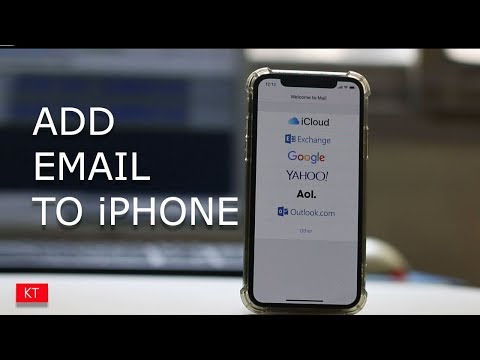
2. Select the email account which you want to add for example iCloud, exchange, google etc.
3. Let me select “Google”.
4. Now enter your email id.
5. Select “Next”.
5. Now enter the password.
6. Select “Next”.
7. Now if you want you can save “Contacts” and “Calendars” also in your Gmail.
8. Select “Save”.
9. Now you have successfully added email to your iPhone.
Thank you for watching this video. Please like and share this video. Also click on the Subscribe button and hit on the bell icon to get the notification for our latest videos for free
Subscribe to my channel: youtube.com/user/Kundastech
Like my page: facebook.com/kundanstech/
Watch some of other popular videos of our channel:
How to check who is using your WiFi
youtube.com/watch?v=k9UpERQgLDk
2 ways to reset forgotten gmail password
youtube.com/watch?v=5wP5jpGcOE4
Solve computer proxy server problem refusing connection
youtube.com/watch?v=qSg5b2FzDx0
What to do if you can't connect to wireless interent
youtube.com/watch?v=RHDLDaIIiy4
Remove VPN settings from iphone and browse internet faster
youtube.com/watch?v=WE_yzXs4OYU
How to reset forgotten apple id password with the help of an email address
youtube.com/watch?v=ndLAmlnnQUI
How to transfer mp3 songs from computer to iPhone without iTunes
youtube.com/watch?v=Nn6K6Rhj9jE
How to recover both apple id and password
youtube.com/watch?v=1RPD6fJqvmQ
This channel is about technology related tips and tricks. You will find tutorials related to computer, iphone and android phones.
How to add email to iPhone 8
How to add email to iPhone x
add email to iPhone iOS 11
How to add email to iPhone iOS 11
How to add email account to iPhone 8
How to add email account to iPhone x
How to add another email to iPhone
How do I add another email to iPhone
How do I add second email to iPhone
multiple email accounts to iPhone
If you want to add email to your iPhone then:
1. Tap on email app.
2. Select the email account which you want to add for example iCloud, exchange, google etc.
3. Let me select “Google”.
4. Now enter your email id.
5. Select “Next”.
5. Now enter the password.
6. Select “Next”.
7. Now if you want you can save “Contacts” and “Calendars” also in your Gmail.
8. Select “Save”.
9. Now you have successfully added email to your iPhone.
Thank you for watching this video. Please like and share this video. Also click on the Subscribe button and hit on the bell icon to get the notification for our latest videos for free
Subscribe to my channel: youtube.com/user/Kundastech
Like my page: facebook.com/kundanstech/
Watch some of other popular videos of our channel:
How to check who is using your WiFi
youtube.com/watch?v=k9UpERQgLDk
2 ways to reset forgotten gmail password
youtube.com/watch?v=5wP5jpGcOE4
Solve computer proxy server problem refusing connection
youtube.com/watch?v=qSg5b2FzDx0
What to do if you can't connect to wireless interent
youtube.com/watch?v=RHDLDaIIiy4
Remove VPN settings from iphone and browse internet faster
youtube.com/watch?v=WE_yzXs4OYU
How to reset forgotten apple id password with the help of an email address
youtube.com/watch?v=ndLAmlnnQUI
How to transfer mp3 songs from computer to iPhone without iTunes
youtube.com/watch?v=Nn6K6Rhj9jE
How to recover both apple id and password
youtube.com/watch?v=1RPD6fJqvmQ
This channel is about technology related tips and tricks. You will find tutorials related to computer, iphone and android phones.
About this tutorial
Kundan Bhattarai published this 0:55 video tutorial on October 31, 2018. It has been watched 22,685 times on YouTube.
- Channel
- Kundan Bhattarai
- Category
- Science & Technology
- Duration
- 0:55
- Published
- October 31, 2018
- Views
- 22,685
- Likes
- 50
Tags
Share
This tutorial in other languages
- FRComment ajouter un courriel à l'iPhone 8 / iPhone x
- ESCómo agregar correo electrónico a 8 iPhone / iPhone x
- PTComo adicionar e-mail para iPhone 8 / x iPhone
- ITCome aggiungere e-mail a iPhone 8 / iPhone x
- DESo fügen Sie E-Mail auf das iPhone 8 / iPhone x
- NLHoe kan ik e-mail toe te voegen aan iPhone 8 / iPhone x
- RUКак добавить электронную почту на iPhone 8 / iPhone х
- PLJak dodać 8-mail do iPhone / iPhone x
- JAiPhone 8 / iPhoneのxに電子メールを追加する方法
- ARكيفية إضافة البريد الإلكتروني لفون 8 / اي فون العاشر
- HIiPhone से 8 ईमेल कैसे जोड़ें / iPhone के एक्स
- IDCara menambahkan email ke iPhone 8 / iPhone x