Playback starts YouTube’s embedded player (privacy-enhanced mode).
How to Add, Remove/Arrange, Use Quick Actions Buttons and Notifications in Action Center Windows 10
ChannelAarohanTechSolDescription from the creator
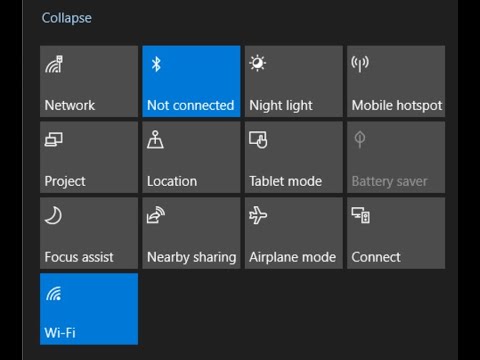
Steps to Add, Remove or Rearrange and Use Quick Actions Buttons and Notifications in Action Center on Windows 10
• How to Access Action Center on Windows 10
• Step to Hide Action Center Button on Windows 10- Settings/Personalization/TaskbarTurn System icon on or off
• How to Add remove and arrange Quick Actions buttons on Windows 10? - Settings/System/Notifications & Actions/Edit your quick actions
• How to Stop Notifications Using Focus Assists (Previously known as Quite Hours)- Settings/System/Focus assist
• How to Disable Notifications on The Lock Screen on Windows 10: Settings/System/Notifications & Actions /Uncheck Show Notification on the lock screen
• How to Turn Off Notifications Completely on Windows 10- Settings/System/Notifications & Actions / Toggle off Notification
• How to Access Action Center on Windows 10
• Step to Hide Action Center Button on Windows 10- Settings/Personalization/TaskbarTurn System icon on or off
• How to Add remove and arrange Quick Actions buttons on Windows 10? - Settings/System/Notifications & Actions/Edit your quick actions
• How to Stop Notifications Using Focus Assists (Previously known as Quite Hours)- Settings/System/Focus assist
• How to Disable Notifications on The Lock Screen on Windows 10: Settings/System/Notifications & Actions /Uncheck Show Notification on the lock screen
• How to Turn Off Notifications Completely on Windows 10- Settings/System/Notifications & Actions / Toggle off Notification
About this tutorial
AarohanTechSol published this 7:45 video tutorial on August 31, 2020. It has been watched 28,310 times on YouTube.
- Channel
- AarohanTechSol
- Category
- Science & Technology
- Duration
- 7:45
- Published
- August 31, 2020
- Views
- 28,310
- Likes
- 240
Share
This tutorial in other languages
- FRComment ajouter, supprimer / Arranger, utiliser des actions rapides et boutons Notifications dans le Centre de Windows 10
- ESCómo agregar, quitar / amueblar, de uso rápido Acciones Botones y Notificaciones en el Centro de actividades de Windows 10
- PTComo adicionar, remover / Organizar, uso rápido Acções Botões e Notificações em Action Center do Windows 10
- ITCome aggiungere, rimuovere / Disporre, utilizzare Quick Azioni Pulsanti e Notifiche nel Centro operativo di Windows 10
- DEWie Hinzufügen, Entfernen / Anordnen Verwenden Schnellaktionen Buttons und Benachrichtigungen in Action Center von Windows 10
- NLHoe kan ik toevoegen, verwijderen / Schikken, gebruik snelacties knoppen en meldingen in Action Center Windows 10
- RUКак добавлять, удалять / организовать, используйте быстрые действия кнопки и уведомление в Центре действий для Windows 10
- PLJak dodawać, usuwać / Wykonam użyj Szybki Operacje przyciski i powiadomienia w Centrum akcji systemu Windows 10
- JA、アクションセンターのWindows 10で削除/並べ替え、使用クイックアクションボタンと通知を追加する方法
- ARكيفية إضافة أو إزالة / ترتيب، استخدم خيارات تطبيقات أزرار والإشعارات في مركز العمل ويندوز 10
- HIकैसे जोड़ें, निकालें / व्यवस्था, उपयोग त्वरित कार्रवाइयां बटन और एक्शन सेंटर में सूचनाएं Windows 10
- IDBagaimana Tambahkan, Hapus / Susun, Gunakan Cepat Tindakan Tombol dan Pemberitahuan di Action Center Windows 10