Playback starts YouTube’s embedded player (privacy-enhanced mode).
How to Automatically Connect/login Broadband | Dialup | PPPoE Connection at Windows (10 & 8) Startup
ChannelMd Atikur RahmanDescription from the creator
Automatically connect to the Internet/network connection at Windows startup Procedure :
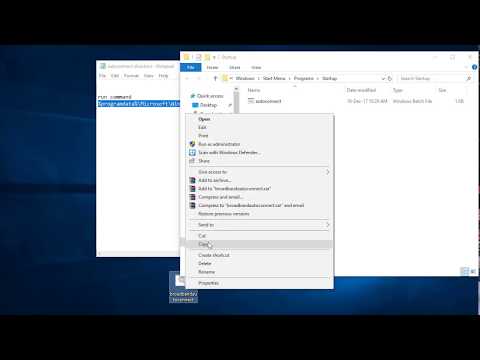
1. Open a notepad
2. type "rasdial Broadband connection name Username Password"
3. save this file as .bat format
4. open your Run Command and paste this line "%programdata%\Microsoft\Windows\Start Menu\Programs\Startup"
5. Now open a older
6. Copy this .bat file and paste here.
||||||Done||||
Now Your Broadband or Dialup or PPPoE Connection auto connect or login at every windows logon or startup in windows 10, 8
....................................................................................
Automatically Connect Dialup Connection in Startup - Windows 10/8.1/8/7
How to set auto reconnect in PPPOE/ Dial up Broadband connection Bangla - PcTricksandTips
Connect the broadband connection automatically with Windows startup
Autoconnect internet connection at startup Windows 7 and Windows 8
--------------------------------------------------------------------------------------
Find Me On:
Youtube : youtube.com/user/maratikbd
Facebook Page :
facebook.com/bdseoexpert
LinkedIn : linkedin.com/in/bdseoexpert
Twitter : twitter.com/maratikbd
Google Plus : plus.google.com/u/0/+AtikurRahmanself
Pinterest : pinterest.com/bdseoexpert/
1. Open a notepad
2. type "rasdial Broadband connection name Username Password"
3. save this file as .bat format
4. open your Run Command and paste this line "%programdata%\Microsoft\Windows\Start Menu\Programs\Startup"
5. Now open a older
6. Copy this .bat file and paste here.
||||||Done||||
Now Your Broadband or Dialup or PPPoE Connection auto connect or login at every windows logon or startup in windows 10, 8
....................................................................................
Automatically Connect Dialup Connection in Startup - Windows 10/8.1/8/7
How to set auto reconnect in PPPOE/ Dial up Broadband connection Bangla - PcTricksandTips
Connect the broadband connection automatically with Windows startup
Autoconnect internet connection at startup Windows 7 and Windows 8
--------------------------------------------------------------------------------------
Find Me On:
Youtube : youtube.com/user/maratikbd
Facebook Page :
facebook.com/bdseoexpert
LinkedIn : linkedin.com/in/bdseoexpert
Twitter : twitter.com/maratikbd
Google Plus : plus.google.com/u/0/+AtikurRahmanself
Pinterest : pinterest.com/bdseoexpert/
About this tutorial
Md Atikur Rahman published this 2:22 video tutorial on November 15, 2018. It has been watched 25,926 times on YouTube.
- Channel
- Md Atikur Rahman
- Category
- Science & Technology
- Duration
- 2:22
- Published
- November 15, 2018
- Views
- 25,926
- Likes
- 85
Tags
Share
This tutorial in other languages
- FRComment connecter automatiquement / login large bande | Dialup | Connexion PPPoE avec Windows (10 et 8) Démarrage
- ES¿Cómo se conecte automáticamente / iniciar sesión banda ancha | acceso telefónico | Conexión PPPoE en Windows (10 y 8) de inicio
- PTComo conectar automaticamente / sessão de banda larga | dial-up | Conexão PPPoE at Windows (10 e 8) Startup
- ITCome connettersi automaticamente / login banda larga | dialup | PPPoE Connection at Windows (10 e 8) di avvio
- DEWie automatisch Connect / anmelden Breitband | Dialup | PPPoE-Verbindung in Windows-(10 und 8) Startup
- NLHoe automatisch verbinding / inloggen Broadband | Inbellen | PPPoE-verbinding in Windows (10 & 8) Startup
- RUКак автоматически подключаться / войти в систему широкополосного доступа | Dialup | PPPoE соединения в Windows (в 10 и 8) Startup
- PLJak automatycznie połączyć / zalogować Broadband | Modem | Połączenie PPPoE w systemie Windows (10 i 8) Uruchomienie
- JAどのように自動的に接続/ブロードバンドログイン|ダイヤルアップ| WindowsのでPPPoE接続(10&8)の起動
- ARكيفية تلقائيا الاتصال / تسجيل الدخول النطاق العريض | الطلب الهاتفي | اتصال PPPoE في ويندوز (10 و 8) بدء التشغيل
- HIकैसे करने के लिए स्वचालित रूप से कनेक्ट / के लिए लॉग इन ब्रॉडबैंड | डायलअप | विंडोज पर PPPoE कनेक्शन (10 और 8) स्टार्टअप
- IDCara otomatis Connect / masuk Broadband | dialup | PPPoE Connection at Windows (10 & 8) Startup