Playback starts YouTube’s embedded player (privacy-enhanced mode).
How to Clear the CMOS - Reset the BIOS & Why
ChannelJohnny PhungIn brief
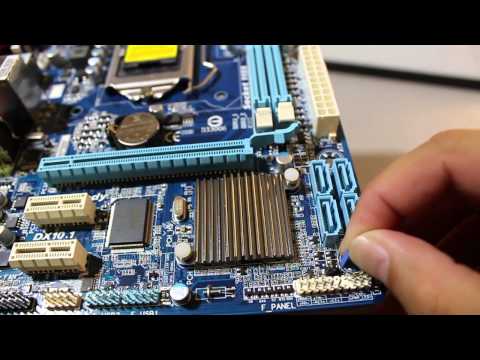
This guide shows how to reset your BIOS to factory defaults by clearing the CMOS, whether through the motherboard’s built-in button or by removing the battery. It’s useful for troubleshooting hardware issues, especially when USB keyboards fail to work during boot. Modern motherboards may simplify the process with dedicated reset buttons.
Questions & answers
Do I need a PS2 keyboard for this process?
Yes, if your BIOS isn’t set to enable USB during boot. Plug it into the purple PS2 port on the motherboard.
How long should I leave the CMOS battery out?
5–10 minutes is usually enough to fully reset the BIOS settings.
Description from the creator
Skip to 04:10 to bypass all the talking.
Clearing the CMOS on your motherboard will reset your BIOS settings to their factory defaults. After clearing the CMOS, you'll need to access the BIOS setup utility and reconfigure your hardware settings.
You might need to clear the CMOS for several reasons but usually you'll want to clear the CMOS to help troubleshoot or solve certain PC problems like hardware compatibility issues.
Sometimes you will have to remove the battery to fully clear the settings.
Many modern motherboards are starting to come with a power, reset, and clear cmos button built right into the board. Those are easy and you won't require the steps I showed you here. Just press and hold one of those buttons down, with the machine off but plugged in.
You might need a standard PS2 keyboard instead of a USB keyboard temporarily. After resettingthe BIOS it is not set to use the USB during the boot up. You need the old style keyboard to plug into the purple port on the motherboard. After you get into the BIOS enable the USB ports.
Clearing the CMOS on your motherboard will reset your BIOS settings to their factory defaults. After clearing the CMOS, you'll need to access the BIOS setup utility and reconfigure your hardware settings.
You might need to clear the CMOS for several reasons but usually you'll want to clear the CMOS to help troubleshoot or solve certain PC problems like hardware compatibility issues.
Sometimes you will have to remove the battery to fully clear the settings.
Many modern motherboards are starting to come with a power, reset, and clear cmos button built right into the board. Those are easy and you won't require the steps I showed you here. Just press and hold one of those buttons down, with the machine off but plugged in.
You might need a standard PS2 keyboard instead of a USB keyboard temporarily. After resettingthe BIOS it is not set to use the USB during the boot up. You need the old style keyboard to plug into the purple port on the motherboard. After you get into the BIOS enable the USB ports.
About this tutorial
Johnny Phung published this 11:59 video tutorial on November 10, 2012. It has been watched 4,756,630 times on YouTube.
- Channel
- Johnny Phung
- Category
- Science & Technology
- Duration
- 11:59
- Published
- November 10, 2012
- Views
- 4,756,630
- Likes
- 20,470
Tags
Share
This tutorial in other languages
- FRComment le CMOS - Réinitialiser le BIOS et pourquoi
- ESCómo borrar el CMOS - Restablecer el BIOS y por qué
- PTComo limpar o CMOS - Repor o BIOS e por que
- ITCome cancellare la CMOS - Ripristinare il BIOS e perché
- DEWie Clear CMOS - Zurücksetzen des BIOS & Warum
- NLHoe kan ik Clear CMOS - Stel de BIOS & Waarom
- RUКак очистить CMOS - Сброс BIOS & Почему
- PLJak wyczyścić pamięć CMOS - Reset BIOS i dlaczego
- JACMOSクリアする方法 - BIOS&なぜリセット
- ARكيفية مسح CMOS - إعادة تعيين BIOS و لماذا
- HIकैसे साफ करने के लिए CMOS - BIOS और क्यों रीसेट
- IDCara Hapus CMOS - Atur ulang BIOS & Mengapa