Playback starts YouTube’s embedded player (privacy-enhanced mode).
How to connect a Set top box to TV HDTV LCD LED Plasma or Smart TV
ChannelIts FiveDescription from the creator
MX Set Top Box Video shows us how to install your set top box. The steps for installing your set top box are as follows:
Procedure 1: To Connect Set Top Box using RCA to RCA Connection and RGB Connection
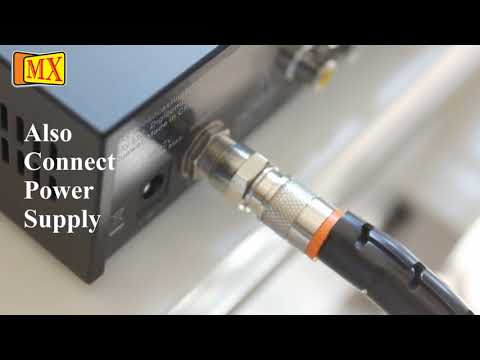
Step 1: Connect your RF cable from your dish to your set top box using an F Connector.
Step 2: Connect your cable end to the set top box in the Satellite In of your box.
Step 3: Connect your RCA cable from the set top box in to your RCA out of the TV.
Step 4: Your Set Top Box is ready for use.
Procedure 2: To Connect your Set Top Box using HDMI HD Connection.
Step 1: Connect your RF cable from you dish to your set top box using an F Connector.
Step 2: Connect your cable end to the set top box in the satellite in of your Box.
Step 3: Connect your HDMI cable from your HD Set Top Box in to your HDMI Connection Set top box.
Step 4: Your Set Top Box is ready for use
What is a RCA connector and what is it used for?
The RCA is the professional solution for common Phono or RCA connectors. RCAs are used for HiFi-applications like stereos, TV-sets, video recorders, beamers etc. The spring loaded ground contact of the RCA prevents pop noises when connecting under load. RCA is sold in pairs which are marked red / black.
Please subscribe to our YOUTUBE Channel: MX Electronics (MDRElex)
You can also Like our Facebook Page: facebook.com/mxelectronics
This video is a complete guide, however if you have any questions feel free to comment or send us an email on [email protected] or visit our website www.mdrelectronics.com
Procedure 1: To Connect Set Top Box using RCA to RCA Connection and RGB Connection
Step 1: Connect your RF cable from your dish to your set top box using an F Connector.
Step 2: Connect your cable end to the set top box in the Satellite In of your box.
Step 3: Connect your RCA cable from the set top box in to your RCA out of the TV.
Step 4: Your Set Top Box is ready for use.
Procedure 2: To Connect your Set Top Box using HDMI HD Connection.
Step 1: Connect your RF cable from you dish to your set top box using an F Connector.
Step 2: Connect your cable end to the set top box in the satellite in of your Box.
Step 3: Connect your HDMI cable from your HD Set Top Box in to your HDMI Connection Set top box.
Step 4: Your Set Top Box is ready for use
What is a RCA connector and what is it used for?
The RCA is the professional solution for common Phono or RCA connectors. RCAs are used for HiFi-applications like stereos, TV-sets, video recorders, beamers etc. The spring loaded ground contact of the RCA prevents pop noises when connecting under load. RCA is sold in pairs which are marked red / black.
Please subscribe to our YOUTUBE Channel: MX Electronics (MDRElex)
You can also Like our Facebook Page: facebook.com/mxelectronics
This video is a complete guide, however if you have any questions feel free to comment or send us an email on [email protected] or visit our website www.mdrelectronics.com
About this tutorial
Its Five published this 3:19 video tutorial on October 27, 2011. It has been watched 1,242,543 times on YouTube.
- Channel
- Its Five
- Category
- Science & Technology
- Duration
- 3:19
- Published
- October 27, 2011
- Views
- 1,242,543
- Likes
- 1,504
Tags
Share
This tutorial in other languages
- FRComment connecter un ensemble boîtier décodeur à LED TV LCD HDTV Plasma ou Smart TV
- ESCómo conectar un decodificador al televisor HDTV LCD LED Plasma o Smart TV
- PTComo conectar um set-top box para TV HDTV LCD LED Plasma ou Smart TV
- ITCome collegare un set top box per TV LCD HDTV LED Plasma o Smart TV
- DEWie eine Set-Top-Box TV HDTV LCD LED Plasma oder Smart TV verbinden
- NLHoe maak je een set-top box aan te sluiten op TV HDTV LCD LED Plasma of Smart TV
- RUКак подключить телеприставку к телевизору HDTV LCD LED Plasma или Smart TV
- PLJak podłączyć dekoder do telewizora HDTV LCD LED lub plazmowych Smart TV
- JAテレビHDTV LCD、LED、プラズマやスマートテレビにセットトップボックスを接続する方法
- ARكيفية ربط مربع الأعلى تعيين لTV HDTV LCD LED البلازما أو التلفزيون الذكية
- HIटीवी HDTV एलसीडी एलईडी प्लाज्मा या स्मार्ट टीवी के लिए एक सेट टॉप बॉक्स कनेक्ट करने के लिए कैसे
- IDCara menghubungkan Set top box untuk TV HDTV LCD LED Plasma atau Smart TV