Playback starts YouTube’s embedded player (privacy-enhanced mode).
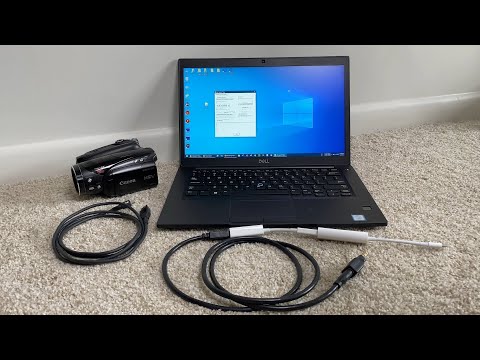
How to connect FireWire devices into a Windows PC with Thunderbolt 3/USB-C
ChannelScott SchrammChapters
Description from the creator
In this video, I show the few options you have to connect older FireWire 400/800 devices to a Windows PC that has a Thunderbolt 3/USB-C port. These devices could be a video camera/camcorder, audio mixer, audio interface, etc. Below are time stamps and links to the hardware and software you'll need.
If you have Windows 11 or Thunderbolt 4, the process in this video may not work. In that case, please see my updated video here: youtu.be/yT0oDYbqwwk
*Time Stamps:*
00:00 - Intro
00:40 - Why not USB
02:20 - What you'll need
04:06 - How to connect
05:00 - Drivers
05:40 - Demo
07:12 - Capturing the video
08:10 - Software
09:42 - Wrap up
10:28 - End
*Links to the items mentioned in the video:*
Apple Thunderbolt 3 and 4 (USB-C) to Thunderbolt 1 and 2 Adapter:
amzn.to/2O6rB10
Apple Thunderbolt to FireWire adapter: (if unavailable, watch youtu.be/LXXSZdOZb-k for more info)
amzn.to/2W0FX68
FireWire 800 to 400 mini plug cable:
amzn.to/2TCSGz1
FireWire 400 to 800 cable:
amzn.to/2UE0XiO
FireWire 400 to 800 adapter:
amzn.to/2u518Ih
FireWire 400 mini to 400 mini cable:
amzn.to/3uci1Av
FireWire 400 mini to 400 full size adapter:
amzn.to/3FTI2tS
Have a desktop with a PCI/PCIe card slot, or a laptop with a ExpressCard/PCMCIA card slot:
amzn.to/3DGUBq9
Laptops with Thunderbolt/FireWire:
amzn.to/3JpAw8M
Other items I recommend:
amazon.com/shop/scottschramm
(note the links above are affiliate links that help support my channel. Your price stays the same but a small commission may come back to me if you decide to purchase anything using my links. It's a win-win for everyone!)
*Software Mentioned:*
WinDV: videohelp.com/software/WinDV
HDV Split: videohelp.com/software/HDVSplit
Windows Movie Maker: movies.blainesville.com/p/wmm-60-on-windows-7.h… or if not working: archive.org/details/wlsetup-all_201802
ffdshow: ffdshow-tryout.sourceforge.net/
ffmpeg: ffmpeg.org/
VLC Player: videolan.org/vlc/
Handbreak: handbrake.fr/
Scenalyzer: scenalyzer.com/
*Other videos that may help you:*
How to connect a FireWire Audio Interface to a Mac or PC with Thunderbolt 3/USB-C
youtu.be/0EhzlqH9fMo
How to connect FireWire devices into new Mac's with Thunderbolt 3/USB-C
youtu.be/UW2Bbn_OjNA
How to connect FireWire devices to a new M1 Mac with Apple Silicon
youtu.be/x5ISyI3VcWo
How to capture DV & HDV video tapes on a Windows 11 PC using FireWire to Thunderbolt/USB-C
youtu.be/yT0oDYbqwwk
*Troubleshooting*
If you are having issues with your PC connecting to the device, there are a few things you can try.
1. Ensure your PC has a Thunderbolt port (not just a USB-C/charging port). Visit the support page of your computer (support.dell.com, support.lenovo.com, etc) and verify that your drivers are up to date. Sometimes the Thunderbolt driver is separate and needs to be installed manually. Also check that your BIOS is up to date. If you're getting blue screens when you plug in, this is the solution.
2. Check the settings in your BIOS as there may be a setting in there to allow data over the Thunderbolt port. Here is an example link that shows the settings: dell.com/support/article/en-us/sln305418/restru… There is also usually an app within Windows called the "Thunderbolt(TM) Software " and make sure it is set to "Always Allow" like this: caldigit.com/thunderbolt-3-devices-in-windows-1…
3. If your device still does not communicate, then you may need to install a driver for the camcorder, audio interface, or whatever device you are trying to connect. If a driver can not be found, then your device may be too old and no longer compatible with newer operating systems like Windows 10. Here is a good webpage that may help you troubleshoot FireWire specific drivers: studio1productions.com/Articles/Firewire-1.htm Additionally if you installed a special FireWire driver you may want to uninstall it and try the built in Windows driver as that may be all you need. You can also try installing a legacy FireWire driver by following these directions: startech.com/en-us/faq/firewire-cards-windows-l…
4. For video cameras, here is a good guide from Sony which has a few other troubleshooting steps: sony.co.uk/electronics/support/camcorders-tape-…
If you have Windows 11 or Thunderbolt 4, the process in this video may not work. In that case, please see my updated video here: youtu.be/yT0oDYbqwwk
*Time Stamps:*
00:00 - Intro
00:40 - Why not USB
02:20 - What you'll need
04:06 - How to connect
05:00 - Drivers
05:40 - Demo
07:12 - Capturing the video
08:10 - Software
09:42 - Wrap up
10:28 - End
*Links to the items mentioned in the video:*
Apple Thunderbolt 3 and 4 (USB-C) to Thunderbolt 1 and 2 Adapter:
amzn.to/2O6rB10
Apple Thunderbolt to FireWire adapter: (if unavailable, watch youtu.be/LXXSZdOZb-k for more info)
amzn.to/2W0FX68
FireWire 800 to 400 mini plug cable:
amzn.to/2TCSGz1
FireWire 400 to 800 cable:
amzn.to/2UE0XiO
FireWire 400 to 800 adapter:
amzn.to/2u518Ih
FireWire 400 mini to 400 mini cable:
amzn.to/3uci1Av
FireWire 400 mini to 400 full size adapter:
amzn.to/3FTI2tS
Have a desktop with a PCI/PCIe card slot, or a laptop with a ExpressCard/PCMCIA card slot:
amzn.to/3DGUBq9
Laptops with Thunderbolt/FireWire:
amzn.to/3JpAw8M
Other items I recommend:
amazon.com/shop/scottschramm
(note the links above are affiliate links that help support my channel. Your price stays the same but a small commission may come back to me if you decide to purchase anything using my links. It's a win-win for everyone!)
*Software Mentioned:*
WinDV: videohelp.com/software/WinDV
HDV Split: videohelp.com/software/HDVSplit
Windows Movie Maker: movies.blainesville.com/p/wmm-60-on-windows-7.h… or if not working: archive.org/details/wlsetup-all_201802
ffdshow: ffdshow-tryout.sourceforge.net/
ffmpeg: ffmpeg.org/
VLC Player: videolan.org/vlc/
Handbreak: handbrake.fr/
Scenalyzer: scenalyzer.com/
*Other videos that may help you:*
How to connect a FireWire Audio Interface to a Mac or PC with Thunderbolt 3/USB-C
youtu.be/0EhzlqH9fMo
How to connect FireWire devices into new Mac's with Thunderbolt 3/USB-C
youtu.be/UW2Bbn_OjNA
How to connect FireWire devices to a new M1 Mac with Apple Silicon
youtu.be/x5ISyI3VcWo
How to capture DV & HDV video tapes on a Windows 11 PC using FireWire to Thunderbolt/USB-C
youtu.be/yT0oDYbqwwk
*Troubleshooting*
If you are having issues with your PC connecting to the device, there are a few things you can try.
1. Ensure your PC has a Thunderbolt port (not just a USB-C/charging port). Visit the support page of your computer (support.dell.com, support.lenovo.com, etc) and verify that your drivers are up to date. Sometimes the Thunderbolt driver is separate and needs to be installed manually. Also check that your BIOS is up to date. If you're getting blue screens when you plug in, this is the solution.
2. Check the settings in your BIOS as there may be a setting in there to allow data over the Thunderbolt port. Here is an example link that shows the settings: dell.com/support/article/en-us/sln305418/restru… There is also usually an app within Windows called the "Thunderbolt(TM) Software " and make sure it is set to "Always Allow" like this: caldigit.com/thunderbolt-3-devices-in-windows-1…
3. If your device still does not communicate, then you may need to install a driver for the camcorder, audio interface, or whatever device you are trying to connect. If a driver can not be found, then your device may be too old and no longer compatible with newer operating systems like Windows 10. Here is a good webpage that may help you troubleshoot FireWire specific drivers: studio1productions.com/Articles/Firewire-1.htm Additionally if you installed a special FireWire driver you may want to uninstall it and try the built in Windows driver as that may be all you need. You can also try installing a legacy FireWire driver by following these directions: startech.com/en-us/faq/firewire-cards-windows-l…
4. For video cameras, here is a good guide from Sony which has a few other troubleshooting steps: sony.co.uk/electronics/support/camcorders-tape-…
About this tutorial
Scott Schramm published this 10:29 video tutorial on July 1, 2020. It has been watched 383,327 times on YouTube.
- Channel
- Scott Schramm
- Category
- Science & Technology
- Duration
- 10:29
- Published
- July 1, 2020
- Views
- 383,327
- Likes
- 4,495
Tags
Share
This tutorial in other languages
- FRComment connecter des périphériques FireWire dans un PC Windows avec Thunderbolt 3 / USB-C
- ESCómo conectar dispositivos FireWire en un PC con Windows con Thunderbolt 3 / USB-C
- PTComo conectar dispositivos FireWire em um PC Windows com Thunderbolt 3 / USB-C
- ITCome collegare dispositivi FireWire in un PC Windows con Thunderbolt 3 / USB-C
- DEWie man FireWire-Geräte in einen Windows-PC mit Thunderbolt 3 / USB-C anschließen
- NLHoe kan FireWire-apparaten aan te sluiten op een Windows-pc met Thunderbolt 3 / USB-C
- RUКак подключить устройства FireWire в Windows ПК с Thunderbolt 3 / USB-C
- PLJak podłączyć urządzenia FireWire w komputerze Windows z Thunderbolt 3 / USB-C
- JAサンダーボルト3 / USB-CでWindows PCにFireWireデバイスを接続する方法
- ARكيفية ربط أجهزة السلك الناري إلى جهاز كمبيوتر ويندوز مع الصاعقة 3 / USB-C
- HIथंडरबोल्ट 3 / USB-सी के साथ एक विंडोज पीसी में फायरवायर उपकरणों को जोड़ने के लिए कैसे
- IDCara untuk menghubungkan perangkat FireWire ke PC Windows dengan Thunderbolt 3 / USB-C