Playback starts YouTube’s embedded player (privacy-enhanced mode).
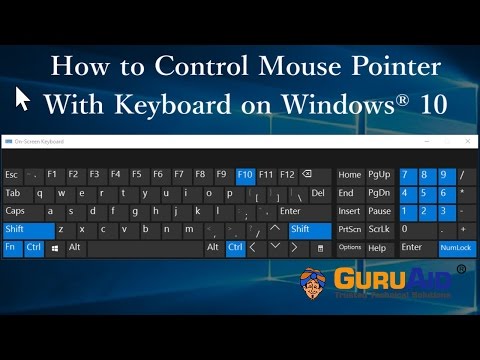
How to Control Mouse Pointer With Keyboard on Windows 10 - GuruAid
ChannelGuruAidDescription from the creator
GuruAid channel provides you simple & easy steps of How to Control Mouse Pointer With Keyboard on Windows 10.
Windows 10 has the feature called “Mouse Keys” allows you to control mouse with keypad, use the numeric keypad to move your mouse around, click and double-click on items, and even drag and drop. We’ll show you how to turn on and configure Mouse Keys so you can use the numeric keypad as a mouse. You can control the mouse with the help of keyboard. Press and hold, ctrl key, to increase the speed of pointer movement, Press and hold number 8, to move the pointer to up side, 2 for down side, 4 for left side, 6 for right side, 1for bottom left side, 3 for bottom right side, 9 for top-right side, 7for top-left side, + F10, for right click, 5 for left click. You can do these changes from “Ease of access centre
GuruAid’s Mission is to make Information Technology Work easy & user friendly for people. In today’s digital world many users who are not tech savvy, often struggle to setup, & configure hardware and software products. Some run into challenges in using the myriad feature-functions of some of these products. Other times users run into some unexpected glitches, with error messages, that are hard to comprehend and fix. GuruAid’s mission is to help customers around the globe deal with these technical challenges.
Visit Channel: youtube.com/guruaid
Subscribe: youtube.com/guruaid?sub_confirmation=1
Website: guruaid.com
GuruAid, a division of Lester, helps consumers and businesses all around the globe with technical support service. GuruAid was launched in 2009 and has grown exponentially since then to become one of the top-5 independent technical support organizations in the world. The service is currently offered in US, Canada, United Kingdom, Australia and Ireland. GuruAid on a daily basis, helps more than 5,000 subscribers get high quality technical support.
Windows 10 has the feature called “Mouse Keys” allows you to control mouse with keypad, use the numeric keypad to move your mouse around, click and double-click on items, and even drag and drop. We’ll show you how to turn on and configure Mouse Keys so you can use the numeric keypad as a mouse. You can control the mouse with the help of keyboard. Press and hold, ctrl key, to increase the speed of pointer movement, Press and hold number 8, to move the pointer to up side, 2 for down side, 4 for left side, 6 for right side, 1for bottom left side, 3 for bottom right side, 9 for top-right side, 7for top-left side, + F10, for right click, 5 for left click. You can do these changes from “Ease of access centre
GuruAid’s Mission is to make Information Technology Work easy & user friendly for people. In today’s digital world many users who are not tech savvy, often struggle to setup, & configure hardware and software products. Some run into challenges in using the myriad feature-functions of some of these products. Other times users run into some unexpected glitches, with error messages, that are hard to comprehend and fix. GuruAid’s mission is to help customers around the globe deal with these technical challenges.
Visit Channel: youtube.com/guruaid
Subscribe: youtube.com/guruaid?sub_confirmation=1
Website: guruaid.com
GuruAid, a division of Lester, helps consumers and businesses all around the globe with technical support service. GuruAid was launched in 2009 and has grown exponentially since then to become one of the top-5 independent technical support organizations in the world. The service is currently offered in US, Canada, United Kingdom, Australia and Ireland. GuruAid on a daily basis, helps more than 5,000 subscribers get high quality technical support.
About this tutorial
GuruAid published this 2:09 video tutorial on November 6, 2017. It has been watched 179,631 times on YouTube.
- Channel
- GuruAid
- Category
- Science & Technology
- Duration
- 2:09
- Published
- November 6, 2017
- Views
- 179,631
- Likes
- 1,066
Tags
Share
This tutorial in other languages
- FRComment contrôle de la souris souris avec le clavier sur Windows 10 - GuruAid
- ESComo control del puntero del ratón con el teclado en Windows 10 - GuruAid
- PTComo controlar o ponteiro do mouse com teclado no Windows 10 - GuruAid
- ITCome controllo puntatore del mouse con la tastiera su Windows 10 - GuruAid
- DEWie erfolgt die Steuerung Maus-Zeiger mit Tastatur auf 10 Fenster - GuruAid
- NLHoe Control Mouse Muis met toetsenbord op Windows 10 - GuruAid
- RUКак управлять указателем мыши с клавиатуры на Windows 10 - GuruAid
- PLJak sterować wskaźnik myszy z klawiaturą w systemie Windows 10 - GuruAid
- JAどのようにコントロールマウスポインタへのWindows 10上のキーボードで - GuruAid
- ARكيفية التحكم في مؤشر الماوس مع لوحة المفاتيح على ويندوز 10 - GuruAid
- HIकैसे नियंत्रण माउस सूचक करने के लिए Windows 10 पर कीबोर्ड के साथ - GuruAid
- IDCara Kontrol Pointer Mouse Dengan Keyboard pada Windows 10 - GuruAid