Playback starts YouTube’s embedded player (privacy-enhanced mode).
How to convert a FASTA file to an Arlequin file
ChannelJosh BantaDescription from the creator
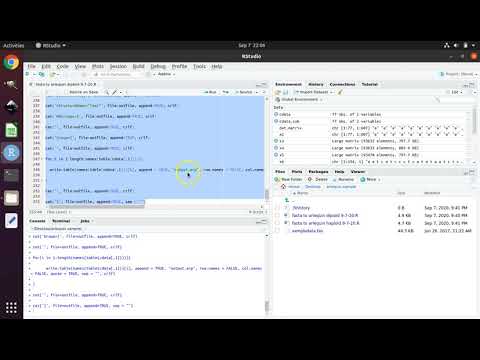
This tutorial shows you how to make a file for use with the population genetic software Arlequin when starting with a file of DNA sequence data in FASTA format.
This tutorial assumes you are using Ubuntu Linux version 20.04 as your operating system. If you do not have a computer running Ubuntu, fear not. You can install Ubuntu as a virtual machine within your current operating system. It is all free.
The instructions for Windows computers are here:
youtube.com/watch?v=diIW3fgewhI
The instructions for Mac computers are here (from 0:00 to 5:37):
youtu.be/f6oU_JzrALk
This tutorial utilizes RStudio:
rstudio.com/
(Rstudio also requires R: r-project.org/)
But you can just use my pre-configured Ubuntu Linux virtual machine! Read more below.
Also, FYI:
I have made a Linux virtual machine that is pre-configured with population genetics and ecological niche modeling programs. I have made videos explaining how to hook up this virtual machine within your Mac or Windows computer, so that you can start using the pre-configured software without having to install any of them (and even without having to install Ubuntu Linux!).
Windows: youtube.com/watch?v=-K8byTOpTY4
Mac: youtu.be/yGYjI2sCqIM
This tutorial assumes you are using Ubuntu Linux version 20.04 as your operating system. If you do not have a computer running Ubuntu, fear not. You can install Ubuntu as a virtual machine within your current operating system. It is all free.
The instructions for Windows computers are here:
youtube.com/watch?v=diIW3fgewhI
The instructions for Mac computers are here (from 0:00 to 5:37):
youtu.be/f6oU_JzrALk
This tutorial utilizes RStudio:
rstudio.com/
(Rstudio also requires R: r-project.org/)
But you can just use my pre-configured Ubuntu Linux virtual machine! Read more below.
Also, FYI:
I have made a Linux virtual machine that is pre-configured with population genetics and ecological niche modeling programs. I have made videos explaining how to hook up this virtual machine within your Mac or Windows computer, so that you can start using the pre-configured software without having to install any of them (and even without having to install Ubuntu Linux!).
Windows: youtube.com/watch?v=-K8byTOpTY4
Mac: youtu.be/yGYjI2sCqIM
About this tutorial
Josh Banta published this 17:25 video tutorial on October 5, 2020. It has been watched 10,619 times on YouTube.
- Channel
- Josh Banta
- Category
- Science & Technology
- Duration
- 17:25
- Published
- October 5, 2020
- Views
- 10,619
- Likes
- 91
Share
This tutorial in other languages
- FRComment convertir un fichier FASTA dans un fichier Arlequin
- ESCómo convertir un archivo a un archivo FASTA Arlequin
- PTComo converter um arquivo FASTA para um arquivo Arlequin
- ITCome convertire un file FASTA in un file Arlequin
- DEWie eine FASTA-Datei in eine Arlequin-Datei konvertieren
- NLHoe maak je een FASTA bestand te converteren naar een Arlequin bestand
- RUКак преобразовать файл FASTA в файл Arlequin
- PLJak przekonwertować plik FASTA do pliku Arlequin
- JAどのようにアルルカンファイルにFASTAファイルを変換する方法
- ARكيفية تحويل ملف FASTA إلى ملف Arlequin
- HIकैसे एक Arlequin फाइल करने के लिए एक FASTA फ़ाइल को रूपांतरित करने
- IDBagaimana mengkonversi file FASTA ke file Arlequin