Playback starts YouTube’s embedded player (privacy-enhanced mode).
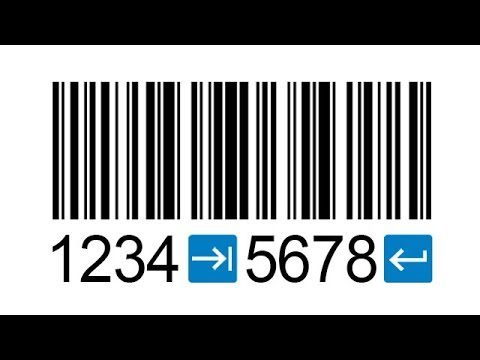
How to Create a Barcode with Control Characters like TAB or ENTER
ChannelTEC-IT SoftwareDescription from the creator
tec-it.com - This tutorial video shows how to encode a control character like Tab, Enter/Carriage Return or FNC1 into a barcode - using TEC-IT's barcode software products like Online Barcode Generator, Barcode Studio, TBarCode Office etc.
Video in Deutsch: youtu.be/y8ppWcQanWU
Video en Español: youtu.be/jb2YIqd9sgI
Why should I create a barcode with control characters?
Barcodes with embedded control characters are useful to automatically confirm input or to TAB into the next edit field when being scanned with a keyboard wedge barcode scanner. TEC-IT's barcode software offers the possibility to encode placeholders for such control characters utilizing so called "Escape Sequences".
What are "Escape Sequences"?
Escape sequences are placeholders for control characters. An escape sequence is created by a backslash followed by at least one letter to select the function. For example, a backslash followed by a lower-case t stands for TAB, backslash followed by a lower-case n for ENTER.
Which control characters are supported?
Our barcode software products support a large number of control characters. You will find a complete list of supported control characters in our Barcode Reference on page 17:
tec-it.com/download/PDF/Barcode_Reference_EN.pdf
How do I create a barcode with encoded control characters?
Step 1: Open our barcode creator software. Generate a barcode (for example a Code128) by entering the data together with a control character of your choice.
Step 2: Check "Escape Sequences" under "Settings" in the barcode maker software for a correct encoding.
Step 3: Scan the finished barcode. The control characters will be decoded correctly.
This works with linear barcodes like Code128, GS1-128 (UCC/EAN) and 2D codes like QR code, Data Matrix or PDF417. Many applications, keyboard-wedge barcode readers and scanner apps support barcodes with embedded control characters.
...
Escape Sequences are supported by most of our products:
Barcode Studio:
tec-it.com/en/software/barcode-software/barcode…
TBarCode Office:
tec-it.com/en/software/barcode-software/office/…
TFORMer Designer:
tec-it.com/en/software/label-printing/label-sof…
Barcode Guru:
appsource.microsoft.com/en-us/product/office/WA…
FREE Online Barcode Generator:
barcode.tec-it.com
...
Copyright: TEC-IT Datenverarbeitung GmbH, Steyr, Austria, tec-it.com
Music: Behind The Line by Screw-Jay (https:/www.jamendo.com/artist/337281/screw-jay)
Like us on facebook: facebook.com/TECITSoftware
Video in Deutsch: youtu.be/y8ppWcQanWU
Video en Español: youtu.be/jb2YIqd9sgI
Why should I create a barcode with control characters?
Barcodes with embedded control characters are useful to automatically confirm input or to TAB into the next edit field when being scanned with a keyboard wedge barcode scanner. TEC-IT's barcode software offers the possibility to encode placeholders for such control characters utilizing so called "Escape Sequences".
What are "Escape Sequences"?
Escape sequences are placeholders for control characters. An escape sequence is created by a backslash followed by at least one letter to select the function. For example, a backslash followed by a lower-case t stands for TAB, backslash followed by a lower-case n for ENTER.
Which control characters are supported?
Our barcode software products support a large number of control characters. You will find a complete list of supported control characters in our Barcode Reference on page 17:
tec-it.com/download/PDF/Barcode_Reference_EN.pdf
How do I create a barcode with encoded control characters?
Step 1: Open our barcode creator software. Generate a barcode (for example a Code128) by entering the data together with a control character of your choice.
Step 2: Check "Escape Sequences" under "Settings" in the barcode maker software for a correct encoding.
Step 3: Scan the finished barcode. The control characters will be decoded correctly.
This works with linear barcodes like Code128, GS1-128 (UCC/EAN) and 2D codes like QR code, Data Matrix or PDF417. Many applications, keyboard-wedge barcode readers and scanner apps support barcodes with embedded control characters.
...
Escape Sequences are supported by most of our products:
Barcode Studio:
tec-it.com/en/software/barcode-software/barcode…
TBarCode Office:
tec-it.com/en/software/barcode-software/office/…
TFORMer Designer:
tec-it.com/en/software/label-printing/label-sof…
Barcode Guru:
appsource.microsoft.com/en-us/product/office/WA…
FREE Online Barcode Generator:
barcode.tec-it.com
...
Copyright: TEC-IT Datenverarbeitung GmbH, Steyr, Austria, tec-it.com
Music: Behind The Line by Screw-Jay (https:/www.jamendo.com/artist/337281/screw-jay)
Like us on facebook: facebook.com/TECITSoftware
About this tutorial
TEC-IT Software published this 1:56 video tutorial on October 26, 2018. It has been watched 344,860 times on YouTube.
- Channel
- TEC-IT Software
- Category
- Science & Technology
- Duration
- 1:56
- Published
- October 26, 2018
- Views
- 344,860
- Likes
- 522
Tags
Share
This tutorial in other languages
- FRComment créer un code-barres avec des caractères de contrôle comme TAB ou ENTRER
- ESCómo crear un código de barras con caracteres de control como TAB o ENTER
- PTComo criar um código de barras com caracteres de controle como TAB ou ENTER
- ITCome creare un codice a barre con caratteri di controllo come TAB o INVIO
- DEWie ein Barcode mit Steuerzeichen wie TAB erstellen oder ENTER
- NLHoe maak je een Barcode met controle karakters zoals TAB of ENTER aanmaken
- RUКак создать штрих-код с управляющими символами, как TAB или ENTER
- PLJak Tworzenie kodu kreskowego z znaków sterujących, takich jak TAB lub ENTER
- JATABやENTERなどの制御文字とバーコードを作成する方法
- ARكيفية إنشاء الباركود مع أحرف تحكم مثل TAB أو ENTER
- HIटैब या ENTER तरह नियंत्रण वर्ण के साथ एक बारकोड कैसे बनाएँ
- IDCara Membuat Barcode dengan Control Karakter seperti TAB atau ENTER