Playback starts YouTube’s embedded player (privacy-enhanced mode).
How to create a Google Calendar or Outlook Calendar Desktop Widget using DejaOffice PC CRM
ChannelCompanionLink Software, Inc.Description from the creator
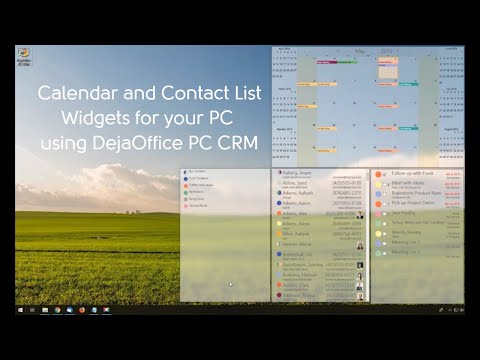
DejaOffice PC CRM offers a feature we call Pinned Windows. A pinned window is a live widget fo your PC Desktop.
You can Pin a Calendar, Contact List, Task List and Memo List. The Widgets are live and allow you to schedule a new event, update an event, or make a task without opening DejaOffice or Outlook.
DejaOffice PC CRM runs in Standalone mode, or you can connect it to Google, Outlook, Palm Desktop, Act!, Goldmine, or DejaCloud. You can also synchronize to DejaOffice on iPhone and Android using USB, Wi-Fi, Bluetooth and DejaCloud.
Free trial - 14-days.
Cost $49.95 for Standalone,
$99.95 for Outlook Add-In.
$299.95 for 5 user CRM.
Includes secure USB, Wi-Fi, Bluetooth and DejaCloud sync and Mobile Apps.
Includes Sync to DejaOffice Mobile CRM on Android and iPhone. Also can sync with Outlook, Act!, GoldMine, Business Contact Manager, and Palm Desktop.
For More information visit:
companionlink.com/pc-crm/
Guides and Features: companionlink.com/support/kb/DejaOffice_PC_CRM_…
You can Pin a Calendar, Contact List, Task List and Memo List. The Widgets are live and allow you to schedule a new event, update an event, or make a task without opening DejaOffice or Outlook.
DejaOffice PC CRM runs in Standalone mode, or you can connect it to Google, Outlook, Palm Desktop, Act!, Goldmine, or DejaCloud. You can also synchronize to DejaOffice on iPhone and Android using USB, Wi-Fi, Bluetooth and DejaCloud.
Free trial - 14-days.
Cost $49.95 for Standalone,
$99.95 for Outlook Add-In.
$299.95 for 5 user CRM.
Includes secure USB, Wi-Fi, Bluetooth and DejaCloud sync and Mobile Apps.
Includes Sync to DejaOffice Mobile CRM on Android and iPhone. Also can sync with Outlook, Act!, GoldMine, Business Contact Manager, and Palm Desktop.
For More information visit:
companionlink.com/pc-crm/
Guides and Features: companionlink.com/support/kb/DejaOffice_PC_CRM_…
About this tutorial
CompanionLink Software, Inc. published this 2:03 video tutorial on November 12, 2019. It has been watched 16,144 times on YouTube.
- Channel
- CompanionLink Software, Inc.
- Category
- Science & Technology
- Duration
- 2:03
- Published
- November 12, 2019
- Views
- 16,144
- Likes
- 65
Tags
Share
This tutorial in other languages
- FRComment créer un calendrier Google ou Outlook Desktop Calendar Widget en utilisant DejaOffice PC CRM
- ESCómo crear un calendario de Google o Outlook Calendar Widget de escritorio utilizando DejaOffice PC CRM
- PTComo criar um Calendário Google ou Outlook Desktop Calendar Widget usando DejaOffice PC CRM
- ITCome creare un Google Calendar o Outlook Calendar Desktop Widget utilizzando DejaOffice PC CRM
- DEWie ein Google-Kalender oder Outlook-Kalender Desktop Widget mit DejaOffice PC CRM erstellen
- NLHoe maak je een Google Calendar of Outlook Calendar Desktop Widget gebruik DejaOffice PC CRM
- RUКак создать календарь Google или календарь Outlook Desktop Widget с помощью DejaOffice PC CRM
- PLJak utworzyć kalendarz Google lub Outlook Desktop Calendar Widget korzystając DejaOffice PC CRM
- JADejaOffice PC CRMを使用してGoogleカレンダーやOutlook Calendarデスクトップウィジェットを作成する方法
- ARكيفية إنشاء تقويم Google أو Outlook التقويم سطح المكتب القطعة باستخدام DejaOffice PC CRM
- HIएक गूगल कैलेंडर या Outlook कैलेंडर डेस्कटॉप विजेट DejaOffice पीसी सीआरएम का उपयोग कर बनाने के लिए कैसे
- IDCara membuat Kalender Google atau Outlook Calendar Desktop Widget menggunakan DejaOffice PC CRM