Playback starts YouTube’s embedded player (privacy-enhanced mode).
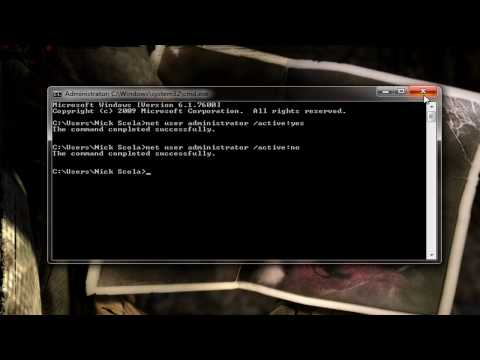
How to Enable or Disable the Windows 7 Hidden Admin Account
Channel7MeetsNickDescription from the creator
7meetsnick.com The built-in Administrator account is an account that has full access and permission on the computer. This will show you how to enable or disable the built-in Administrator account in Windows 7. By default, the built-in administrator account is named Administrator, and is disabled. If you enable the built-in Administrator account, it is recommended to create a password for it to help keep it secured.
CMD Mode:
Enabled: net user administrator /active:yes
Disabled: net user administrator /active:no
How to open up local users and groups: 7meetsnick.com/how-to-open-local-users-and-grou…
How to open up the local security policy editor in windows 7: 7meetsnick.com/how-to-open-the-local-security-p…
CMD Mode:
Enabled: net user administrator /active:yes
Disabled: net user administrator /active:no
How to open up local users and groups: 7meetsnick.com/how-to-open-local-users-and-grou…
How to open up the local security policy editor in windows 7: 7meetsnick.com/how-to-open-the-local-security-p…
About this tutorial
7MeetsNick published this 6:50 video tutorial on November 2, 2010. It has been watched 201,168 times on YouTube.
- Channel
- 7MeetsNick
- Category
- Science & Technology
- Duration
- 6:50
- Published
- November 2, 2010
- Views
- 201,168
- Likes
- 362
Tags
Share
This tutorial in other languages
- FRComment activer ou désactiver le Windows 7 Invisible compte administrateur
- ESCómo activar o desactivar la cuenta de administrador de Windows 7 ocultos
- PTComo ativar ou desativar a conta Administrador Invisível Windows 7
- ITCome abilitare o disabilitare il Windows 7 Hidden Account amministratore
- DEWie Aktivieren oder Deaktivieren des Windows 7 versteckte Admin-Konto
- NLHoe kan in- of uitschakelen van de Windows 7 Verborgen Admin Account
- RUКак включить или отключить Windows 7 Скрытый Администратор учетной записи
- PLJak włączyć lub wyłączyć Windows 7 Ukrytych Administrator konta
- JAWindows 7の隠し管理者アカウントを有効または無効にする方法
- ARكيفية تمكين أو تعطيل حساب المسؤول المخفية ويندوز 7
- HIसक्षम या अक्षम विंडोज 7 छिपे हुए व्यवस्थापक खाते तक कैसे
- IDCara Aktifkan atau Nonaktifkan Akun Admin Tersembunyi Windows 7