Playback starts YouTube’s embedded player (privacy-enhanced mode).
How to export contacts from a Gmail account to another
ChannelKundan BhattaraiDescription from the creator
Like my Facebook page at: facebook.com/kundanstech
Visit my blog: kundanstech.com for more tips and tricks
At first log into the Gmail account whose contact you want to export.
Click on “Gmail” drop down menu and select “Contacts”.
Select the contacts which you want to export or select all the contacts.
Click on “More” drop down menu and select “Export”.
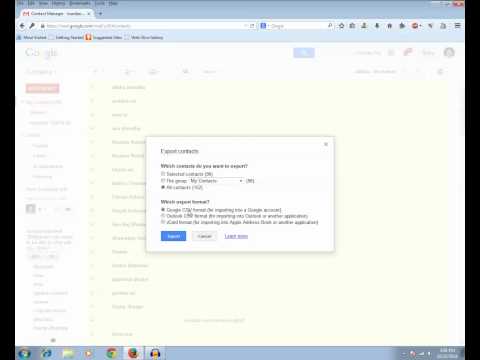
Now you can export “Selected contacts” or group such as “Family”, “Friends” or you can select “All contacts”.
Select the format in which you want to export the contact “Google CSV Format” for exporting it into another Gmail account. Since we are going to export the contact into another Gmail account so we need to select this one.
Click on “Export” button.
You will get an excel file where you can see all the exported emails contacts.
Now log into the other Gmail account where you want to import the contacts.
Click on “Gmail” Drop down menu as done above and select “Contacts”.
Click on “More” drop down menu and select “import”.
Choose the file where you have the email contacts exported from another Gmail account.
Click on “import” button.
You will see the contacts imported and a message that the contacts are imported but not yet merged. If there is any duplicate contact then you want to merge it so that you won’t have the same email contact twice.
Click on “Find and merge duplicates”.
If you have any duplicate contacts it will be merged or else you will see a message that there are no duplicate contacts
Visit my blog: kundanstech.com for more tips and tricks
At first log into the Gmail account whose contact you want to export.
Click on “Gmail” drop down menu and select “Contacts”.
Select the contacts which you want to export or select all the contacts.
Click on “More” drop down menu and select “Export”.
Now you can export “Selected contacts” or group such as “Family”, “Friends” or you can select “All contacts”.
Select the format in which you want to export the contact “Google CSV Format” for exporting it into another Gmail account. Since we are going to export the contact into another Gmail account so we need to select this one.
Click on “Export” button.
You will get an excel file where you can see all the exported emails contacts.
Now log into the other Gmail account where you want to import the contacts.
Click on “Gmail” Drop down menu as done above and select “Contacts”.
Click on “More” drop down menu and select “import”.
Choose the file where you have the email contacts exported from another Gmail account.
Click on “import” button.
You will see the contacts imported and a message that the contacts are imported but not yet merged. If there is any duplicate contact then you want to merge it so that you won’t have the same email contact twice.
Click on “Find and merge duplicates”.
If you have any duplicate contacts it will be merged or else you will see a message that there are no duplicate contacts
About this tutorial
Kundan Bhattarai published this 6:32 video tutorial on November 12, 2014. It has been watched 126,858 times on YouTube.
- Channel
- Kundan Bhattarai
- Category
- Science & Technology
- Duration
- 6:32
- Published
- November 12, 2014
- Views
- 126,858
- Likes
- 1,033
Tags
Share
This tutorial in other languages
- FRComment exporter des contacts à partir d'un compte Gmail à un autre
- ESCómo exportar contactos desde una cuenta de Gmail a otra
- PTComo exportar contatos de uma conta do Gmail para outro
- ITCome esportare i contatti da un account Gmail a un altro
- DEWie für den Export von Kontakten aus einem Google Mail-Konto zu einem anderen
- NLHoe te exporteren van contactpersonen uit een Gmail-account naar een andere
- RUКак экспортировать контакты из Gmail в учетной записи в другую
- PLJak kontaktów wywozu z konta Gmail do innego
- JA別のGmailアカウントから連絡先をエクスポートする方法
- ARكيفية تصدير جهات الاتصال من جوجل حساب الى آخر
- HIकैसे एक जीमेल से निर्यात संपर्कों के लिए एक और खाते
- IDCara mengekspor kontak dari akun Gmail yang lain