Playback starts YouTube’s embedded player (privacy-enhanced mode).
How to fix Your DNS server might be unavailable Error in windows 7/8/10
ChannelTeconzDescription from the creator
How to fix Your DNS server might be unavailable Error in windows 7/8/10-your dns server might be unavailable.
I get the following error message while try to access my google chrome browser:
This site can't be reached.
DNS address could not be found.
Try running Windows Network Diagnostics.
DNS_PROBE_FINISHED_NXDOMAIN
Then i try to click the "Try running Windows Network Diagnostics" option and then it starts to troubleshooting.
But it again shows the notification "Contact your network administrator or Internet Service Provider".The DNS server may be experiencing problems,Windows Help and Support can provide more information about DNS.
After the sometime again it shows the following notification:
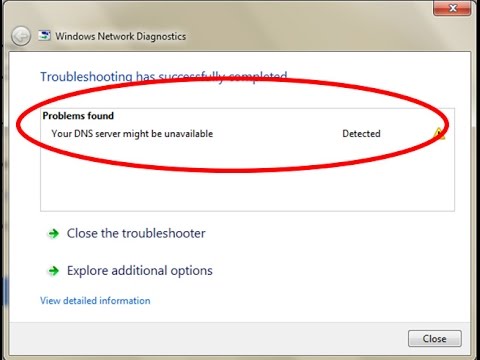
Troubleshooting has successfully completed.
Problem found.
Your DNS server might be unavailable.
This error solution is common for windows 7,windows 8,windows 8.1,windows 10 also and this type of errors are occurring over wifi network or mobile data connections,as well as landline router problem.
Solution:
1.Goto command prompt and then click to run as "Administrator" mode.
2.Now type these commands one by one
3.netsh winsock reset
4.ipconfig /flushdns
5.ipconfig int ip reset
6.Finally once restart your pc the problem is solved.
I get the following error message while try to access my google chrome browser:
This site can't be reached.
DNS address could not be found.
Try running Windows Network Diagnostics.
DNS_PROBE_FINISHED_NXDOMAIN
Then i try to click the "Try running Windows Network Diagnostics" option and then it starts to troubleshooting.
But it again shows the notification "Contact your network administrator or Internet Service Provider".The DNS server may be experiencing problems,Windows Help and Support can provide more information about DNS.
After the sometime again it shows the following notification:
Troubleshooting has successfully completed.
Problem found.
Your DNS server might be unavailable.
This error solution is common for windows 7,windows 8,windows 8.1,windows 10 also and this type of errors are occurring over wifi network or mobile data connections,as well as landline router problem.
Solution:
1.Goto command prompt and then click to run as "Administrator" mode.
2.Now type these commands one by one
3.netsh winsock reset
4.ipconfig /flushdns
5.ipconfig int ip reset
6.Finally once restart your pc the problem is solved.
About this tutorial
Teconz published this 1:34 video tutorial on October 27, 2017. It has been watched 592,716 times on YouTube.
- Channel
- Teconz
- Category
- Science & Technology
- Duration
- 1:34
- Published
- October 27, 2017
- Views
- 592,716
- Likes
- 3,165
Tags
Share
This tutorial in other languages
- FRComment réparer votre serveur DNS peut être indisponible erreur dans Windows 7/8/10
- ESCómo arreglar su servidor DNS podría ser un error no está disponible en Windows 7/8/10
- PTComo corrigir o seu servidor DNS pode ser erro indisponíveis no Windows 7/8/10
- ITCome riparare Il server DNS potrebbe essere Errore disponibile in Windows 7/8/10
- DEWie Sie Ihre DNS-Server beheben könnte 7/8/10 in Windows nicht verfügbar Fehler sein
- NLHoe op te lossen Uw DNS-server mogelijk niet beschikbaar Fout in windows 7/8/10 zijn
- RUКак исправить Ваш DNS-сервер может быть недоступен Ошибка в окнах 7/8/10
- PLJak naprawić Twój serwer DNS może być niedostępny Błąd w oknach 7/8/10
- JAお使いのDNSサーバを修正する方法のウィンドウで使用できないエラーの可能性があります7/8/10
- ARكيفية إصلاح قد يكون الخادم DNS لديك خطأ غير متوفرة في ويندوز 7/8/10
- HIकैसे तय करने के लिए आपके DNS सर्वर खिड़कियों 7/8/10 में अनुपलब्ध त्रुटि हो सकती है
- IDCara untuk memperbaiki Server DNS Anda mungkin Kesalahan tidak tersedia di windows 7/8/10