Playback starts YouTube’s embedded player (privacy-enhanced mode).
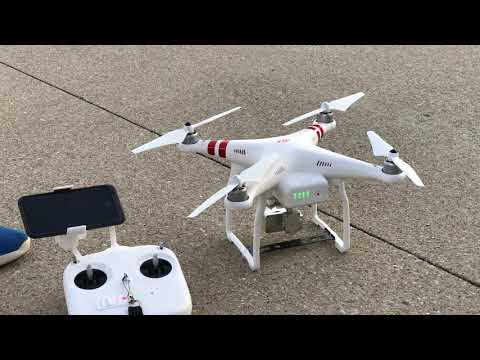
HOW TO FLY A QUADCOPTER/DRONE FOR BEGINNERS
ChannelCarson MillerIn brief
Get comfortable flying a DJI Phantom 3 Standard drone with basic controls and safety tips. This video covers setup, takeoff, and simple maneuvers—ideal for absolute beginners or anyone curious about drones.
Questions & answers
Where are the drone’s recorded videos stored?
On the micro SD card inside the drone’s camera.
What app is used to control the DJI Phantom 3?
The DJI GO app, available for iPhone and Android.
Description from the creator
In this video, I teach you how to fly a DJI Phantom 3 Standard drone...This video can also be for people just wanting some entertainment in their lives because....you may find it entertaining also:)) (OPEN FOR FAQ's)
+ FLOWN IN THIS VIDEO - DJI Phantom 3 Standard: click.dji.com/AI_EF1BhEdj5nSbJfO2g?pm=custom
⭐️NEW 2020 BEST BEGINNER DRONE⭐️: DJI Mavic Mini Fly More Combo: click.dji.com/ALvgzizPS62Yuz0mmMHvZw?pm=custom
+ DJI Mavic Mini: click.dji.com/ANb02yJUIOsguKZN3nns_A?pm=link
💵🛸For anything else, consider checking out my Amazon Associates page to find all of the gear I use + everything used in this video!
⇨ AMAZON: amazon.com/shop/carsonmtech
◇⧎◇⧎◇⧎◇⧎◇⧎◇⧎◇⧎◇⧎◇⧎◇⧎◇⧎◇⧎◇⧎◇⧎◇⧎◇⧎◇⧎◇⧎◇⧎◇⧎◇⧎◇⧎◇⧎◇
FAQ's:
Q: WHAT THE FLIP IS THAT LIGHTNING CABLE DOING COMING OUT OF YOUR PHONE IS IT CHARGING THE PHONE? IS IT CONNECTED TO THE REMOTE? WHAT IS IT?
A: First off; no, it isn't connected to my controller. It is connected to my MacBook Pro simply so that I can record my iPhone screen with Quicktime Player. I do this because, at the time of recording this video, there were not any natively supported solutions to record an iPhone screen.
Q: What app is that? Why does mine not look the same?
A: The app is "DJI GO" and is used to connect to any DJI drones. The app is supported on both iPhone and Android. However, they do appear different between the two operating systems so that may be why your app looks different.
Q: Where are the recorded videos stored?
A: It really depends on your drone. For the DJI Phantom 3 Standard, they are located on a micro SD card which is placed in the camera of the drone itself that stores all the videos/photos recorded. The drone when you first buy it comes with a free included 8GB micro SD card :).
Q: How did you shoot in 4K from a 2.7k camera? What are your camera settings?
A: The simple answer is I didn't. The reason that this video is in 4K is due to the 2.7K footage being upscaled to 4K. The main camera I used to shoot this video, an iPhone 7, was used to record native 4K footages to that is why those parts of the video look so crispy ;). As for camera settings, I just used the standard automatic settings and I didn't change any color profiles or any other options in settings. Also, I didn't add any color grading in post. This is just all videos directly from the drone itself.
◇⧎◇⧎◇⧎◇⧎◇⧎◇⧎◇⧎◇⧎◇⧎◇⧎◇⧎◇⧎◇⧎◇⧎◇⧎◇⧎◇⧎◇⧎◇⧎◇⧎◇⧎◇⧎◇⧎◇
👍🏼Wanna see me more frequently? Check me out on some other social medias:
ϟ TWITTER: twitter.com/carsonmtech
ϟ INSTAGRAM: instagram.com/carsonmtech/
ϟ SNAPCHAT: snapchat.com/add/carsonmtech
ϟ FACEBOOK: facebook.com/carsonmtech/
ϟ MY WEBSITE: carsonmtech.weebly.com
📥Contact: [email protected]
📬Want to send me fan mail or something to review? Go to youtube.com/carsonmtech/about to find my P.O. Box address to send me stuff :)
◇⧎◇⧎◇⧎◇⧎◇⧎◇⧎◇⧎◇⧎◇⧎◇⧎◇⧎◇⧎◇⧎◇⧎◇⧎◇⧎◇⧎◇⧎◇⧎◇⧎◇⧎◇⧎◇⧎◇
⚠️DISCLAIMERS:
- Many of the links above may be an affiliate link. If you purchase products with these links, I will receive a small commission at no additional cost to you. Thank you for supporting small creators!
- This video was not paid for by outside persons or manufacturers. No product was supplied to me for this video.
◇⧎◇⧎◇⧎◇⧎◇⧎◇⧎◇⧎◇⧎◇⧎◇⧎◇⧎◇⧎◇⧎◇⧎◇⧎◇⧎◇⧎◇⧎◇⧎◇⧎◇⧎◇⧎◇⧎◇
#HowToFlyADrone #HowToFlyAQuadcopter #DJIPhantom3Standard
+ FLOWN IN THIS VIDEO - DJI Phantom 3 Standard: click.dji.com/AI_EF1BhEdj5nSbJfO2g?pm=custom
⭐️NEW 2020 BEST BEGINNER DRONE⭐️: DJI Mavic Mini Fly More Combo: click.dji.com/ALvgzizPS62Yuz0mmMHvZw?pm=custom
+ DJI Mavic Mini: click.dji.com/ANb02yJUIOsguKZN3nns_A?pm=link
💵🛸For anything else, consider checking out my Amazon Associates page to find all of the gear I use + everything used in this video!
⇨ AMAZON: amazon.com/shop/carsonmtech
◇⧎◇⧎◇⧎◇⧎◇⧎◇⧎◇⧎◇⧎◇⧎◇⧎◇⧎◇⧎◇⧎◇⧎◇⧎◇⧎◇⧎◇⧎◇⧎◇⧎◇⧎◇⧎◇⧎◇
FAQ's:
Q: WHAT THE FLIP IS THAT LIGHTNING CABLE DOING COMING OUT OF YOUR PHONE IS IT CHARGING THE PHONE? IS IT CONNECTED TO THE REMOTE? WHAT IS IT?
A: First off; no, it isn't connected to my controller. It is connected to my MacBook Pro simply so that I can record my iPhone screen with Quicktime Player. I do this because, at the time of recording this video, there were not any natively supported solutions to record an iPhone screen.
Q: What app is that? Why does mine not look the same?
A: The app is "DJI GO" and is used to connect to any DJI drones. The app is supported on both iPhone and Android. However, they do appear different between the two operating systems so that may be why your app looks different.
Q: Where are the recorded videos stored?
A: It really depends on your drone. For the DJI Phantom 3 Standard, they are located on a micro SD card which is placed in the camera of the drone itself that stores all the videos/photos recorded. The drone when you first buy it comes with a free included 8GB micro SD card :).
Q: How did you shoot in 4K from a 2.7k camera? What are your camera settings?
A: The simple answer is I didn't. The reason that this video is in 4K is due to the 2.7K footage being upscaled to 4K. The main camera I used to shoot this video, an iPhone 7, was used to record native 4K footages to that is why those parts of the video look so crispy ;). As for camera settings, I just used the standard automatic settings and I didn't change any color profiles or any other options in settings. Also, I didn't add any color grading in post. This is just all videos directly from the drone itself.
◇⧎◇⧎◇⧎◇⧎◇⧎◇⧎◇⧎◇⧎◇⧎◇⧎◇⧎◇⧎◇⧎◇⧎◇⧎◇⧎◇⧎◇⧎◇⧎◇⧎◇⧎◇⧎◇⧎◇
👍🏼Wanna see me more frequently? Check me out on some other social medias:
ϟ TWITTER: twitter.com/carsonmtech
ϟ INSTAGRAM: instagram.com/carsonmtech/
ϟ SNAPCHAT: snapchat.com/add/carsonmtech
ϟ FACEBOOK: facebook.com/carsonmtech/
ϟ MY WEBSITE: carsonmtech.weebly.com
📥Contact: [email protected]
📬Want to send me fan mail or something to review? Go to youtube.com/carsonmtech/about to find my P.O. Box address to send me stuff :)
◇⧎◇⧎◇⧎◇⧎◇⧎◇⧎◇⧎◇⧎◇⧎◇⧎◇⧎◇⧎◇⧎◇⧎◇⧎◇⧎◇⧎◇⧎◇⧎◇⧎◇⧎◇⧎◇⧎◇
⚠️DISCLAIMERS:
- Many of the links above may be an affiliate link. If you purchase products with these links, I will receive a small commission at no additional cost to you. Thank you for supporting small creators!
- This video was not paid for by outside persons or manufacturers. No product was supplied to me for this video.
◇⧎◇⧎◇⧎◇⧎◇⧎◇⧎◇⧎◇⧎◇⧎◇⧎◇⧎◇⧎◇⧎◇⧎◇⧎◇⧎◇⧎◇⧎◇⧎◇⧎◇⧎◇⧎◇⧎◇
#HowToFlyADrone #HowToFlyAQuadcopter #DJIPhantom3Standard
About this tutorial
Carson Miller published this 12:22 video tutorial on November 3, 2016. It has been watched 10,351,178 times on YouTube.
- Channel
- Carson Miller
- Category
- Science & Technology
- Duration
- 12:22
- Published
- November 3, 2016
- Views
- 10,351,178
- Likes
- 54,666
Tags
Share
This tutorial in other languages
- FRComment voler un quadcopter / DRONE POUR DEBUTANTS
- ES¿Cómo hacer volar un QuadCopter / ABEJÓN PARA PRINCIPIANTES
- PTComo pilotar um Quadrotor / DRONE PARA INICIANTES
- ITCOME FLY A quadcopter / DRONE PER PRINCIPIANTI
- DEHOW TO FLY A Quadcopter / DROHNE FÜR ANFÄNGER
- NLHoe te vliegen A quadcopter / DRONE VOOR BEGINNERS
- RUКАК летать Quadcopter / DRONE для начинающих
- PLJAK latać QUADCOPTER / DRONE DLA POCZĄTKUJĄCYCH
- JAHOW TO FLY Aクワッドローター/ DRONE FOR BEGINNERS
- ARHOW TO FLY A كوادكوبتر / طائرة بدون طيار للمبتدئين
- HIकैसे के लिए उड़ान भरने एक quadcopter / गबन के लिए शुरुआती
- IDCARA FLY A Quadcopter / Drone UNTUK PEMULA