Playback starts YouTube’s embedded player (privacy-enhanced mode).
How To Forward Yahoo Mail To Gmail
ChannelHow-to VideosDescription from the creator
If you want to know how automatically send your incoming Yahoo mail to your Gmail account. Then, follow these steps.
1. Sign in into your Yahoo email account.
2. At the top right, click on Settings.
3. Click on Switch to basic Mail at bottom left.
4. In an alert popup, click again on Switch to basic Mail button.
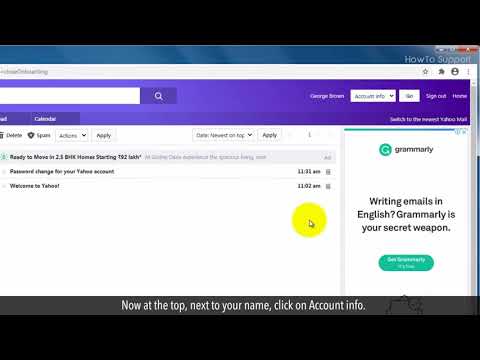
5. Now at the top, next to your name, click on Account info.
6. From the drop-down list, select Settings and click on go button.
7. Scroll down the page, and at the bottom, you will see Forwarding with an empty text field.
8. Write your Gmail address here and press Enter.
9. For the verification, you will receive an email from Yahoo in your Gmail account.
10. Check your Inbox in your Gmail.
11. To verify your email account, click on Click here text in the email.
12. This will redirect you to Yahoo, and click on Verify button here.
Congratulations! Your Gmail address has been verified by Yahoo, and now this will start forwarding your Yahoo emails to your Gmail account.
Content in this video is provided on an "as is" basis with no express or implied warranties whatsoever. Any reference of any third party logos, brand names, trademarks, services marks, trade names, trade dress and copyrights shall not imply any affiliation to such third parties, unless expressly specified
1. Sign in into your Yahoo email account.
2. At the top right, click on Settings.
3. Click on Switch to basic Mail at bottom left.
4. In an alert popup, click again on Switch to basic Mail button.
5. Now at the top, next to your name, click on Account info.
6. From the drop-down list, select Settings and click on go button.
7. Scroll down the page, and at the bottom, you will see Forwarding with an empty text field.
8. Write your Gmail address here and press Enter.
9. For the verification, you will receive an email from Yahoo in your Gmail account.
10. Check your Inbox in your Gmail.
11. To verify your email account, click on Click here text in the email.
12. This will redirect you to Yahoo, and click on Verify button here.
Congratulations! Your Gmail address has been verified by Yahoo, and now this will start forwarding your Yahoo emails to your Gmail account.
Content in this video is provided on an "as is" basis with no express or implied warranties whatsoever. Any reference of any third party logos, brand names, trademarks, services marks, trade names, trade dress and copyrights shall not imply any affiliation to such third parties, unless expressly specified
About this tutorial
How-to Videos published this 1:28 video tutorial on September 12, 2020. It has been watched 34,983 times on YouTube.
- Channel
- How-to Videos
- Category
- Science & Technology
- Duration
- 1:28
- Published
- September 12, 2020
- Views
- 34,983
- Likes
- 39
Tags
Share
This tutorial in other languages
- FRComment faire pour l'avenir de Yahoo Mail Gmail
- ESCómo reenviar el correo de Yahoo a Gmail
- PTComo encaminhar Yahoo Mail para o Gmail
- ITCome inoltrare Yahoo Mail a Gmail
- DEWie man Weiterleiten Yahoo Mail zu Gmail
- NLHow To Forward Yahoo Mail To Gmail
- RUКак Forward Yahoo Mail Для Gmail
- PLJak do przekazania Yahoo Mail na Gmaila
- JAどのように転送YahooメールにGmailの
- ARكيفية إعادة توجيه بريد ياهو إلى Gmail
- HIकैसे करने के लिए आगे याहू मेल करने के लिए जीमेल
- IDCara Teruskan Yahoo Mail Untuk Gmail