Playback starts YouTube’s embedded player (privacy-enhanced mode).
How to Free Up Space on iPhone (& Never Worry About It Again)
ChannelTheUnlockrIn brief
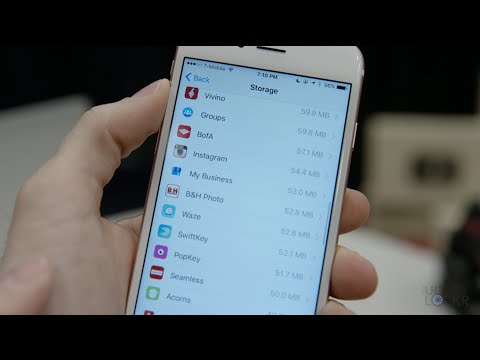
This video shows how to quickly reclaim storage on an iPhone by removing duplicate photos (like those from Instagram), offloading old images to cloud backups, and clearing unnecessary app caches—ideal for users who’ve noticed their device running low on space without upgrading storage.
Questions & answers
Does this work on any iPhone model?
Yes, the steps apply to all iPhones running iOS.
Description from the creator
Link to everything I mentioned in the video:
theunlockr.com/2016/04/21/free-up-space-on-ipho… *CLICK SHOW MORE FOR MORE RESOURCES!
Video Description:
Since most iPhone users don't stray from iOS they usually upgrade from an iPhone to a newer iPhone. When they do this, things like photos, app data, and a tons of other things are synced and then transferred directly to the new phone. Combine this with the fact that most users don't upgrade their storage when buying their next iPhone and you can see how we have a pretty easy recipe for running out of space pretty quickly.
Luckily you can free up space on your iPhone with a few simple steps. Things like making sure you aren't saving duplicate photos (Instagram is notorious for this), saving photos to the cloud automatically so you can delete old ones from the phone without fear of losing them forever, as well as cleaning up some app data and caches that are just taking up space for no good reason.
So let's see how we can free up storage space on your iPhone and how we can put things in place to make it far less often you'll need to do this purging.
Head here for the latest jailbreaking tutorials and jailbreak tweaks! - unlockr.co/YcqU
Want to see what I film with and what I recommend you use to make videos on YouTube? Here here! - unlockr.co/pXmf
Set your phone free! I now sell unlock codes to allow you to use any carrier with your phone, head here! - unlockr.co/nSXcw8S
If this video helped you, please consider donating to help fund more content like this! - paypal.com/cgi-bin/webscr?cmd=_s-xclick&hos…
Check out our site for more videos, tips, tricks, and more!
TheUnlockr.com
Check out our YouTube Channel!
YouTube.com/TheUnlockr
If you like getting the most out of your tech, you should definitely subscribe to TheUnlockr. Just saying.
Subscribe - youtube.com/user/mobileunlimited?sub_confirmati…
Connect with us on our social networks to chat, get behind the scenes photos, and shots of tech we're excited about as we travel:
Facebook - facebook.com/TheUnlockr
Twitter - twitter.com/TheUnlockr
Google+ - plus.google.com/+TheUnlockr1
Instagram - instagram.com/theunlockr/
theunlockr.com/2016/04/21/free-up-space-on-ipho… *CLICK SHOW MORE FOR MORE RESOURCES!
Video Description:
Since most iPhone users don't stray from iOS they usually upgrade from an iPhone to a newer iPhone. When they do this, things like photos, app data, and a tons of other things are synced and then transferred directly to the new phone. Combine this with the fact that most users don't upgrade their storage when buying their next iPhone and you can see how we have a pretty easy recipe for running out of space pretty quickly.
Luckily you can free up space on your iPhone with a few simple steps. Things like making sure you aren't saving duplicate photos (Instagram is notorious for this), saving photos to the cloud automatically so you can delete old ones from the phone without fear of losing them forever, as well as cleaning up some app data and caches that are just taking up space for no good reason.
So let's see how we can free up storage space on your iPhone and how we can put things in place to make it far less often you'll need to do this purging.
Head here for the latest jailbreaking tutorials and jailbreak tweaks! - unlockr.co/YcqU
Want to see what I film with and what I recommend you use to make videos on YouTube? Here here! - unlockr.co/pXmf
Set your phone free! I now sell unlock codes to allow you to use any carrier with your phone, head here! - unlockr.co/nSXcw8S
If this video helped you, please consider donating to help fund more content like this! - paypal.com/cgi-bin/webscr?cmd=_s-xclick&hos…
Check out our site for more videos, tips, tricks, and more!
TheUnlockr.com
Check out our YouTube Channel!
YouTube.com/TheUnlockr
If you like getting the most out of your tech, you should definitely subscribe to TheUnlockr. Just saying.
Subscribe - youtube.com/user/mobileunlimited?sub_confirmati…
Connect with us on our social networks to chat, get behind the scenes photos, and shots of tech we're excited about as we travel:
Facebook - facebook.com/TheUnlockr
Twitter - twitter.com/TheUnlockr
Google+ - plus.google.com/+TheUnlockr1
Instagram - instagram.com/theunlockr/
About this tutorial
TheUnlockr published this 7:13 video tutorial on November 12, 2016. It has been watched 3,747,270 times on YouTube.
- Channel
- TheUnlockr
- Category
- Science & Technology
- Duration
- 7:13
- Published
- November 12, 2016
- Views
- 3,747,270
- Likes
- 48,228
Tags
Share
This tutorial in other languages
- FRComment libérer de l'espace sur l'iPhone (et Ne vous souciez It Again)
- ESCómo liberar espacio en el iPhone (y nunca preocuparse de nuevo)
- PTComo liberar espaço no iPhone (e nunca se preocupar com It Again)
- ITCome liberare spazio su iPhone (e mai preoccuparsi di It Again)
- DEWie, um Platz auf dem iPhone (und nie Worry About It Again)
- NLHoe maak je ruimte vrij te maken op de iPhone (en Never Worry About It Again)
- RUКак освободить место на iPhone (и не беспокоиться о его снова)
- PLJak wolnego miejsca na iPhone (i nie martwić się o to jeszcze raz)
- JAどのように無料アップスペースにiPhone上で(&決してそれを心配アゲイン)
- ARكيفية تحرير مساحة على اي فون (وتقلق بشأن ذلك أبدا مرة أخرى)
- HIकैसे करने के लिए जगह खाली iPhone पर (और कभी चिंता यह बारे में फिर से)
- IDCara Gratis Up Space pada iPhone (& Jangan Khawatir Tentang It Again)