Playback starts YouTube’s embedded player (privacy-enhanced mode).
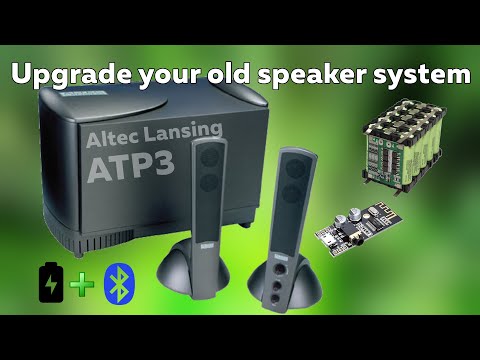
How to install bluetooth module to any speaker system I Altec Lansing ATP3 I
ChanneldiyExplorerDescription from the creator
This video is all about the installation process of bluetooth audio receiver MH M28 into a computer speaker system (Altec Lansing ATP3). This speaker system only had 3.5mm wired audio jack available on it. The quality of this speaker is exceptional and the bass is remarkable for an entry level speaker set. So, I think this one deserves an upgrade or modification because it's totally worth it. This video is not applicable on ATP3 speakers only but to other brands/models speaker audio system also that has no wireless audio receiving capabilities.
In this video, you might learn techniques in doing this that you might apply to your DIY projects also. The supply voltage of the speaker is roughly between 12-15V DC in the secondary. Yes, it uses a linear EI core transformers and I'm not really sure on it's voltage rating. However, it manage to work with no problem on my DIY 12V battery pack youtu.be/4H-ANadoniM. I want it also to work without connecting on AC mains so that I'll still be able to use it on a place where there's no source of electricity but only batteries.
The 3.5mm jack wired audio source function was not removed. I just added push button switch so that I can choose from two audio source namely wireless bluetooth audio and the wired source. The bluetooth module only gets powered when switch is set to bluetooth mode. That's why we need at least 12 pins for push button switch or slide switch. Note that it can be done using a 12 pins push button switch however I only manage to obtain a 24 pins switch on my local store.
You can find the schematic diagram here (facebook link): bit.ly/332PKfT
I hope you like it. Please subscribe, like and share for more videos.
Audio tracks:
--------------------------------------
Eveningland - Love now
Eveningland - Express
Eveningland - Rev
--------------------------------------
Track: Tobu - Candyland
Watch: youtu.be/IIrCDAV3EgI
Download: ncs.io/candyland
--------------------------------------
Track: Spektrem - Shine
Watch: youtu.be/n4tK7LYFxI0
Download: ncs.io/shine
--------------------------------------
In this video, you might learn techniques in doing this that you might apply to your DIY projects also. The supply voltage of the speaker is roughly between 12-15V DC in the secondary. Yes, it uses a linear EI core transformers and I'm not really sure on it's voltage rating. However, it manage to work with no problem on my DIY 12V battery pack youtu.be/4H-ANadoniM. I want it also to work without connecting on AC mains so that I'll still be able to use it on a place where there's no source of electricity but only batteries.
The 3.5mm jack wired audio source function was not removed. I just added push button switch so that I can choose from two audio source namely wireless bluetooth audio and the wired source. The bluetooth module only gets powered when switch is set to bluetooth mode. That's why we need at least 12 pins for push button switch or slide switch. Note that it can be done using a 12 pins push button switch however I only manage to obtain a 24 pins switch on my local store.
You can find the schematic diagram here (facebook link): bit.ly/332PKfT
I hope you like it. Please subscribe, like and share for more videos.
Audio tracks:
--------------------------------------
Eveningland - Love now
Eveningland - Express
Eveningland - Rev
--------------------------------------
Track: Tobu - Candyland
Watch: youtu.be/IIrCDAV3EgI
Download: ncs.io/candyland
--------------------------------------
Track: Spektrem - Shine
Watch: youtu.be/n4tK7LYFxI0
Download: ncs.io/shine
--------------------------------------
About this tutorial
diyExplorer published this 15:44 video tutorial on November 28, 2019. It has been watched 47,996 times on YouTube.
- Channel
- diyExplorer
- Category
- Science & Technology
- Duration
- 15:44
- Published
- November 28, 2019
- Views
- 47,996
- Likes
- 346
Tags
Share
This tutorial in other languages
- FRComment installer le module Bluetooth à tout système de haut-parleurs Altec Lansing I ATP3 I
- ESCómo instalar el módulo Bluetooth a cualquier sistema de altavoces Altec Lansing que me ATP3
- PTComo instalar o Bluetooth módulo para qualquer sistema de colunas I Altec Lansing ATP3 I
- ITCome installare il modulo Bluetooth a qualsiasi sistema di altoparlanti Altec Lansing I ATP3 I
- DEWie Bluetooth-Modul an jedem Lautsprechersystem I Altec Lansing ATP3 ich installieren
- NLHoe maak je bluetooth module te installeren om een luidspreker systeem dat ik Altec Lansing ATP3 I
- RUКак установить модуль Bluetooth для любой акустической системы я Altec Lansing ATP3 I
- PLJak zainstalować moduł bluetooth do dowolnego systemu głośników Altec Lansing ATP3 I I
- JAあらゆるスピーカーシステムIアルテックランシングATP3 IにBluetoothモジュールをインストールする方法
- ARكيفية تثبيت بلوتوث وحدة لأي نظام مكبر الصوت I انسنغ ATP3 I
- HIकिसी भी स्पीकर सिस्टम मैं अल्टेक लांसिंग ATP3 मैं करने के लिए ब्लूटूथ मॉड्यूल स्थापित करने के लिए
- IDCara menginstal modul bluetooth ke sistem speaker saya Altec Lansing ATP3 saya