Playback starts YouTube’s embedded player (privacy-enhanced mode).
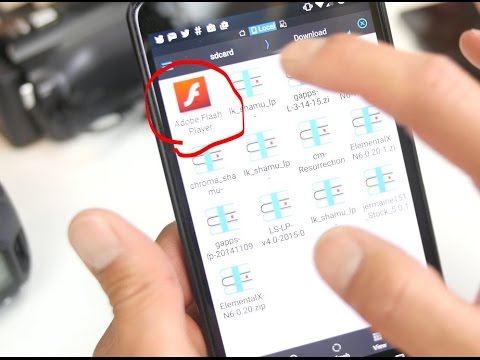
How to Install Flash Player on Android Lollipop!
ChannelMax LeeDescription from the creator
For those of you with latest Android 5.0, 5.0.1, 5.0.2, or 5.1 Lollipop OS, here's how to install Adobe Flash Player to view legacy Flash Player-enabled websites.
Download and Step-by-Step Tutorial Here:
highonandroid.com/android-apps/how-to-install-f…
Camera used for video:
Panasonic GH4 + Metabones Speedbooster + Sigma 18-35mm + Tokina 11-16mm
My Camera Gear:
highonandroid.com/my-camera-gear/
If you like this video, subscribe to my channel here:
bit.ly/zedomax
Subscribe to my 2nd Channel if you want more HighOnAndroid vids!
YouTube.com/HighOnAndroid
Like Android News? Check out our Android News section here:
news.highonandroid.com
Music Credits:
Dub Zap from YouTube Audio Library.
-------------------------------------------
Best way to contact me is on Twitter as I am always tweeting 24/7:
Twitter.com/zedomax
Follow me on Google Plus here:
plus.google.com/+MaxLee
Follow me on My Facebook Page:
facebook.com/howtoblog
Follow me on Instagram:
instagram.com/reallyhighonandroid
-------------------------------------------
Wanna get really High on Android?
Grab High On Android T-shirts here:
store.highonandroid.com/
You can buy Peony's bracelets here used in my video:
shop.peonysbracelets.com/
------------------------------------------------------------------------------------------
Do you have a technical question about this video?
If it's a technical question such as how to root or install a ROM,
please ask your question here by starting a new topic at the new Android Rehab Center:
forum.highonandroid.com/c/Android-Rehab-Center/…
YouTube commenting/notification system is very outdated and makes it hard/impossible
to get back to everyone but if you post it on our Rehab Center, you will get an answer ASAP!
Here's a video explaining why you didn't get a reply from my videos:
youtube.com/watch?v=FBfku5Lk7xk
------------------------------------------------------------------------------------------
Follow my social media:
twitter.com/zedomax
instagram.com/reallyhighonandroid
facebook.com/howtoblog
------------------------------------------
Join the HighOnAndroid VIP Fans List here:
highonandroid.com/newsletter.php
------------------------------------------
#HighOnAndroid
Download and Step-by-Step Tutorial Here:
highonandroid.com/android-apps/how-to-install-f…
Camera used for video:
Panasonic GH4 + Metabones Speedbooster + Sigma 18-35mm + Tokina 11-16mm
My Camera Gear:
highonandroid.com/my-camera-gear/
If you like this video, subscribe to my channel here:
bit.ly/zedomax
Subscribe to my 2nd Channel if you want more HighOnAndroid vids!
YouTube.com/HighOnAndroid
Like Android News? Check out our Android News section here:
news.highonandroid.com
Music Credits:
Dub Zap from YouTube Audio Library.
-------------------------------------------
Best way to contact me is on Twitter as I am always tweeting 24/7:
Twitter.com/zedomax
Follow me on Google Plus here:
plus.google.com/+MaxLee
Follow me on My Facebook Page:
facebook.com/howtoblog
Follow me on Instagram:
instagram.com/reallyhighonandroid
-------------------------------------------
Wanna get really High on Android?
Grab High On Android T-shirts here:
store.highonandroid.com/
You can buy Peony's bracelets here used in my video:
shop.peonysbracelets.com/
------------------------------------------------------------------------------------------
Do you have a technical question about this video?
If it's a technical question such as how to root or install a ROM,
please ask your question here by starting a new topic at the new Android Rehab Center:
forum.highonandroid.com/c/Android-Rehab-Center/…
YouTube commenting/notification system is very outdated and makes it hard/impossible
to get back to everyone but if you post it on our Rehab Center, you will get an answer ASAP!
Here's a video explaining why you didn't get a reply from my videos:
youtube.com/watch?v=FBfku5Lk7xk
------------------------------------------------------------------------------------------
Follow my social media:
twitter.com/zedomax
instagram.com/reallyhighonandroid
facebook.com/howtoblog
------------------------------------------
Join the HighOnAndroid VIP Fans List here:
highonandroid.com/newsletter.php
------------------------------------------
#HighOnAndroid
About this tutorial
Max Lee published this 5:33 video tutorial on November 12, 2015. It has been watched 109,860 times on YouTube.
- Channel
- Max Lee
- Category
- Science & Technology
- Duration
- 5:33
- Published
- November 12, 2015
- Views
- 109,860
- Likes
- 817
Tags
Share
This tutorial in other languages
- FRComment faire pour installer Flash Player sur Android Lollipop!
- ESCómo instalar Flash Player en Android Lollipop!
- PTComo instalar o Flash Player no Android Lollipop!
- ITCome installare Flash Player su Android Lollipop!
- DESo installieren Sie Flash Player auf Android Lollipop!
- NLHoe kan ik Flash Player te installeren op Android Lollipop!
- RUКак установить Flash Player на Android леденец!
- PLJak zainstalować Flash Player na Androida Lollipop!
- JAAndroidのロリポップ上のFlash Playerをインストールする方法!
- ARكيفية تثبيت فلاش لاعب على الروبوت المصاصة!
- HIएंड्रॉयड लॉलीपॉप पर फ़्लैश प्लेयर स्थापित करने के लिए कैसे!
- IDCara Install Flash Player di Android Lollipop!