Playback starts YouTube’s embedded player (privacy-enhanced mode).
How to Install MySQL server on Ubuntu 18.04/20.04
ChannelTubeMintDescription from the creator
How to Install MySQL server on Ubuntu 18.04/19.04
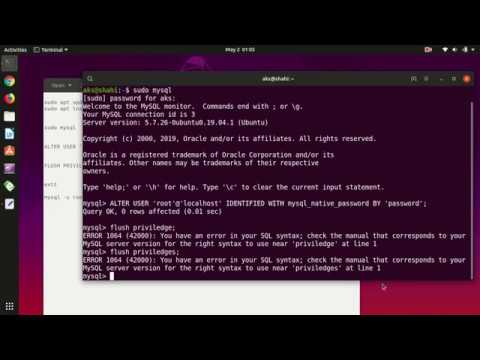
Here are the commands that you have to type..
sudo apt update
sudo apt install mysql-server
sudo mysql
ALTER USER 'root'@'localhost' IDENTIFIED WITH mysql_native_password BY 'password';
FLUSH PRIVILEGES;
exit
mysql -u root -p
enter root password for mysql
tubemint.com/product-tag/gig/ PAID Support: [email protected] Instagram & twitter @tubemint
Here are the commands that you have to type..
sudo apt update
sudo apt install mysql-server
sudo mysql
ALTER USER 'root'@'localhost' IDENTIFIED WITH mysql_native_password BY 'password';
FLUSH PRIVILEGES;
exit
mysql -u root -p
enter root password for mysql
tubemint.com/product-tag/gig/ PAID Support: [email protected] Instagram & twitter @tubemint
About this tutorial
TubeMint published this 5:48 video tutorial on November 4, 2019. It has been watched 63,114 times on YouTube.
- Channel
- TubeMint
- Category
- Science & Technology
- Duration
- 5:48
- Published
- November 4, 2019
- Views
- 63,114
- Likes
- 549
Tags
Share
This tutorial in other languages
- FRComment faire pour installer le serveur MySQL sur Ubuntu 18.04 / 20.04
- ESCómo instalar el servidor MySQL en Ubuntu 18.04 / 20.04
- PTComo instalar o servidor MySQL no Ubuntu 18.04 / 20.04
- ITCome installare un server MySQL su Ubuntu 18.04 / 20.04
- DESo installieren Sie MySQL-Server auf Ubuntu 18.04 / 20.04
- NLHoe maak je MySQL server installeren op Ubuntu 18.04 / 20.04
- RUКак установить сервер MySQL на Ubuntu 18,04 / 20,04
- PLJak zainstalować serwer MySQL w Ubuntu 18.04 / 20.04
- JA18.04 / 20.04のUbuntu上でMySQLサーバをインストールする方法
- ARكيفية تثبيت خادم MySQL على أوبونتو 18.04 / 20.04
- HIउबंटू 18.04 / 20.04 पर MySQL सर्वर स्थापित करने के लिए कैसे
- IDCara Install MySQL Server di Ubuntu 18.04 / 20.04