Playback starts YouTube’s embedded player (privacy-enhanced mode).
How to Restore Variables When Rotating the Device - Android Studio Tutorial
ChannelCoding in FlowDescription from the creator
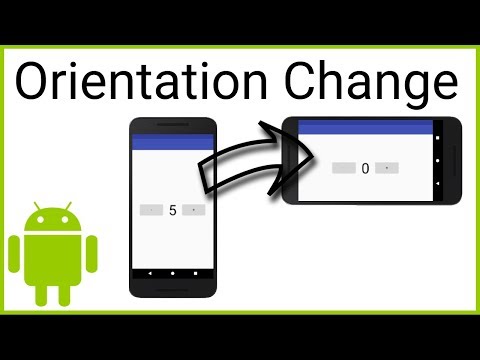
When there are runtime configuration changes in your Android phone, like changing the screen orientation or the device's language, your whole app process will be destroyed and recreated from scratch and together with it, all member variables will be reset. The system already takes care of default views like the text in an EditText field or the scrolling position of a RecyclerView or ListView. But we have to restore the variables of our activity ourselves and we do this by overriding onSaveInstanceState and passing the values to the outState Bundle. After the Activity has been recreated, there are 2 places where we can get our values back: onCreate or onRestoreInstanceState, which both get passed the savedInstanceState Bundle.
Source Code:
gist.github.com/codinginflow/16b73c12aca3c3cf3d…
____________________
💻 Find the BEST programming tutorials on TutHub:
tuthub.io
⭐ Get my MVVM Caching Course now:
codinginflow.com/caching
❗ Subscribe to the channel:
youtube.com/c/codinginflo...
📨 Subscribe to the Coding in Flow newsletter:
codinginflow.com/newsletter
❓ Join our free developer community:
discord.gg/TSnMvmc
📣 Follow Coding in Flow on other sites:
Facebook: facebook.com/codinginflow
Instagram: instagram.com/codinginflow
TikTok: tiktok.com/@codinginflow
Twitter: twitter.com/codinginflow
Github: github.com/codinginflow
💰 Business requests, sponsoring, etc.: [email protected]
Source Code:
gist.github.com/codinginflow/16b73c12aca3c3cf3d…
____________________
💻 Find the BEST programming tutorials on TutHub:
tuthub.io
⭐ Get my MVVM Caching Course now:
codinginflow.com/caching
❗ Subscribe to the channel:
youtube.com/c/codinginflo...
📨 Subscribe to the Coding in Flow newsletter:
codinginflow.com/newsletter
❓ Join our free developer community:
discord.gg/TSnMvmc
📣 Follow Coding in Flow on other sites:
Facebook: facebook.com/codinginflow
Instagram: instagram.com/codinginflow
TikTok: tiktok.com/@codinginflow
Twitter: twitter.com/codinginflow
Github: github.com/codinginflow
💰 Business requests, sponsoring, etc.: [email protected]
About this tutorial
Coding in Flow published this 4:37 video tutorial on November 14, 2018. It has been watched 72,290 times on YouTube.
- Channel
- Coding in Flow
- Category
- Science & Technology
- Duration
- 4:37
- Published
- November 14, 2018
- Views
- 72,290
- Likes
- 1,571
Tags
Share
This tutorial in other languages
- FRComment restaurer les variables lors de la rotation de l'appareil - Android studio Tutorial
- ESCómo restaurar las variables cuando se gira el dispositivo - Android Studio Tutorial
- PTComo restaurar variáveis quando girando o dispositivo - Android Estúdio Tutorial
- ITCome ripristinare le variabili durante la rotazione del dispositivo - Android Studio Tutorial
- DEWie Variablen wiederherzustellen, wenn die Drehvorrichtung - Android Studio Tutorial
- NLHoe kan ik variabelen te herstellen wanneer het apparaat te draaien - Android Studio Tutorial
- RUКак восстановить переменные при повороте устройства - Android Studio Tutorial
- PLJak przywrócić zmiennych Przy obracaniu elementu - Android Studio Tutorial
- JAアンドロイドStudioチュートリアル - デバイスを回転させたときの変数を復元する方法
- ARكيفية استعادة المتغيرات عندما تدوير الأجهزة - الروبوت التعليمي ستوديو
- HIचर पुनर्स्थापित कैसे जब डिवाइस घूर्णन - एंड्रॉयड स्टूडियो ट्यूटोरियल
- IDCara Kembalikan Variabel Ketika Memutar Device - Android Studio Tutorial