Playback starts YouTube’s embedded player (privacy-enhanced mode).
How to screen mirror/ stream laptop/ PC to TV - wireless, no adapters!
ChannelTomsTechReviewsIn brief
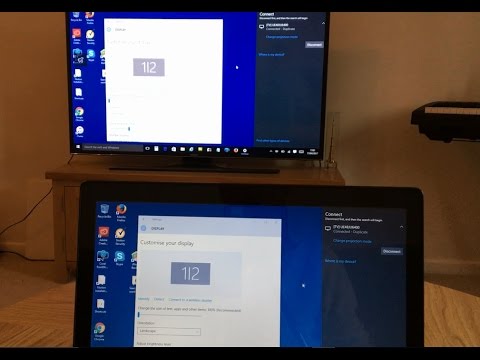
Wirelessly mirror your Windows PC (8.1 or later) to a smart TV without adapters, letting you stream video, audio, and apps like browsing or Skype onto a larger screen. The process is quick and stable once connected, using built-in Miracast technology.
Questions & answers
Do I need extra software or cables?
No—just a Windows PC and a smart TV with Miracast.
Description from the creator
For this method to work you just need Windows 8.1, 10, 11 or higher operating system and a smart TV. Windows 7 and 8 will also work but may need updating to the latest Miracast wireless display drivers. You can find out more information on how to do this from my website here. tomstechreviews.com
In this video I am using Windows 10 and a Samsung 49''' Smart TV. Once your PC is mirrored with your TV, the connection is very stable and will let you project anything you do on your PC, whether that's surfing the internet, watching movies or using Skype etc.
🙂 Suscribe For More Great Videos (IT'S FREE)
youtube.com/channel/UCYeQqK5nxmZ2MxPDhuTQBow?su…
If you have any questions please leave a comment below and I will try to answer as soon as possible.
Please thumbs up, share and subscribe if you liked this video and if you really liked it then I would be really made up if you gave me a 'Super Thanks'!
Thanks a lot for watching! Tom 🙂
#mirrortv #streamtv #streamlaptop
About this tutorial
TomsTechReviews published this 4:31 video tutorial on October 25, 2017. It has been watched 2,694,216 times on YouTube.
- Channel
- TomsTechReviews
- Category
- Science & Technology
- Duration
- 4:31
- Published
- October 25, 2017
- Views
- 2,694,216
- Likes
- 10,411
Tags
Share
Further reading
-
How to connect your laptop to your TV wirelessly or with HDMI
cnet.com
The most basic PC-to-TV connection consists of running a wire from your computer to the HDMI input on your TV. If you have an older TV and an older laptop, there are options like VGA , but that's ...
-
Use wireless screen mirroring to display your Windows 10 ...
sony.com
The computer and TV must support the Miracast feature. Manuals are posted on your model support page. General information about connecting a computer to a TV using wired connections (HDMI, RGB) is also available. Screen…
-
How to use screen mirroring on Windows 10 to turn your PC ...
windowscentral.com
Disconnecting wireless display. If you no longer need to use screen mirroring, you can click the Disconnect button from the toolbar that appears at the top of the primary monitor, or you can use ...
This tutorial in other languages
- FRComment miroir écran / ordinateur portable flux / PC à la télévision - sans fil, pas d'adaptateur secteur!
- ESComo espejo de pantalla / ordenador portátil corriente / PC a la TV - inalámbrica, sin necesidad de adaptadores!
- PTComo espelho tela / laptop stream / PC para TV - sem fios, sem adaptadores!
- ITCome specchio schermo / laptop flusso / PC alla TV - wireless, senza adattatori!
- DEWie man Bildschirm Spiegel / stream Laptop / PC zum TV - W-LAN, keine Adapter!
- NLHoe kan ik het scherm spiegel / beek laptop / PC naar TV - draadloos, geen adapters!
- RUКак экран зеркало / поток ноутбук / ПК к телевизору - беспроводный, нет адаптеры!
- PLJak lustro ekran / potok laptopa / PC do telewizora - bezprzewodowo, bez adapterów!
- JAどのようにテレビ画面にミラーへ/ストリームノートPC / PC - 無線、ないアダプタ!
- ARكيفية الشاشة مرآة المحمول / تيار / PC إلى TV - لاسلكية، لا محولات!
- HIकैसे स्क्रीन दर्पण / धारा लैपटॉप / पीसी के लिए टीवी के लिए - वायरलेस, कोई एडेप्टर!
- IDCara cermin layar / laptop aliran / PC ke TV - nirkabel, tidak ada adapter!