Playback starts YouTube’s embedded player (privacy-enhanced mode).
How to set your analog radio controlled clock in a different time zone ( eng version )
ChannelNick AlphaDescription from the creator
I read many comments online about people complaining that their analog radio clock sets in a different time zone than the one they currently live and that there is no way to fix this . Well there is a way and i will show you how to do it in this video , in 4 simple steps .
- Step one . Set the clock in radio search mode showing 12:00. Most radio clocks have two buttons at the back, one for manual and one for auto setup. Press the auto and let it set at 12:00 waiting for radio signal.
- Step 2 Unscrew the bolts behind the clock and open the cap
- Step 3 (crucial step do it carefully) Slowly and gently move with your fingers the hours pointer , (do it that way in order to avoid moving the internal gears) , the amount of time that the radio clock needs , in order to show the correct time .
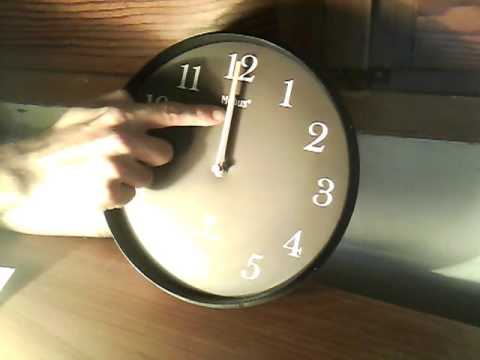
You will adjust the hours difference by moving slowly the hours pointer , dont do full rounds with the minutes pointer. In this video i turn the hours pointer from 12 to 1 and the minutes pointer remain as is .
----------Optional Move----------
To find out If you did the previous step correctly , set again the clock in Searching Mode by pressing again the auto setup button at the back. Now , instead of showing you 12:00 it will show you the time difference you have already set from step 3(1:00 , 2:00 , 11:00 or whatever it may be ) .
If it set again at 12:00 this means that you have to try again adjusting the hours pointer slower this time in order to have the desirable effect (because the internal gears moved along side with the pointer at step 3) .
- Step 4 Put the cap back and screw the bolts . You are done !
From the final stage you can either set the time manually or leave the clock in Searching Mode and it will adjust by itself after a while with the correct time.
Thanks for watching
- Step one . Set the clock in radio search mode showing 12:00. Most radio clocks have two buttons at the back, one for manual and one for auto setup. Press the auto and let it set at 12:00 waiting for radio signal.
- Step 2 Unscrew the bolts behind the clock and open the cap
- Step 3 (crucial step do it carefully) Slowly and gently move with your fingers the hours pointer , (do it that way in order to avoid moving the internal gears) , the amount of time that the radio clock needs , in order to show the correct time .
You will adjust the hours difference by moving slowly the hours pointer , dont do full rounds with the minutes pointer. In this video i turn the hours pointer from 12 to 1 and the minutes pointer remain as is .
----------Optional Move----------
To find out If you did the previous step correctly , set again the clock in Searching Mode by pressing again the auto setup button at the back. Now , instead of showing you 12:00 it will show you the time difference you have already set from step 3(1:00 , 2:00 , 11:00 or whatever it may be ) .
If it set again at 12:00 this means that you have to try again adjusting the hours pointer slower this time in order to have the desirable effect (because the internal gears moved along side with the pointer at step 3) .
- Step 4 Put the cap back and screw the bolts . You are done !
From the final stage you can either set the time manually or leave the clock in Searching Mode and it will adjust by itself after a while with the correct time.
Thanks for watching
About this tutorial
Nick Alpha published this 2:33 video tutorial on November 1, 2015. It has been watched 46,220 times on YouTube.
- Channel
- Nick Alpha
- Category
- Science & Technology
- Duration
- 2:33
- Published
- November 1, 2015
- Views
- 46,220
- Likes
- 91
Tags
Share
This tutorial in other languages
- FRComment régler votre horloge radio analogique dans un fuseau horaire différent (version eng)
- ESCómo configurar el reloj controlado por radio analógica en una zona horaria diferente (versión esp)
- PTComo definir o seu relógio controlado por rádio analógico em um fuso horário diferente (versão eng)
- ITCome impostare la radiosveglia controllato analogico in un fuso orario diverso (versione ita)
- DEWie Sie Ihre analogen Funkuhr in einer anderen Zeitzone (eng Version) einzustellen
- NLHoe kunt u uw analoge radiogestuurde klok in te stellen in een andere tijdzone (Eng versie)
- RUКак установить аналоговый радиоуправляемые часы в другом часовом поясе (англ версия)
- PLJak ustawić analogowy zegar sterowany sygnałem radiowym w innej strefie czasowej (wersja ENG)
- JA異なるタイムゾーン(ENG版)にあなたのアナログ電波時計を設定する方法
- ARكيفية تعيين التناظرية الراديو الخاص على مدار الساعة للرقابة في منطقة زمنية مختلفة (الإصدار المهندس)
- HIएक अलग समय क्षेत्र (eng संस्करण) में एनालॉग रेडियो नियंत्रित घड़ी सेट करने के लिए कैसे
- IDBagaimana mengatur dikendalikan radio jam analog di zona waktu yang berbeda (versi eng)