Playback starts YouTube’s embedded player (privacy-enhanced mode).
How to setup Hotmail with Exchange ActiveSync on your iPhone
ChannelwindowsliveDescription from the creator
Instructions:
1. Tap Settings from the main screen, then Mail, Contacts, Calendars.
2. Tap Add Account.
3. Tap Microsoft Exchange to configure Hotmail access.
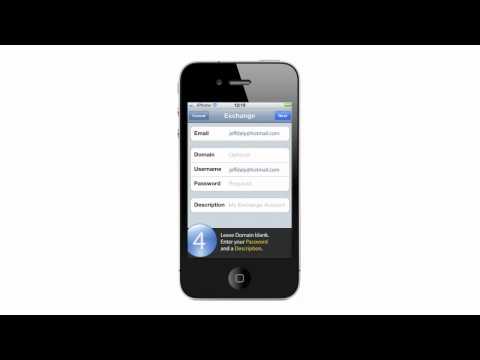
4. Enter your full Hotmail address in both the Email and Username fields. Leave Domain blank, enter your Password and a Description, tap Next.
5. Enter m.hotmail.com for the Server name and tap Next.
6. Select whether you want to sync your Mail, Contacts, and Calendars and tap Save.
About this tutorial
windowslive published this 1:12 video tutorial on October 26, 2011. It has been watched 34,063 times on YouTube.
- Channel
- windowslive
- Category
- Science & Technology
- Duration
- 1:12
- Published
- October 26, 2011
- Views
- 34,063
- Likes
- 26
Tags
Share
Further reading
-
Set up Exchange ActiveSync on your iPhone, iPad, or iPod ...
support.apple.com
Tap Settings > Mail > Accounts, then select your Exchange account. You can also set up automatic out-of-office replies, and change how often you want Mail to sync. To change advanced settings, tap your account name to c…
-
How to Set Up Hotmail for MS Exchange On Your iPhone
idownloadblog.com
According to LiveSide, Microsoft Exchange ActiveSync support has not been officially launched but it does work for certain people. How to install Hotmail via MicroSoft Exchange on the iPhone: Step 1: On your iPhone, go…
-
How To Setup Hotmail Using Exchange ActiveSync On Your iPhone ...
iphonehacks.com
You can follow these steps to setup Hotmail using Exchange ActiveSync on your iPhone, iPad and iPod Touch: Launch the Settings App. Under Settings, tap on “Mail, Contacts, Calendar”. Then tap on “Add Account”. Tap on “M…
This tutorial in other languages
- FRComment configurer Hotmail avec Exchange ActiveSync sur votre iPhone
- ES¿Cómo configurar Hotmail con Exchange ActiveSync en su iPhone
- PTComo configurar Hotmail com o Exchange ActiveSync no seu iPhone
- ITCome configurare Hotmail con Exchange ActiveSync sul tuo iPhone
- DESo richten Sie Hotmail mit Exchange ActiveSync auf Ihrem iPhone
- NLHoe te opstelling Hotmail met Exchange ActiveSync op je iPhone
- RUКак настроить Hotmail с Exchange ActiveSync на вашем iPhone
- PLJak skonfigurować Hotmail z Exchange ActiveSync na iPhonie
- JAどのようにセットアップのHotmailへのあなたのiPhone上のExchange ActiveSyncで
- ARكيفية إعداد هوتميل مع ActiveSync Exchange على اي فون الخاص بك
- HIकैसे सेटअप हॉटमेल के लिए अपने iPhone पर Exchange ActiveSync के साथ
- IDCara setup Hotmail dengan Exchange ActiveSync pada iPhone Anda