Playback starts YouTube’s embedded player (privacy-enhanced mode).
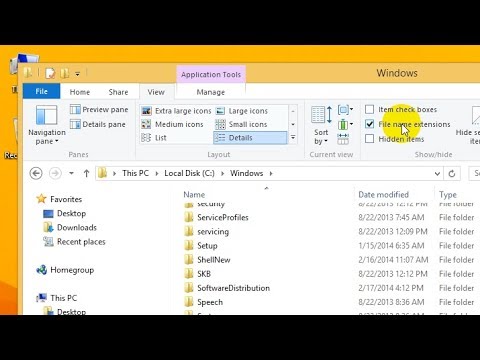
How to show File Extensions in Windows 8, 8.1, 10
ChannelfuruleviDescription from the creator
What are file name extension?
File name extension are the last characters after the dot (.) in a file's name. Example:
.jpg .exe .txt .docx .avi .mp3 .mov
If the you can't see the file name extensions do the following:
- Open File explorer by pressing Windows key + E
- If the toolbar is not visible press Control + F1 to show it
- go to the "View" tab
- check "File name extensions"
...File name extensions should be visible now.
File name extension are the last characters after the dot (.) in a file's name. Example:
.jpg .exe .txt .docx .avi .mp3 .mov
If the you can't see the file name extensions do the following:
- Open File explorer by pressing Windows key + E
- If the toolbar is not visible press Control + F1 to show it
- go to the "View" tab
- check "File name extensions"
...File name extensions should be visible now.
About this tutorial
furulevi published this 1:02 video tutorial on October 31, 2014. It has been watched 24,616 times on YouTube.
- Channel
- furulevi
- Category
- Science & Technology
- Duration
- 1:02
- Published
- October 31, 2014
- Views
- 24,616
- Likes
- 164
Tags

Share
This tutorial in other languages
- FRComment afficher les extensions de fichier dans Windows 8, 8.1, 10
- ESCómo mostrar las extensiones de archivo de Windows 8, 8.1, 10
- PTComo mostrar extensões de arquivo no Windows 8, 8.1, 10
- ITCome visualizzare le estensioni dei file in Windows 8, 8.1, 10
- DEWie Dateierweiterungen in Windows 8 zeigen, 8.1, 10
- NLHoe te File extensies weergegeven in Windows 8, 8.1, 10
- RUКак показать расширение файлов в Windows 8, 8.1, 10
- PLJak pokazują rozszerzeń plików w Windows 8, 8,1, 10
- JAWindowsの8、8.1、10でファイルの拡張子を表示する方法
- ARكيفية إظهار ملحقات الملفات في ويندوز 8، 8.1، 10
- HIWindows 8, 8.1, 10 में फ़ाइल एक्सटेंशन को दिखाने के कैसे
- IDBagaimana menampilkan File Extensions di Windows 8, 8.1, 10