Playback starts YouTube’s embedded player (privacy-enhanced mode).
How to speed up your Internet Connection - Windows Setting
ChannelMusicartaDescription from the creator
YouTube channel: youtube.com/musicarta
Facebook: facebook.com/pages/Musicar...
Twitter: twitter.com/Musicarta
Google Buzz: google.com/profiles/musicarta
Digg: digg.com/Musicarta
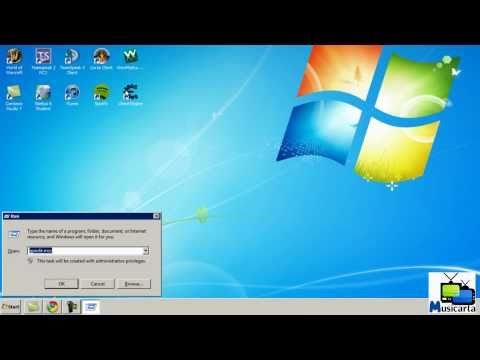
This video will show you how to speed up your internet connection by changing a simple setting in Windows
If you do not have 'Run...' in your start menu, you can press 'windows key' + 'R' on your keyboard.
This must be typed into the run command in Windows: gpedit.msc
Hit enter to run the command.
Note that this setting can be changed in all versions of windows APART FROM:
XP Home Edition
Vista Home Basic and Home Premium versions
Windows 7 Home Basic and Home Premium versions.
Any versions of Windows that were released before XP.
If you do not have the 'Network' folder in the 'Administrative Templates' folder, follow the steps below to make the other folders (including the required 'Network' folder) appear:
Right click 'Administrative Templates' (in the left margin of the group policy window) and click add remove templates. You will then have a dialg box with a list of templates. Click Add and this should open the Windows\system32\inf folder and list a number of .ADM files. From this list, add in Conf.adm and System.adm. Close the Add/Remove templates box and you should now have the requied options, the network folder included.
If you have a question about this video, after reading all of this description, please send me a direct message on YouTube and I will try and get back to you.
If you would like to request a computer related tutorial for me to make and upload, please leave a comment on my channel and I will see what I can do.
In the unlikely event that anything goes wrong with your computer when following the steps in my video, then it is in no way my fault and I am not responsible. I am, however, prepared to help you as best I can. If you do have a problem, feel free to get in touch.
All the programs and websites featured in this video are not owned or copyrighted by myself and due credit goes to their authors/creators.
For business enquires only, contact me here: [email protected]
Facebook: facebook.com/pages/Musicar...
Twitter: twitter.com/Musicarta
Google Buzz: google.com/profiles/musicarta
Digg: digg.com/Musicarta
This video will show you how to speed up your internet connection by changing a simple setting in Windows
If you do not have 'Run...' in your start menu, you can press 'windows key' + 'R' on your keyboard.
This must be typed into the run command in Windows: gpedit.msc
Hit enter to run the command.
Note that this setting can be changed in all versions of windows APART FROM:
XP Home Edition
Vista Home Basic and Home Premium versions
Windows 7 Home Basic and Home Premium versions.
Any versions of Windows that were released before XP.
If you do not have the 'Network' folder in the 'Administrative Templates' folder, follow the steps below to make the other folders (including the required 'Network' folder) appear:
Right click 'Administrative Templates' (in the left margin of the group policy window) and click add remove templates. You will then have a dialg box with a list of templates. Click Add and this should open the Windows\system32\inf folder and list a number of .ADM files. From this list, add in Conf.adm and System.adm. Close the Add/Remove templates box and you should now have the requied options, the network folder included.
If you have a question about this video, after reading all of this description, please send me a direct message on YouTube and I will try and get back to you.
If you would like to request a computer related tutorial for me to make and upload, please leave a comment on my channel and I will see what I can do.
In the unlikely event that anything goes wrong with your computer when following the steps in my video, then it is in no way my fault and I am not responsible. I am, however, prepared to help you as best I can. If you do have a problem, feel free to get in touch.
All the programs and websites featured in this video are not owned or copyrighted by myself and due credit goes to their authors/creators.
For business enquires only, contact me here: [email protected]
About this tutorial
Musicarta published this 2:27 video tutorial on November 7, 2011. It has been watched 625,031 times on YouTube.
- Channel
- Musicarta
- Category
- Science & Technology
- Duration
- 2:27
- Published
- November 7, 2011
- Views
- 625,031
- Likes
- 2,712
Tags
Share
This tutorial in other languages
- FRComment accélérer votre connexion Internet - Cadre de Windows
- ESCómo acelerar la conexión a Internet - Configuración de Windows
- PTComo acelerar a conexão com a Internet - Windows Configuração
- ITCome velocizzare la connessione a Internet - Windows Setting
- DEWie Sie Ihre Internet-Verbindung zu beschleunigen - Windows-Einstellungen
- NLHoe kan ik de snelheid van uw Internet-verbinding - Windows Instelling
- RUКак ускорить процесс подключения к Интернету - Windows Установка
- PLJak przyspieszyć połączenia internetowego - Otoczenie systemu Windows
- JAあなたのインターネット接続をスピードアップする方法 - Windowsの設定
- ARكيفية تسريع اتصال الانترنت الخاص بك - إعداد ويندوز
- HIकैसे अपने इंटरनेट कनेक्शन की गति को - विंडोज सेटिंग
- IDCara mempercepat Koneksi Internet Anda - Jendela Pengaturan