The creator does not allow this video to be played on other websites. You can watch it directly on YouTube.
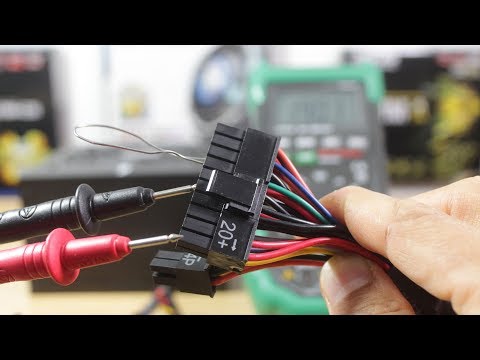
How To Test A Power Supply Unit (PSU) With A Digital Multimeter | Advanced Troubleshooting
ChannelHealMyTechDescription from the creator
In this youtube video tutorial I show you how to test a psu with a multimeter or how to test a power supply unit using a digital multimeter. This is an advanced troubleshoot tutorial. There is a paper clip test you can do to check if a power supply is dead or not. However that test only checks for power but not for correct voltage.
First you need to test for AC Voltage coming from the mains plug. Next you need to test for DC voltage from each of the pin on the power supply unit.
Standard ATX 12V power supply units can be either 20 pins or 24 (20+4) pins. The method is the same for each.
This video is also a stand alone tutorial as part of a longer Troubleshoot series, see details in the video and below.
Time Stamps:
00:36 Troubleshoot Series Intro | Desktop Pc Computer Not Turning On No Display | How A Computer Works
youtube.com/watch?v=Wkcx-x9gjkg
00:44 Test A Laptop Charger Adaptor With A Digital Multimeter
youtube.com/watch?v=-jbD2bXtZqU
00:50 Troubleshoot A Dead Computer Pc No Power - Desktop PC Computer Not Turning On At All Easy Fix Repair
youtube.com/watch?v=cbYdMIgMlOo
00:55 The paper clip test
001:43 Power Supply Unit Replacement Under 2 minutes Challenge
youtube.com/watch?v=cQqCkIuUEd8
01:55 Mastech Digital Multimeter MS8268
Amazon Affiliate UK: amzn.to/2y5xnXC
Amazon Affiliate US: amzn.to/2xa7ng8
02:53 UK AC Voltage Range: 216.2 to 253V
nottingham.ac.uk/etc/guide-voltageoptimisation.…
03:02 Tolerance of -6% to +10%
04:42 Turn a Computer Power Supply into Bench Power by Jason Poel Smith
makezine.com/projects/computer-power-supply-to-…
06:00 Laptop No Display Black Screen Blank Screen On Startup | Best Guide How To Fix Troubleshoot Repair
youtube.com/watch?v=E60VjaeNnP4
07:26 DC Volt Tolerance
Red/Purple: 5V +/- 4% = 4.8 to 5.2 V
Yellow/Blue: 12V +/- 4% = 11.52 to 12.48
Orange: 3.3V +/- 4% = 3.168 to 3.432
10:18 How To Take Out Or Remove A Motherboard From A Desktop Computer Case | Breadboarding Easy Mode
youtube.com/watch?v=UM-9wAUQCdU
Affiliate Product Links:
Canon EOS 1300D UK: amzn.to/2h8SZvw
Canon EOS 1300D US: amzn.to/2xplQW1
Boya BY M1 Lavalier Microphone UK: amzn.to/2xHslo4
Boya BY M1 Lavalier Microphone US: amzn.to/2y4Ydze
Zoom H1 Recorder UK: amzn.to/2w14L0W
Zoom H1 Recorder US: amzn.to/2xGyqkB
Mastech Digital Multimeter MS8268 UK: amzn.to/2y5xnXC
Mastech Digital Multimeter MS8268 US: amzn.to/2xa7ng8
HealMyTech Custom Amazon Affiliate Links:
UK Amazon Affiliate link: amazon.co.uk/?tag=healmytech-21
US Amazon Affiliate link: amazon.com/?tag=healmytech-20
Subscribe to my channel: HealMyTech
youtube.com/c/healmypc99
Connect with me:
Email: [email protected]
Twitter: @healmytech
Facebook: facebook.com/Healmytech-1739142406338235/
Thanks for watching!
Don't Click This! youtube.com/channel/UCCN6jhE-nqsfmp1GYazd2wA?su…
First you need to test for AC Voltage coming from the mains plug. Next you need to test for DC voltage from each of the pin on the power supply unit.
Standard ATX 12V power supply units can be either 20 pins or 24 (20+4) pins. The method is the same for each.
This video is also a stand alone tutorial as part of a longer Troubleshoot series, see details in the video and below.
Time Stamps:
00:36 Troubleshoot Series Intro | Desktop Pc Computer Not Turning On No Display | How A Computer Works
youtube.com/watch?v=Wkcx-x9gjkg
00:44 Test A Laptop Charger Adaptor With A Digital Multimeter
youtube.com/watch?v=-jbD2bXtZqU
00:50 Troubleshoot A Dead Computer Pc No Power - Desktop PC Computer Not Turning On At All Easy Fix Repair
youtube.com/watch?v=cbYdMIgMlOo
00:55 The paper clip test
001:43 Power Supply Unit Replacement Under 2 minutes Challenge
youtube.com/watch?v=cQqCkIuUEd8
01:55 Mastech Digital Multimeter MS8268
Amazon Affiliate UK: amzn.to/2y5xnXC
Amazon Affiliate US: amzn.to/2xa7ng8
02:53 UK AC Voltage Range: 216.2 to 253V
nottingham.ac.uk/etc/guide-voltageoptimisation.…
03:02 Tolerance of -6% to +10%
04:42 Turn a Computer Power Supply into Bench Power by Jason Poel Smith
makezine.com/projects/computer-power-supply-to-…
06:00 Laptop No Display Black Screen Blank Screen On Startup | Best Guide How To Fix Troubleshoot Repair
youtube.com/watch?v=E60VjaeNnP4
07:26 DC Volt Tolerance
Red/Purple: 5V +/- 4% = 4.8 to 5.2 V
Yellow/Blue: 12V +/- 4% = 11.52 to 12.48
Orange: 3.3V +/- 4% = 3.168 to 3.432
10:18 How To Take Out Or Remove A Motherboard From A Desktop Computer Case | Breadboarding Easy Mode
youtube.com/watch?v=UM-9wAUQCdU
Affiliate Product Links:
Canon EOS 1300D UK: amzn.to/2h8SZvw
Canon EOS 1300D US: amzn.to/2xplQW1
Boya BY M1 Lavalier Microphone UK: amzn.to/2xHslo4
Boya BY M1 Lavalier Microphone US: amzn.to/2y4Ydze
Zoom H1 Recorder UK: amzn.to/2w14L0W
Zoom H1 Recorder US: amzn.to/2xGyqkB
Mastech Digital Multimeter MS8268 UK: amzn.to/2y5xnXC
Mastech Digital Multimeter MS8268 US: amzn.to/2xa7ng8
HealMyTech Custom Amazon Affiliate Links:
UK Amazon Affiliate link: amazon.co.uk/?tag=healmytech-21
US Amazon Affiliate link: amazon.com/?tag=healmytech-20
Subscribe to my channel: HealMyTech
youtube.com/c/healmypc99
Connect with me:
Email: [email protected]
Twitter: @healmytech
Facebook: facebook.com/Healmytech-1739142406338235/
Thanks for watching!
Don't Click This! youtube.com/channel/UCCN6jhE-nqsfmp1GYazd2wA?su…
About this tutorial
HealMyTech published this 10:32 video tutorial on November 2, 2017. It has been watched 778,922 times on YouTube.
- Channel
- HealMyTech
- Category
- Science & Technology
- Duration
- 10:32
- Published
- November 2, 2017
- Views
- 778,922
- Likes
- 8,175
Share
This tutorial in other languages
- FRComment tester une unité d'alimentation d'alimentation (PSU) avec un multimètre numérique | Dépannage avancé
- ESCómo hacer pruebas unitarias de una fuente de alimentación (PSU) con un multímetro digital | Solución avanzada de problemas
- PTComo teste de uma unidade para Alimentação (PSU) com um multímetro Digital | Solução avançada de problemas
- ITCome testare un unità di alimentazione (PSU) con un multimetro digitale | Risoluzione dei problemi avanzata
- DEHow To Test A Stromversorgungseinheit (PSU) mit einem Digitalmultimeter | Erweiterte Fehlerbehebung
- NLHow To Test A Power Supply Unit (PSU) met een digitale multimeter | geavanceerde probleemoplossing
- RUКак Тест A Блок Для питания (PSU) с цифровым мультиметром | Дополнительные способы устранения неполадок
- PLJak przetestować Zasilacz (PSU) z cyfrowym multimetru | zaawansowane rozwiązywanie problemów
- JAAデジタルマルチメータではどのようにするために、テストA電源ユニット(PSU)|高度なトラブルシューティング
- ARكيفية اختبار وحدة التيار الكهربائي (PSU) مع رقمي متعدد | استكشاف الأخطاء وإصلاحها المتقدم
- HIकैसे करने के लिए टेस्ट एक बिजली की आपूर्ति इकाई (पीएसयू) एक डिजिटल मल्टीमीटर के साथ | उन्नत समस्या निवारण
- IDCara Uji Sebuah Power Supply Unit (PSU) Dengan A Digital Multimeter | Pemecahan Masalah lanjut