Playback starts YouTube’s embedded player (privacy-enhanced mode).
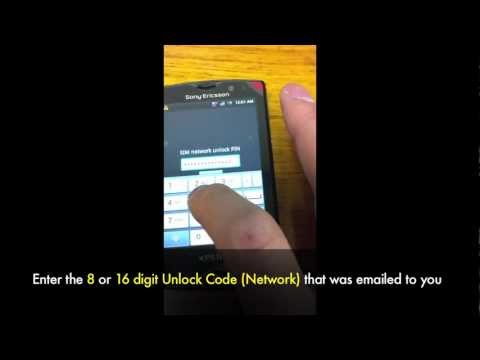
How to Unlock Sony Ericsson Phone by Unlock Code - Unlocking All models Xperia, X10, At&t, Rogers
ChannelCellunlocker.netDescription from the creator
cellunlocker.net - #1 Sony Ericsson Phone Unlocking Site 1-800-507-9077. This a guide & Instructions on How to Unlock any Sony Ericsson Phone Network by Unlock Code. 100% Guaranteed Fast & Easy.
Enjoy an exclusive 10% discount on your unlock with a coupon code: YOUTUBE10
Unlock all GSM Networks including At&t, T-Mobile, Rogers, Fido, Bell, Telus, Koodo, Wind, Chatr, Vodafone, Orange, O2, 3 Three, Telcel, Claro, Telefonica, Telecom, Telstra, etc.. by enter the 8 or 16 digit Unlock Code emailed to you.
- Lowest price guaranteed!
- Fast Turnaround time emailed to you
- 100% Guaranteed to Unlock your Phone's Network
General Sony Ericsson Unlocking Instructions:
1. Switch ON your phone with a Non accepted SIM Card,
2. Phone will ask you to enter Sim unlock pin
3. Enter unlock code
4. Phone will be unlocked
OR
1. Switch ON your phone without SIM Card
2. Press 1 time the left arrow,
3. Press 2 times the button * ,
4. Press 1 time the left arrow,
5. The message "Personalize with MNC2″ will appear,
6. You can now enter the Unlock Code we send to you.
If your phone have a "JOGDIAL" (ex : SonyEricsson K700i) you must press "down arrow" instead of "left arrow" for step 2 & 3. We mean by "Down Arrow" to direct the Jogdial down !
Unlock Check
to check that there is enough attempts to enter the unlock code into your phone, please reply back with the necessary information:
With a Non accepted simcard start up the phone. When the screen says "emergency calls"
1. Start up the phone and press the Menu key ( ) and Back key ( ) as follows:
2. Pressing Key Sequences: Menu Back Back Menu Back Menu Menu Back
OR
press *#*#7378423#*#* and access the service menu
Go to Simlock Menu:
EX:
[x] Network 10
[ ] Network Subset 10
[ ] Service Provider 10
[ ] Corporate 10
[ ] Sim 0
[x] Network 10 (This means you still have 10 tries to enter the Unlock code and your network is still locked)
1-800-507-9077
[email protected]
100% Guaranteed or your Money Back
Unlock NOW! cellunlocker.net/sony-ericsson-unlock.php
Enjoy an exclusive 10% discount on your unlock with a coupon code: YOUTUBE10
Unlock all GSM Networks including At&t, T-Mobile, Rogers, Fido, Bell, Telus, Koodo, Wind, Chatr, Vodafone, Orange, O2, 3 Three, Telcel, Claro, Telefonica, Telecom, Telstra, etc.. by enter the 8 or 16 digit Unlock Code emailed to you.
- Lowest price guaranteed!
- Fast Turnaround time emailed to you
- 100% Guaranteed to Unlock your Phone's Network
General Sony Ericsson Unlocking Instructions:
1. Switch ON your phone with a Non accepted SIM Card,
2. Phone will ask you to enter Sim unlock pin
3. Enter unlock code
4. Phone will be unlocked
OR
1. Switch ON your phone without SIM Card
2. Press 1 time the left arrow,
3. Press 2 times the button * ,
4. Press 1 time the left arrow,
5. The message "Personalize with MNC2″ will appear,
6. You can now enter the Unlock Code we send to you.
If your phone have a "JOGDIAL" (ex : SonyEricsson K700i) you must press "down arrow" instead of "left arrow" for step 2 & 3. We mean by "Down Arrow" to direct the Jogdial down !
Unlock Check
to check that there is enough attempts to enter the unlock code into your phone, please reply back with the necessary information:
With a Non accepted simcard start up the phone. When the screen says "emergency calls"
1. Start up the phone and press the Menu key ( ) and Back key ( ) as follows:
2. Pressing Key Sequences: Menu Back Back Menu Back Menu Menu Back
OR
press *#*#7378423#*#* and access the service menu
Go to Simlock Menu:
EX:
[x] Network 10
[ ] Network Subset 10
[ ] Service Provider 10
[ ] Corporate 10
[ ] Sim 0
[x] Network 10 (This means you still have 10 tries to enter the Unlock code and your network is still locked)
1-800-507-9077
[email protected]
100% Guaranteed or your Money Back
Unlock NOW! cellunlocker.net/sony-ericsson-unlock.php
About this tutorial
Cellunlocker.net published this 3:56 video tutorial on November 6, 2012. It has been watched 138,054 times on YouTube.
- Channel
- Cellunlocker.net
- Category
- Science & Technology
- Duration
- 3:56
- Published
- November 6, 2012
- Views
- 138,054
- Likes
- 141
Share
This tutorial in other languages
- FRComment ouvrir / accès au service caché Menu Sony Xperia S
- ESCómo Menú de Acceso Abierto Servicio / ocultos en el Sony Xperia S
- PTComo para abrir o menu / Acesso ao serviço ocultas na Sony Xperia S
- ITCome Aprire il menu / servizio di accesso nascosti su Sony Xperia S
- DEWie zu öffnen / Zugang versteckter Service-Menü auf Sony Xperia S
- NLHoe te openen / Access Verborgen Servicemenu op Sony Xperia S
- RUКак Открыть / Access Hidden Service Menu на Sony Xperia S
- PLJak otworzyć menu / Dostęp Ukryty obsługa na Sony Xperia S
- JAどのようにソニーのXperia Sのオープン/アクセス隠されたサービスメニューへ
- ARكيفية القائمة المفتوحة / وصول الخدمة المخفية على سوني اريكسون S
- HIकैसे पर सोनी एक्सपीरिया एस ओपन / पहुँच हिडन सेवा मेनू
- IDCara Aktifkan Sony Ericsson Telepon dengan Kode Aktifkan - Unlocking Semua model Xperia, X10, At & t, Rogers