Playback starts YouTube’s embedded player (privacy-enhanced mode).
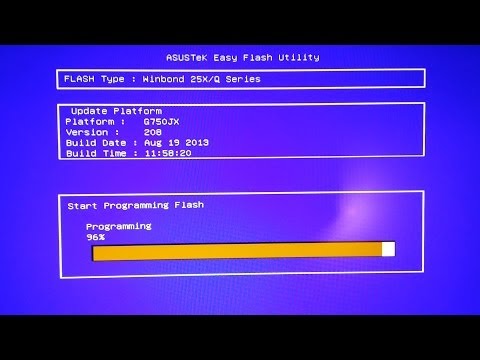
How To Update your ASUS Computer / Laptop's BIOS!
ChannelwwjoshdewDescription from the creator
For the Asus G750JX-DB71,
click this link: bit.ly/G750JX
Or this link: is.gd/G750JX
For the Asus X202E,
use this link: bit.ly/X202E
Pressing F4 while your computer boots will put you in EzFlash mode. Alternatively, you can press F2 and start EzFlash from there.
Please follow me for the latest videos!
Twitter: twitter.com/wwjoshdew
Facebook: fb.com/wwjoshdew
(Other Social Media links are below.)
Please Subscribe to my YouTube Channel.
You'll get notified as soon as I upload a new video!
Please Click Here: tinyurl.com/wwjoshdew
Click here for all of my videos: goo.gl/Up5lq
My Unlisted YouTube Videos: goo.gl/OPrdy
My Favorite YouTube Videos: goo.gl/wdhJZ
Watch me play games and live stream???
ustream.tv/channel/wwjoshdew
twitch.tv/wwjoshdew/profile
(I'll Tweet when I'm live streaming.)
Please STALK ME with the links below!
Gaming Channel: goo.gl/TvigNm
2nd Channel: goo.gl/CkHcwh
Instagram: goo.gl/ojTFn
Vimeo: goo.gl/7Zt31v
Vine: goo.gl/66FEbk
GPlus: goo.gl/imdZ1
click this link: bit.ly/G750JX
Or this link: is.gd/G750JX
For the Asus X202E,
use this link: bit.ly/X202E
Pressing F4 while your computer boots will put you in EzFlash mode. Alternatively, you can press F2 and start EzFlash from there.
Please follow me for the latest videos!
Twitter: twitter.com/wwjoshdew
Facebook: fb.com/wwjoshdew
(Other Social Media links are below.)
Please Subscribe to my YouTube Channel.
You'll get notified as soon as I upload a new video!
Please Click Here: tinyurl.com/wwjoshdew
Click here for all of my videos: goo.gl/Up5lq
My Unlisted YouTube Videos: goo.gl/OPrdy
My Favorite YouTube Videos: goo.gl/wdhJZ
Watch me play games and live stream???
ustream.tv/channel/wwjoshdew
twitch.tv/wwjoshdew/profile
(I'll Tweet when I'm live streaming.)
Please STALK ME with the links below!
Gaming Channel: goo.gl/TvigNm
2nd Channel: goo.gl/CkHcwh
Instagram: goo.gl/ojTFn
Vimeo: goo.gl/7Zt31v
Vine: goo.gl/66FEbk
GPlus: goo.gl/imdZ1
About this tutorial
wwjoshdew published this 9:36 video tutorial on November 13, 2013. It has been watched 426,132 times on YouTube.
- Channel
- wwjoshdew
- Category
- Science & Technology
- Duration
- 9:36
- Published
- November 13, 2013
- Views
- 426,132
- Likes
- 655
Tags
Share
This tutorial in other languages
- FRComment mettre à jour votre ASUS Computer / BIOS de votre ordinateur portable!
- ESCómo actualizar su ASUS Computer / BIOS del ordenador portátil!
- PTComo atualizar o seu ASUS Computer / Laptop BIOS!
- ITCome aggiornare l'ASUS Computer / BIOS del computer portatile!
- DEWie Sie Ihre ASUS Computer / Laptop-BIOS aktualisieren!
- NLHoe kunt u uw ASUS Computer / BIOS Laptop Update!
- RUКак обновить свой ASUS Computer / BIOS ноутбука!
- PLJak zaktualizować BIOS ASUS komputera / laptopa!
- JAあなたのASUSコンピュータ/ノートPCのBIOSを更新する方法!
- ARكيفية تحديث ASUS الحاسوب / BIOS الكمبيوتر المحمول المفضل
- HIकैसे अपने ASUS कंप्यूटर / लैपटॉप के BIOS अद्यतन करने के लिए!
- IDCara Update ASUS Komputer / Laptop BIOS!