Playback starts YouTube’s embedded player (privacy-enhanced mode).
How To Use Android 4 Tablets - Basics Of The Operating System - Tutorial For Android
ChanneltabletpcukDescription from the creator
whattabletpc.com/ Tutorial for Android showing how to use Android 4 Tablets and the basics of the Android operating system for mobile devices.
Android Ice Cream Sandwich is the latest version of Google's Android operating system for smartphones and mobile tablets.
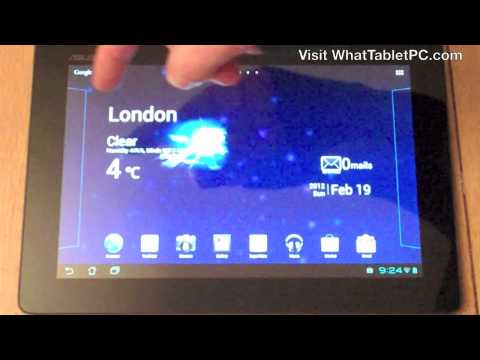
How to use Android 4.0 for tablets - this video introduces a tutorial/guide on navigating Android using taps, swipes and flicks of a finger tip.
Although, the video shows you how to operate Android 4.0 Ice Cream Sandwich operating systems, the same approach can be taken for using Android 3 Honeycomb tablet PCs. If you've got an even earlier version of Android on your tablet PC then a lot of the principles will be the same but the screens may look different.
We look at unlocking an Android tablet PC, selecting apps and widgets and generally tour the Android interface.
How to change wallpaper background on an Android tablet PC - including live and static wallpapers on Android 4.0 Ice Cream Sandwich.
A guide through the Android home screen desktops and how to navigate through them.
A guide through the features of the Android tablet home screen - including using Google search on your Android tablet, how to find Apps and Widgets on Android, undo/back button, home button, and how to access your latest open apps/multitasking view on Android.
The full list of what the video shows is as follows:
Navigating through the web, YouTube, Camera, Gallery, email, Music etc. shortcuts on Android.
Notification area - where you can see as new notifications, emails, downloading apps etc.
How to set the orientation of your Android tablet and how to change settings in Android to lock the screen and turn-off the auto rotate screen feature so that you lock your Android screen.
Navigating your Android tablet with a single tap to select apps and long taps to set wallpaper.
How to set-up short cuts in Android so you can configure your home screens/desktops
Using pinching to zoom-in and zoom-out of images in Android..
Flicking to jump between Android home screens.
The Android keyboard and how you use it to search the web via the quick Google search feature.
That's it for the features, if you're interested, this video shows Android 4 on the Asus Eee Pad Transformer Prime tablet.
I'll be posting more Android tutorials soon so subscribe to the TabletPCUK YouTube channel for more Android tutorials and Android tablet video reviews coming soon.
If you want to get free email updates about Android tablet PC reviews and tutorials then visit whattabletpc.com/choose-the-best-tablet-pc/
If you found this video useful then please press the "Like" button or leave a comment. I'm happy to answer questions too.
Android Ice Cream Sandwich is the latest version of Google's Android operating system for smartphones and mobile tablets.
How to use Android 4.0 for tablets - this video introduces a tutorial/guide on navigating Android using taps, swipes and flicks of a finger tip.
Although, the video shows you how to operate Android 4.0 Ice Cream Sandwich operating systems, the same approach can be taken for using Android 3 Honeycomb tablet PCs. If you've got an even earlier version of Android on your tablet PC then a lot of the principles will be the same but the screens may look different.
We look at unlocking an Android tablet PC, selecting apps and widgets and generally tour the Android interface.
How to change wallpaper background on an Android tablet PC - including live and static wallpapers on Android 4.0 Ice Cream Sandwich.
A guide through the Android home screen desktops and how to navigate through them.
A guide through the features of the Android tablet home screen - including using Google search on your Android tablet, how to find Apps and Widgets on Android, undo/back button, home button, and how to access your latest open apps/multitasking view on Android.
The full list of what the video shows is as follows:
Navigating through the web, YouTube, Camera, Gallery, email, Music etc. shortcuts on Android.
Notification area - where you can see as new notifications, emails, downloading apps etc.
How to set the orientation of your Android tablet and how to change settings in Android to lock the screen and turn-off the auto rotate screen feature so that you lock your Android screen.
Navigating your Android tablet with a single tap to select apps and long taps to set wallpaper.
How to set-up short cuts in Android so you can configure your home screens/desktops
Using pinching to zoom-in and zoom-out of images in Android..
Flicking to jump between Android home screens.
The Android keyboard and how you use it to search the web via the quick Google search feature.
That's it for the features, if you're interested, this video shows Android 4 on the Asus Eee Pad Transformer Prime tablet.
I'll be posting more Android tutorials soon so subscribe to the TabletPCUK YouTube channel for more Android tutorials and Android tablet video reviews coming soon.
If you want to get free email updates about Android tablet PC reviews and tutorials then visit whattabletpc.com/choose-the-best-tablet-pc/
If you found this video useful then please press the "Like" button or leave a comment. I'm happy to answer questions too.
About this tutorial
tabletpcuk published this 10:36 video tutorial on November 8, 2012. It has been watched 578,047 times on YouTube.
- Channel
- tabletpcuk
- Category
- Science & Technology
- Duration
- 10:36
- Published
- November 8, 2012
- Views
- 578,047
- Likes
- 1,098
Tags
Share
This tutorial in other languages
- FRComment faire pour utiliser Android 4 comprimés - Principes de base du système d'exploitation - Tutoriel pour Android
- ESCómo utilizar Android Tablets 4 - Conceptos básicos del sistema operativo - Tutorial para Android
- PTComo usar o Android 4 Tablets - Fundamentos do sistema operacional - Tutorial Para Android
- ITCome utilizzare Android 4 compresse - Nozioni di base del sistema operativo - Tutorial per Android
- DEWie zu verwenden Android 4 Tabletten - Grundlagen des Betriebssystems - Tutorial für Android
- NLHoe te gebruiken Android 4 Tablets - Basics van het besturingssysteem - tutorial voor Android
- RUКак Использовать Android 4 таблетки - Основы операционной системы - Учебник для Android
- PLJak korzystać z Androidem 4 Tabletki - Podstawy systemu operacyjnego - poradnik dla Androida
- JAどのようにするために使用するアンドロイド4錠 - オペレーティングシステムの基本 - チュートリアルのアンドロイド
- ARكيفية استخدام الروبوت 4 أقراص - أساسيات نظام التشغيل - دروس للحصول على الروبوت
- HIकैसे करने के लिए उपयोग एंड्रॉयड 4 गोलियां - ट्यूटोरियल एंड्रॉयड के लिए - ऑपरेटिंग सिस्टम की मूल बातें
- IDCara Gunakan Android 4 Tablet - Dasar-Dasar Dari Sistem Operasi - Tutorial Untuk Android