Playback starts YouTube’s embedded player (privacy-enhanced mode).
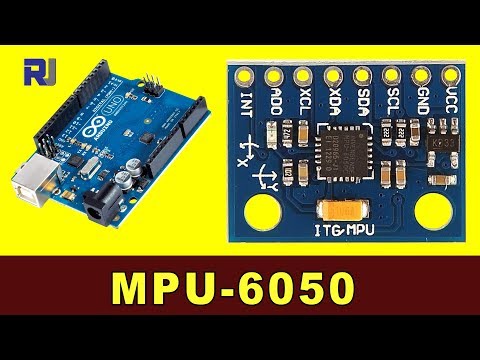
How to use MPU-6050 Accelerometer and Gyroscope with Arduino code
ChannelRobojaxChapters
Description from the creator
In this video you will learn how to use MPU-6050 Accelerometer and Gyroscope sensor module for Arduino.
The best thank you for me is to Subscribe 🔔 to my channel and thumb up the video. It is greatly appreciated. 🔔 😊.
I will reply to all Subscriber's 🔔 questions. So make sure to Subscribe.😊
**** Free Course ****
Arduino Step by Step Course (over 100 lectures) Starts here youtu.be/-6qSrDUA5a8
📚⬇️ Download and resource page for this video robojax.com/RJT97
****Purchase MPU-6050****
Amazon Canada: amzn.to/3qzV2ue
Amazon USA: amzn.to/3vd6kYD
Amazon Europe (all countries): amzn.to/3tbjGmH
Banggood: banggood.com/custlink/KDvdoA2eQ8
*** Purchase Arduino Start Kit ***
Amazon USA: amzn.to/3z88F9G or just UNO board amzn.to/3aY7KOL
Amazon Canada: amzn.to/31an88J or just UNO board amzn.to/3pYxSNN
Amazon Europe (all Europe): amzn.to/3pMCHge or Just UNO board amzn.to/2PgGItD
AliExpress: s.click.aliexpress.com/e/_9uc7Xe
Banggood: banggood.com/custlink/3GDdsC1slt or UNO board banggood.com/custlink/vKmdbc7blp
eBay: ebay.us/B1JWLi
****** Purchase Authentic Arduino Uno from ****
Amazon USA: amzn.to/2KApAwK
Amazon Canada: amzn.to/37LZ8sW
All Europe Amazon: amzn.to/36YDSzn
Related videos:
MPU-6050 with Display youtu.be/uIz6WIis4dc
Chapters of this video:
00:00 Start
00:00 Introduction
02:28 Hardware explained
03:45 Datasheet viewed
06:08 Getting library
06:44 Wiring explained
09:05 Code explained
#robojax #robojaxMPU6050
MPU-6050 Registers' map:
invensense.com/wp-content/uploads/2015/02/MPU-6…
----------- Robojax.com -----------
Website: robojax.com
All tutorials: robojax.com/tutorial_categories.php?lang=en
Downloads files: robojax.com/files.php?lang=en
If you found this tutorial helpful, please support me so I can continue creating contents like this. (PayPal):
🔥paypal.me/robojaxTV
Follow me on Facebook fb.me/robojaxTV
Follow me on TikTok tiktok.com/@robojaxtv
Follow me on Twitter: twitter.com/robojaxTV
Follow me on Instagram: instagram.com/robojax/
**** AFFILIATE PROGRAM ****
We are a participant in the Amazon Services LLC Associates Program, an affiliate advertising program designed to provide a means for us to earn fees by linking to Amazon.com and affiliated sites.
The best thank you for me is to Subscribe 🔔 to my channel and thumb up the video. It is greatly appreciated. 🔔 😊.
I will reply to all Subscriber's 🔔 questions. So make sure to Subscribe.😊
**** Free Course ****
Arduino Step by Step Course (over 100 lectures) Starts here youtu.be/-6qSrDUA5a8
📚⬇️ Download and resource page for this video robojax.com/RJT97
****Purchase MPU-6050****
Amazon Canada: amzn.to/3qzV2ue
Amazon USA: amzn.to/3vd6kYD
Amazon Europe (all countries): amzn.to/3tbjGmH
Banggood: banggood.com/custlink/KDvdoA2eQ8
*** Purchase Arduino Start Kit ***
Amazon USA: amzn.to/3z88F9G or just UNO board amzn.to/3aY7KOL
Amazon Canada: amzn.to/31an88J or just UNO board amzn.to/3pYxSNN
Amazon Europe (all Europe): amzn.to/3pMCHge or Just UNO board amzn.to/2PgGItD
AliExpress: s.click.aliexpress.com/e/_9uc7Xe
Banggood: banggood.com/custlink/3GDdsC1slt or UNO board banggood.com/custlink/vKmdbc7blp
eBay: ebay.us/B1JWLi
****** Purchase Authentic Arduino Uno from ****
Amazon USA: amzn.to/2KApAwK
Amazon Canada: amzn.to/37LZ8sW
All Europe Amazon: amzn.to/36YDSzn
Related videos:
MPU-6050 with Display youtu.be/uIz6WIis4dc
Chapters of this video:
00:00 Start
00:00 Introduction
02:28 Hardware explained
03:45 Datasheet viewed
06:08 Getting library
06:44 Wiring explained
09:05 Code explained
#robojax #robojaxMPU6050
MPU-6050 Registers' map:
invensense.com/wp-content/uploads/2015/02/MPU-6…
----------- Robojax.com -----------
Website: robojax.com
All tutorials: robojax.com/tutorial_categories.php?lang=en
Downloads files: robojax.com/files.php?lang=en
If you found this tutorial helpful, please support me so I can continue creating contents like this. (PayPal):
🔥paypal.me/robojaxTV
Follow me on Facebook fb.me/robojaxTV
Follow me on TikTok tiktok.com/@robojaxtv
Follow me on Twitter: twitter.com/robojaxTV
Follow me on Instagram: instagram.com/robojax/
**** AFFILIATE PROGRAM ****
We are a participant in the Amazon Services LLC Associates Program, an affiliate advertising program designed to provide a means for us to earn fees by linking to Amazon.com and affiliated sites.
About this tutorial
Robojax published this 13:10 video tutorial on October 25, 2018. It has been watched 169,011 times on YouTube.
- Channel
- Robojax
- Category
- Science & Technology
- Duration
- 13:10
- Published
- October 25, 2018
- Views
- 169,011
- Likes
- 1,714
Tags
Share
This tutorial in other languages
- FRComment utiliser MPU-6050 Accéléromètre et Gyroscope avec le code Arduino
- ESCómo utilizar MPU-6050 del acelerómetro y el giroscopio con el código de Arduino
- PTComo usar MPU-6050 acelerômetro e giroscópio com código Arduino
- ITCome usare MPU-6050 accelerometro e giroscopio con il codice di Arduino
- DEWie verwenden MPU-6050 Accelerometer und Gyroskop mit Arduino Code
- NLHoe wordt MPU-6050 Accelerometer en gyroscoop te gebruiken met Arduino code
- RUКак использовать MPU-6050 акселерометр и гироскоп с Arduino кодом
- PLJak korzystać z MPU-6050 żyroskopu i akcelerometru z kodem Arduino
- JAArduinoのコードでMPU-6050加速度センサーとジャイロスコープを使用する方法
- ARكيفية استخدام MPU-6050 التسارع والجيروسكوب مع رمز اردوينو
- HIArduino कोड के साथ MPU-6050 एक्सीलरोमीटर और जाइरोस्कोप का उपयोग कैसे करें
- IDCara menggunakan MPU-6050 Accelerometer dan giroskop dengan kode Arduino