Playback starts YouTube’s embedded player (privacy-enhanced mode).
How to use USB Flash Drive as a RAM in Windows 10
ChannelASA TechnicalDescription from the creator
How to use USB Flash Drive as a RAM in Windows 10
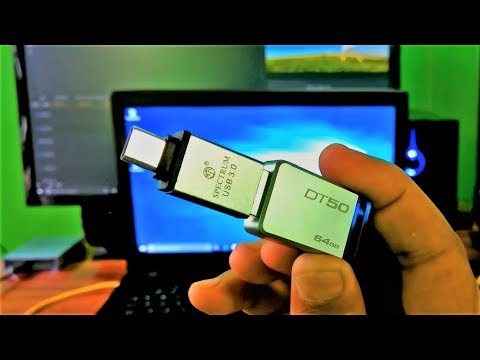
Hi friends, here I showed up in this video how to use a USB flash drive as a RAM in Windows computer and also today I’m going to unboxing and quick review of Kingston 64gb USB 3.0 flash drive and a Type-C OTG USB flash drive adapter.
The USB flash drive’s brand is Kingstone, Model Name is Data Traveler 50
Storage capacity 64 GB.
Supported port: USB 3.1 generation 1 Type-A, 3.0 and 2.0 backwards compatible. The drive is also customizable.
Supported OS: Windows 10, Windows 8.1, Windows 8, Windows 7 (SP1), Windows Vista (SP2), Mac OS X version 10.7.x and higher version, Linux version 2.6.x and higher version and Chrome OS, as you can see.
This USB Flash Drive comes with 5 years limited warrant.
The Type-C OTG USB flash drive adapter’s Brand is Spectrum,
This Type-C OTG USB flash drive is suitable for smart phones, Type-C supportable laptops, MacBook, Type-C supportable digital camera and other Type-C supportable external devices, as like external HDD or SSD. but It does not support computer transfer.
This Type-C OTG USB flash drive adapter has a metal body and is slightly smaller than a standard flash drive, which makes it very device friendly.
Supported port: There’s Type-C 3.1 on the male's side and USB 3.0 on the female's side.
And watch this video for more information about how do you convert a USB flash drive as a RAM in Windows Computer.
⚫Kingstone Data Traveler 50 64GB USB 3.0 - amzn.to/39EooQ8
⚫SanDisk Ultra 64GB USB 3.0 - amzn.to/2vcOJWZ
-----------------------------------------------------------------------------------------
Of course, let us know your opinion.
Please Like, Comment we need your support.
And guys please don't forget to Subscribe our channel ASA Technical.
Thank you.
Hi friends, here I showed up in this video how to use a USB flash drive as a RAM in Windows computer and also today I’m going to unboxing and quick review of Kingston 64gb USB 3.0 flash drive and a Type-C OTG USB flash drive adapter.
The USB flash drive’s brand is Kingstone, Model Name is Data Traveler 50
Storage capacity 64 GB.
Supported port: USB 3.1 generation 1 Type-A, 3.0 and 2.0 backwards compatible. The drive is also customizable.
Supported OS: Windows 10, Windows 8.1, Windows 8, Windows 7 (SP1), Windows Vista (SP2), Mac OS X version 10.7.x and higher version, Linux version 2.6.x and higher version and Chrome OS, as you can see.
This USB Flash Drive comes with 5 years limited warrant.
The Type-C OTG USB flash drive adapter’s Brand is Spectrum,
This Type-C OTG USB flash drive is suitable for smart phones, Type-C supportable laptops, MacBook, Type-C supportable digital camera and other Type-C supportable external devices, as like external HDD or SSD. but It does not support computer transfer.
This Type-C OTG USB flash drive adapter has a metal body and is slightly smaller than a standard flash drive, which makes it very device friendly.
Supported port: There’s Type-C 3.1 on the male's side and USB 3.0 on the female's side.
And watch this video for more information about how do you convert a USB flash drive as a RAM in Windows Computer.
⚫Kingstone Data Traveler 50 64GB USB 3.0 - amzn.to/39EooQ8
⚫SanDisk Ultra 64GB USB 3.0 - amzn.to/2vcOJWZ
-----------------------------------------------------------------------------------------
Of course, let us know your opinion.
Please Like, Comment we need your support.
And guys please don't forget to Subscribe our channel ASA Technical.
Thank you.
About this tutorial
ASA Technical published this 5:44 video tutorial on November 8, 2018. It has been watched 162,542 times on YouTube.
- Channel
- ASA Technical
- Category
- Science & Technology
- Duration
- 5:44
- Published
- November 8, 2018
- Views
- 162,542
- Likes
- 2,083
Tags
Share
This tutorial in other languages
- FRComment utiliser un lecteur flash USB comme RAM dans Windows 10
- ESCómo utilizar la unidad flash USB como memoria RAM en Windows 10
- PTComo usar USB Flash Drive como uma RAM no Windows 10
- ITCome utilizzare Flash Drive USB come memoria RAM in Windows 10
- DEWie man USB-Flash-Laufwerk als RAM unter Windows 10 verwenden,
- NLHoe maak je USB Flash Drive gebruiken als RAM in Windows 10
- RUКак использовать USB Flash Drive в качестве оперативной памяти в Windows 10
- PLJak korzystać z USB Flash Drive jako RAM w systemie Windows 10
- JAWindowsの10でRAMとしてUSBフラッシュドライブを使用する方法
- ARكيفية استخدام محرك فلاش USB بمثابة ذاكرة الوصول العشوائي في نظام التشغيل Windows 10
- HIUSB फ्लैश ड्राइव Windows 10 में एक रैम के रूप में उपयोग करने के लिए कैसे
- IDCara menggunakan USB Flash Drive sebagai RAM pada Windows 10