Playback starts YouTube’s embedded player (privacy-enhanced mode).
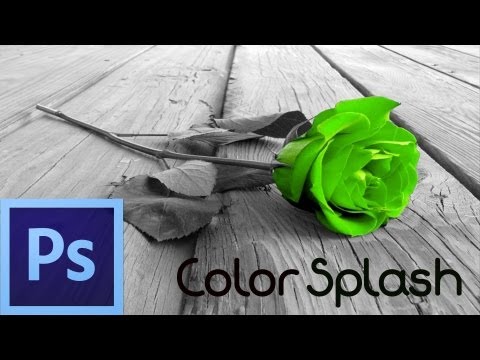
Photoshop CS6 Tutorial: Color Splash Effect (For Beginners)
ChannelDusty PorterDescription from the creator
In this video tutorial, I show you how to create a color splash effect within Adobe Photoshop CS6.
1.) Duplicate the background layer (this should be your image)
2.) Once you have duplicated the layer select the background layer and go to image --- adjustments --- black and white.
3.) Once your image is completely black and white you can grab your eraser tool and ONLY erase what you want to be color.
Photoshop CS5 Color Splash Tutorial Here:
youtube.com/watch?v=Smlzuay6-G8
Get a FREE DOMAIN NAME and 50% Off Web Hosting For Your Website: goo.gl/iGVMmp
MY SECRET WEAPON AND BEST TOOL TO GROW A YOUTUBE CHANNEL FAST
Download TubeBuddy Free Today ---- goo.gl/0z8H76
Follow Me On Twitter Here: @dustyporteryt
Hire Me To Use My Voice In Your Video/Project: bit.ly/dustysvoice
Follow Me On Instagram Here: @dmporter17
Game With Me On Twitch Here: twitch.tv/dusttbuster
Hire Freelancers And Get Work Done For A Great Price On Fiverr: bit.ly/FiverrDusty
Do you have a question or tutorial that you'd like for me to make? Submit yours here: bit.ly/askyourqeustionhere
Do You Find My Content Helpful, become a channel Member:
youtube.com/channel/UC_Gz...
My Gear:
My Main Camera: geni.us/2LICQR (Amazon)
My Main Lens: geni.us/xXxvKB (Amazon)
My Microphone: geni.us/kdeQG (Amazon)
Budget Microphone: geni.us/rOxBqm (Amazon)
My Headphones: geni.us/5mtk (Amazon)
External Hard Drives: geni.us/twEuHG (Amazon)
My Favorite Mouse: geni.us/pXSp (Amazon)
Budget Audio Interface: geni.us/wiKz (Amazon)
My Audio Interface: geni.us/Kf5wrAV (Amazon)
My Editing Monitor: geni.us/0kGTq (Amazon)
MY WEBSITES:
youtubecreatorshub.com
thinktutorial.com
----------------------------------------------------------------------------------
LISTEN TO OUR PODCASTS:
YouTube Creators Hub: bit.ly/youtubecreatorshubpodcast
Entrepreneurs Minute: bit.ly/entrepreneursminute
Podcasters Unplugged: bit.ly/podcastersunplugged
Disclaimers: Links in the description are typically affiliate links that let you help support the channel at no extra cost.
1.) Duplicate the background layer (this should be your image)
2.) Once you have duplicated the layer select the background layer and go to image --- adjustments --- black and white.
3.) Once your image is completely black and white you can grab your eraser tool and ONLY erase what you want to be color.
Photoshop CS5 Color Splash Tutorial Here:
youtube.com/watch?v=Smlzuay6-G8
Get a FREE DOMAIN NAME and 50% Off Web Hosting For Your Website: goo.gl/iGVMmp
MY SECRET WEAPON AND BEST TOOL TO GROW A YOUTUBE CHANNEL FAST
Download TubeBuddy Free Today ---- goo.gl/0z8H76
Follow Me On Twitter Here: @dustyporteryt
Hire Me To Use My Voice In Your Video/Project: bit.ly/dustysvoice
Follow Me On Instagram Here: @dmporter17
Game With Me On Twitch Here: twitch.tv/dusttbuster
Hire Freelancers And Get Work Done For A Great Price On Fiverr: bit.ly/FiverrDusty
Do you have a question or tutorial that you'd like for me to make? Submit yours here: bit.ly/askyourqeustionhere
Do You Find My Content Helpful, become a channel Member:
youtube.com/channel/UC_Gz...
My Gear:
My Main Camera: geni.us/2LICQR (Amazon)
My Main Lens: geni.us/xXxvKB (Amazon)
My Microphone: geni.us/kdeQG (Amazon)
Budget Microphone: geni.us/rOxBqm (Amazon)
My Headphones: geni.us/5mtk (Amazon)
External Hard Drives: geni.us/twEuHG (Amazon)
My Favorite Mouse: geni.us/pXSp (Amazon)
Budget Audio Interface: geni.us/wiKz (Amazon)
My Audio Interface: geni.us/Kf5wrAV (Amazon)
My Editing Monitor: geni.us/0kGTq (Amazon)
MY WEBSITES:
youtubecreatorshub.com
thinktutorial.com
----------------------------------------------------------------------------------
LISTEN TO OUR PODCASTS:
YouTube Creators Hub: bit.ly/youtubecreatorshubpodcast
Entrepreneurs Minute: bit.ly/entrepreneursminute
Podcasters Unplugged: bit.ly/podcastersunplugged
Disclaimers: Links in the description are typically affiliate links that let you help support the channel at no extra cost.
About this tutorial
Dusty Porter published this 3:51 video tutorial on November 8, 2013. It has been watched 468,476 times on YouTube.
- Channel
- Dusty Porter
- Category
- Science & Technology
- Duration
- 3:51
- Published
- November 8, 2013
- Views
- 468,476
- Likes
- 3,776
Tags
Share
This tutorial in other languages
- FRPhotoshop CS6 Tutoriel: Effet de couleur Splash (pour les débutants)
- ESTutorial Photoshop CS6: Efecto Color Splash (para principiantes)
- PTPhotoshop CS6 Tutorial: Color Splash Effect (para iniciantes)
- ITPhotoshop CS6 Tutorial: Colour Splash Effect (per principianti)
- DEPhotoshop CS6 Tutorial: Color Splash Effect (für Anfänger)
- NLPhotoshop CS6 Tutorial: Color Splash Effect (voor beginners)
- RUPhotoshop CS6 Учебное пособие: Цвет Всплеск Effect (для начинающих)
- PLPhotoshop CS6 Tutorial: Kolor Splash Effect (dla początkujących)
- JAPhotoshopのCS6チュートリアル:カラースプラッシュ効果(初心者用)
- ARفوتوشوب CS6 دروس: اللون سبلاش تأثير (للمبتدئين)
- HIफ़ोटोशॉप CS6 ट्यूटोरियल: रंग स्पलैश प्रभाव (शुरुआती के लिए)
- IDPhotoshop CS6 Tutorial: Warna Splash Effect (Untuk Pemula)