Playback starts YouTube’s embedded player (privacy-enhanced mode).
How To Post A Picture In A Forum Post
ChannelOutdoorFreaksDotNetDescription from the creator
Short tutorial on how to embed and post pictures into your hunting forum posts - or any forum for that matter.
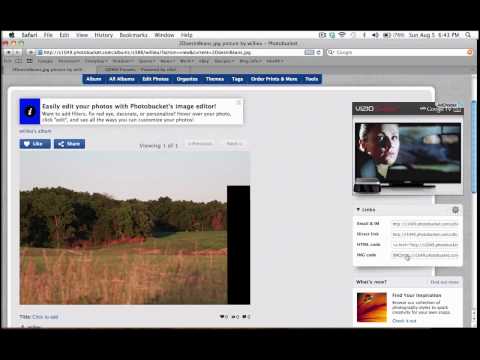
Ok guys, today I'm going to show you how to upload a picture to a forum, a hunting forum. This isn't a monster deal for some people but some folks just can't get the hang of it. It's a pretty simple way; it doesn't take long at all once you know what you're doing. Ok, just make a photo bucket account, you can use a number of them, I actually prefer Flickr, but most people seem to use photo bucket so I'll show you how to use photo bucket. First of all you need to sign up for an account you do the whole sign up, they send you an email, all that stuff, select photo and videos, pick one that you want to upload, you can see it uploading here. The bigger the file size the longer it takes to upload. It's actually playing. Then go to view album, or you can upload more, not interested in that. Then here's the picture here, then on the side, they have the image code, the img code. You click on it and it automatically copies for you. So I have this picture, I have the image code of this picture, so now I go here; go into wherever I need to go, a new thread. Then all I simply do is paste that into here, and there is the picture right there. Hit submit new thread, and go into general discussion, how to post a picture tutorial, and there it is right here. It's pretty simple, you can edit photos in photo bucket, and you can do a number of different things. You can add them to albums; you can add tags on them to organize them for different food plot projects, TSI, and things of that nature. But really the best thing to do is to jump in here, start messing around, and try to learn it, this video is on YouTube, there are definitely other videos on YouTube about the same thing, so watch them, read up on it, it's definitely hard the first time but after that it seems pretty easy and you'll get the hang of it quick. But that's it, pretty simple; check us out, outdoorfreaks.net, later.
Ok guys, today I'm going to show you how to upload a picture to a forum, a hunting forum. This isn't a monster deal for some people but some folks just can't get the hang of it. It's a pretty simple way; it doesn't take long at all once you know what you're doing. Ok, just make a photo bucket account, you can use a number of them, I actually prefer Flickr, but most people seem to use photo bucket so I'll show you how to use photo bucket. First of all you need to sign up for an account you do the whole sign up, they send you an email, all that stuff, select photo and videos, pick one that you want to upload, you can see it uploading here. The bigger the file size the longer it takes to upload. It's actually playing. Then go to view album, or you can upload more, not interested in that. Then here's the picture here, then on the side, they have the image code, the img code. You click on it and it automatically copies for you. So I have this picture, I have the image code of this picture, so now I go here; go into wherever I need to go, a new thread. Then all I simply do is paste that into here, and there is the picture right there. Hit submit new thread, and go into general discussion, how to post a picture tutorial, and there it is right here. It's pretty simple, you can edit photos in photo bucket, and you can do a number of different things. You can add them to albums; you can add tags on them to organize them for different food plot projects, TSI, and things of that nature. But really the best thing to do is to jump in here, start messing around, and try to learn it, this video is on YouTube, there are definitely other videos on YouTube about the same thing, so watch them, read up on it, it's definitely hard the first time but after that it seems pretty easy and you'll get the hang of it quick. But that's it, pretty simple; check us out, outdoorfreaks.net, later.
About this tutorial
OutdoorFreaksDotNet published this 3:48 video tutorial on November 6, 2012. It has been watched 10,511 times on YouTube.
- Channel
- OutdoorFreaksDotNet
- Category
- Sports
- Duration
- 3:48
- Published
- November 6, 2012
- Views
- 10,511
- Likes
- 28
Tags
Share
This tutorial in other languages
- FRComment faire pour publier une photo dans un forum post
- ESCómo publicar una imagen en un mensaje en el foro
- PTComo postar uma imagem em um fórum
- ITCome inviare un Picture In A Messaggio Forum
- DEHow To Post ein Bild in einem Forum
- NLHoe om een beeld in een Forum
- RUКак отправить фотографию в форуме сообщение
- PLJak opublikować zdjęcie na forum post
- JAどのように投稿するAピクチャーでAフォーラムのポスト
- ARكيفية المشاركة صورة في المنتدى Post
- HIकैसे करने के लिए पोस्ट एक चित्र में एक मंच पोस्ट
- IDCara Kirim Sebuah Gambar Dalam Facebook