Playback starts YouTube’s embedded player (privacy-enhanced mode).
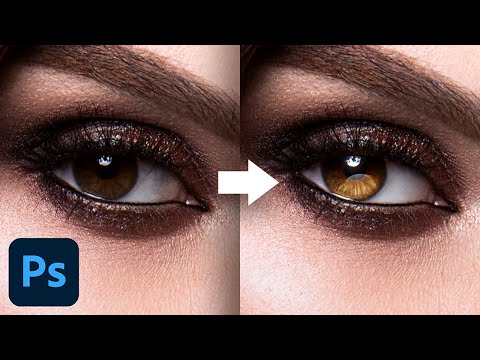
5 Advanced Techniques to Make Eyes Sparkle! - Photoshop Tutorial
ChannelPiXimperfectChapters
Description from the creator
Create Beautiful and Attractive Eyes Full of Detail with Photoshop! In this tutorial, we will learn how 5 techniques to retouch eyes and make them significantly attractive.
First, we will start by learning how to shape the light and add shine and dimension to the eyes. We will achieve this using simple concepts of blending modes.
Then, we will use Curves to create a kicker light that adds a noticeable depth to the eyes. We will also create details for the iris using advanced brushes, masking, and curves, to make them look dramatic. Also, you will learn ways to create reflections!
Most importantly, we will explore different methods to clean the eye whites and remove veins and irregularities.
I hope this video helps you. Thank you so much for watching :)
► THE WACOM TABLET I USE:
pix.live/wacom
► INFORMATION ON ALL WACOM TABLETS:
Wacom's Website: bit.ly/pixwacominfo
► WACOM TABLETS WITH DISPLAY:
wacom.com/en-us/products/pen-displays
► TIMESTAMPS:
00:00 Introduction
02:50 1. Shaping the light with blend modes
05:48 2. Creating a kicker light with curves
07:08 3. Creating the details
11:13 4. Creating a reflection
15:04 5. Cleaning up the eye whites
20:25 Bonus tip
22:23 Recap
► DOWNLOADS
1. Sample Images: bit.ly/3kjiAlg
2. Finished PSD: patreon.com/posts/40128077 (Only for our PiXimperfect Patreon Family Members)
► HELP US CREATE MORE FREE VIDEOS:
Support us at Patreon: patreon.com/piximperfect
► SHARE: goo.gl/IUhnUl
►LET'S CONNECT:
Facebook: facebook.com/piximperfect
Twitter: twitter.com/piximperfect
Instagram: instagram.com/piximperfect
First, we will start by learning how to shape the light and add shine and dimension to the eyes. We will achieve this using simple concepts of blending modes.
Then, we will use Curves to create a kicker light that adds a noticeable depth to the eyes. We will also create details for the iris using advanced brushes, masking, and curves, to make them look dramatic. Also, you will learn ways to create reflections!
Most importantly, we will explore different methods to clean the eye whites and remove veins and irregularities.
I hope this video helps you. Thank you so much for watching :)
► THE WACOM TABLET I USE:
pix.live/wacom
► INFORMATION ON ALL WACOM TABLETS:
Wacom's Website: bit.ly/pixwacominfo
► WACOM TABLETS WITH DISPLAY:
wacom.com/en-us/products/pen-displays
► TIMESTAMPS:
00:00 Introduction
02:50 1. Shaping the light with blend modes
05:48 2. Creating a kicker light with curves
07:08 3. Creating the details
11:13 4. Creating a reflection
15:04 5. Cleaning up the eye whites
20:25 Bonus tip
22:23 Recap
► DOWNLOADS
1. Sample Images: bit.ly/3kjiAlg
2. Finished PSD: patreon.com/posts/40128077 (Only for our PiXimperfect Patreon Family Members)
► HELP US CREATE MORE FREE VIDEOS:
Support us at Patreon: patreon.com/piximperfect
► SHARE: goo.gl/IUhnUl
►LET'S CONNECT:
Facebook: facebook.com/piximperfect
Twitter: twitter.com/piximperfect
Instagram: instagram.com/piximperfect
About this tutorial
PiXimperfect published this 24:33 video tutorial on August 30, 2020. It has been watched 222,226 times on YouTube.
- Channel
- PiXimperfect
- Category
- Education
- Duration
- 24:33
- Published
- August 30, 2020
- Views
- 222,226
- Likes
- 9,996
Tags
Share
This tutorial in other languages
- FR5 Techniques avancées pour rendre pétiller! - Photoshop Tutorial
- ESLas técnicas avanzadas de 5 a hacer que los ojos de la chispa! - Tutorial de Photoshop
- PTTécnicas de 5 avançadas para fazer os olhos faísca! - Photoshop Tutorial
- ITTecniche 5 avanzate per fare gli occhi Sparkle! - Photoshop Tutorial
- DE5 Fortgeschrittene Techniken Make Augen Sparkle! - Photoshop Tutorial
- NL5 Geavanceerde technieken om Eyes Sparkle! - Photoshop Tutorial
- RU5 Дополнительные методы, чтобы сделать глаза искрятся! - Photoshop Tutorial
- PLTechniki 5 zaawansowane, aby sprawić, że oczy Sparkle! - Photoshop Tutorial
- JA目の輝きを作るために5つの高度なテクニック! - Photoshopのチュートリアル
- ARتقنيات متقدمة 5 لجعل العيون البريق! - دروس فوتوشوب
- HI5 उन्नत तकनीक आंखें चमक बनाने के लिए! - फ़ोटोशॉप ट्यूटोरियल
- IDTeknik 5 Lanjutan Membuat Mata Sparkle! - Photoshop Tutorial