Playback starts YouTube’s embedded player (privacy-enhanced mode).
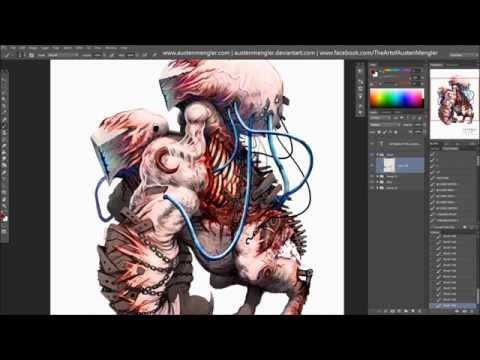
How to Add Blood Effects in Photoshop
ChannelThe Art of Austen MenglerDescription from the creator
In this casual tutorial walk-through I go over my thoughts and techniques behind how to use gore and blood effectively in your horror creatures and digital illustrations in Photoshop. This creature design is called "ALOADAI" and is freelance work done for the game AETHERA. See the final piece: fav.me/d9swvdj or check out the game: facebook.com/AetheraRPG/
Links to free downloads of the Photoshop brushes I use are on my deviantART profile here: austenmengler.deviantart.com/As I only use free brushes that I find online, I've linked to all of them in my section "Photoshop Brushes". I'll be releasing a free download of my brush pack collection soon too.
I use Photoshop CC with my Wacom Intuos Pro tablet. Recorded using Debut Video Capture Software and edited in Windows Movie Maker.
Mentioned in this video:
- Anthony Jones Gumroad: gumroad.com/robotpencil
- Peter Mohrbacher / One Fantastic Week: youtube.com/user/Bugmeyer
- Mr--Jack brush pack: fav.me/d1yc98d
Follow my art on deviantART, Facebook or Instagram:
- austenmengler.deviantart.com/
- facebook.com/TheArtofAustenMengler
- instagram.com/austenmengler
Art Resources Playlist:
youtube.com/playlist?list=PLdaigQz6cQJ2jrpSzC9F…
Convention Schedule 2016:
austenmengler.deviantart.com/journal/2016-CONVE…
If you have a business inquiry or are after purchasing prints or sketchbooks be sure to email me at [email protected] and I'll be happy to sort it out for you as soon as possible.
Cheers and all the best!
- Austen Mengler
Concept Artist & Illustrator
----------------------------------------------------
All Artwork © Austen Mengler
----------------------------------------------------
Website: austenmengler.com/
Store: austenmengler.com/store/
Etsy: etsy.com/au/shop/AustenMenglerArt
Sign up for my Art Newsletter:
us8.list-manage.com/subscribe?u=3b7885eefe3d00f…
Support my work on Patreon:
patreon.com/AustenMengler
Follow my Work on Social Media:
Instagram: instagram.com/austenmengler
Facebook Page: facebook.com/TheArtofAustenMengler
ArtStation: artstation.com/artist/AustenMengler
deviantART: austenmengler.deviantart.com/
Twitter: twitter.com/AustenMengler
Tumblr: austenmengler.tumblr.com/
Behance: behance.net/AustenMengler
LinkedIn: linkedin.com/in/austenmengler
Official Merchandise Stores:
Redbubble (AU): redbubble.com/people/lordnetsua
Society6 (USA): society6.com/lordnetsua
INPRNT (USA): inprnt.com/gallery/austenmengler
Gumroad Store (Digital Tutorials): gumroad.com/austenmengler
Links to free downloads of the Photoshop brushes I use are on my deviantART profile here: austenmengler.deviantart.com/As I only use free brushes that I find online, I've linked to all of them in my section "Photoshop Brushes". I'll be releasing a free download of my brush pack collection soon too.
I use Photoshop CC with my Wacom Intuos Pro tablet. Recorded using Debut Video Capture Software and edited in Windows Movie Maker.
Mentioned in this video:
- Anthony Jones Gumroad: gumroad.com/robotpencil
- Peter Mohrbacher / One Fantastic Week: youtube.com/user/Bugmeyer
- Mr--Jack brush pack: fav.me/d1yc98d
Follow my art on deviantART, Facebook or Instagram:
- austenmengler.deviantart.com/
- facebook.com/TheArtofAustenMengler
- instagram.com/austenmengler
Art Resources Playlist:
youtube.com/playlist?list=PLdaigQz6cQJ2jrpSzC9F…
Convention Schedule 2016:
austenmengler.deviantart.com/journal/2016-CONVE…
If you have a business inquiry or are after purchasing prints or sketchbooks be sure to email me at [email protected] and I'll be happy to sort it out for you as soon as possible.
Cheers and all the best!
- Austen Mengler
Concept Artist & Illustrator
----------------------------------------------------
All Artwork © Austen Mengler
----------------------------------------------------
Website: austenmengler.com/
Store: austenmengler.com/store/
Etsy: etsy.com/au/shop/AustenMenglerArt
Sign up for my Art Newsletter:
us8.list-manage.com/subscribe?u=3b7885eefe3d00f…
Support my work on Patreon:
patreon.com/AustenMengler
Follow my Work on Social Media:
Instagram: instagram.com/austenmengler
Facebook Page: facebook.com/TheArtofAustenMengler
ArtStation: artstation.com/artist/AustenMengler
deviantART: austenmengler.deviantart.com/
Twitter: twitter.com/AustenMengler
Tumblr: austenmengler.tumblr.com/
Behance: behance.net/AustenMengler
LinkedIn: linkedin.com/in/austenmengler
Official Merchandise Stores:
Redbubble (AU): redbubble.com/people/lordnetsua
Society6 (USA): society6.com/lordnetsua
INPRNT (USA): inprnt.com/gallery/austenmengler
Gumroad Store (Digital Tutorials): gumroad.com/austenmengler
About this tutorial
The Art of Austen Mengler published this 33:05 video tutorial on October 28, 2016. It has been watched 4,176 times on YouTube.
- Channel
- The Art of Austen Mengler
- Category
- Education
- Duration
- 33:05
- Published
- October 28, 2016
- Views
- 4,176
- Likes
- 85
Share
This tutorial in other languages
- FRComment ajouter des effets de sang dans Photoshop
- ESCómo agregar efectos en la sangre en Photoshop
- PTComo adicionar efeitos de sangue em Photoshop
- ITCome aggiungere sangue Effects in Photoshop
- DEWie Hinzufügen Blut Effekte in Photoshop
- NLHoe toe te voegen Blood Effects in Photoshop
- RUКак добавить крови эффекты в Photoshop
- PLJak dodać efekty krew w Photoshopie
- JAPhotoshopで血効果を追加する方法
- ARكيفية إضافة تأثيرات الدم في فوتوشوب
- HIकैसे Photoshop में रक्त प्रभाव जोड़ने के लिए
- IDBagaimana Tambahkan Efek Darah di Photoshop