Playback starts YouTube’s embedded player (privacy-enhanced mode).
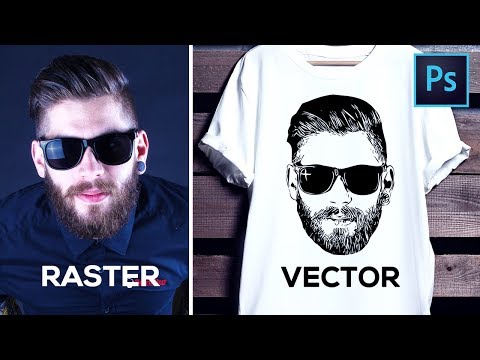
How to Convert Raster Image into Vector in Photoshop
ChannelPixivuDescription from the creator
👇 My best AI prompts, exclusive prompt generators, and creative tools are all here
pixvu.net
For years, my content has been about helping you create better visuals and find smarter ways to turn an idea into something real. That has not changed. What has changed is the creative landscape around us, and it is changing faster than ever.
AI can now help create images, concepts, effects, audio, video, and entire creative workflows in a fraction of the time. But speed alone does not make something good. The quality still comes from the person behind the tool: the idea, the taste, the direction, the decisions, and knowing how to turn an imperfect result into something worth keeping. As AI becomes more accessible, those creative skills matter even more.
That is why this channel is moving in a new direction, and why I built Pixvu. I want to focus on the part of AI that actually matters in real creative work: better ideas, stronger results, more control, and less wasted time. Pixvu brings that into one place with carefully crafted prompts, exclusive prompt generators, AI creation tools, and a growing creative workspace designed to help turn a rough idea into something much closer to what you imagined. The goal is simple: use AI to reduce the trial and error, not the creativity, so more of your time goes into making the work better instead of fighting the tools.
I see this as a new chapter, not a reset. Everything we have learned about visuals, composition, detail, quality, and creative problem-solving still matters. We simply have a much more powerful set of tools in front of us now. I want to explore them seriously, find what genuinely works, and share what I learn along the way.
If you are excited about where creative work is heading, I would love for you to join us on pixvu.net and be part of what comes next.
pixvu.net
For years, my content has been about helping you create better visuals and find smarter ways to turn an idea into something real. That has not changed. What has changed is the creative landscape around us, and it is changing faster than ever.
AI can now help create images, concepts, effects, audio, video, and entire creative workflows in a fraction of the time. But speed alone does not make something good. The quality still comes from the person behind the tool: the idea, the taste, the direction, the decisions, and knowing how to turn an imperfect result into something worth keeping. As AI becomes more accessible, those creative skills matter even more.
That is why this channel is moving in a new direction, and why I built Pixvu. I want to focus on the part of AI that actually matters in real creative work: better ideas, stronger results, more control, and less wasted time. Pixvu brings that into one place with carefully crafted prompts, exclusive prompt generators, AI creation tools, and a growing creative workspace designed to help turn a rough idea into something much closer to what you imagined. The goal is simple: use AI to reduce the trial and error, not the creativity, so more of your time goes into making the work better instead of fighting the tools.
I see this as a new chapter, not a reset. Everything we have learned about visuals, composition, detail, quality, and creative problem-solving still matters. We simply have a much more powerful set of tools in front of us now. I want to explore them seriously, find what genuinely works, and share what I learn along the way.
If you are excited about where creative work is heading, I would love for you to join us on pixvu.net and be part of what comes next.
About this tutorial
Pixivu published this 7:23 video tutorial on October 27, 2018. It has been watched 1,239,980 times on YouTube.
Tags
Share
This tutorial in other languages
- FRComment convertir l'image raster en vecteur dans Photoshop
- ESCómo convertir imágenes de trama en el vector en Photoshop
- PTComo converter imagem raster em vetor no Photoshop
- ITCome convertire immagini raster in vettoriale in Photoshop
- DEWie Konvertieren von Raster-Bild in Vektor in Photoshop
- NLHoe te converteren Raster Image naar Vector in Photoshop
- RUКак конвертировать растровое изображение в вектор в Photoshop
- PLJak Konwersja obrazu rastrowego do wektora w Photoshopie
- JAPhotoshopでVectorにラスタ画像を変換する方法
- ARكيفية تحويل الصورة النقطية إلى المتجه في فوتوشوب
- HIमें फ़ोटोशॉप वेक्टर में रेखापुंज छवि में कनवर्ट करने के लिए कैसे
- IDCara Mengkonversi Raster Image ke Vector di Photoshop