Playback starts YouTube’s embedded player (privacy-enhanced mode).
How to Create a Database, Add Tables and Import Data in MySQL Workbench
ChannelMatt MacartyChapters
Description from the creator
@MattMacarty
#mysql #mysql_workbench #sqltutorial #dataengineering
**Guide to getting your data from a CSV or Excel file directly into a MySQL database using MySQL Workbench!**
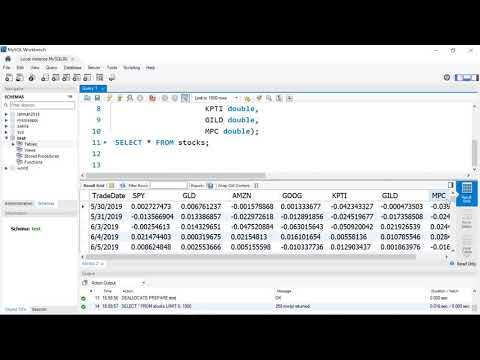
This step-by-step tutorial covers the entire workflow: from creating your database (schema) to defining table structures and using the **Table Data Import Wizard** to load stock data in minutes.
Learn how to make databases, table and addd data in MySQL Workbench
Learn the basic workflow -- create -- import -- view data
Learn how to use mysql workbench to bulk import csv formatted data
You will learn both the traditional **SQL syntax** and the quick **Wizard method** for data import, ensuring you master data setup and cleaning.
### 🛠️ **Key MySQL Skills You Will Master:**
* **Database Creation:** Use the `CREATE DATABASE` and `USE` commands.
* **Table Definition:** Define tables and specify data types (VARCHAR, DOUBLE) using `CREATE TABLE` syntax [0:02:26].
* **Importing Data:** Use the Table Data Import Wizard to load CSV files quickly [0:06:54].
* **Data Type Conversion:** Learn how to fix common import errors, specifically transforming date strings into proper MySQL Date format using the `STR_TO_DATE` function [0:10:21].
* **Schema Cleanup:** Use the `ALTER TABLE` command to modify column names and data types after import [0:13:41].
---
### ⏱️ Video Chapters / Timestamps
0:00 - Introduction to the Database Creation Workflow
0:32 - **Connecting to MySQL Server in Workbench**
1:05 - Creating a New Database (Schema) using `CREATE DATABASE`
1:46 - Deleting a Database using the `DROP DATABASE` command
2:10 - Using the `USE` command to activate a database
2:21 - **Method 1: Creating a Table using SQL Syntax**
3:04 - Reviewing the source CSV data file
3:59 - Defining column names and data types (VARCHAR vs. DATE)
5:50 - Checking the empty table with `SELECT * FROM table`
6:54 - **Method 2: Importing Data using the Wizard**
7:39 - Selecting the target table for import
8:15 - Executing the import and checking for record counts
9:19 - Viewing the imported data (as strings)
10:21 - **Data Cleaning: Transforming Strings to Date Format** using `STR_TO_DATE`
11:43 - **Method 3: Creating a NEW Table via the Import Wizard**
12:10 - Allowing the Wizard to define the column types (and fixing the date issue)
13:41 - **Fixing the Date/Time Issue** using the `ALTER TABLE` command
14:48 - Final check of the cleaned data
---
### 🔗 Resources
* **Data File (data.csv):** [github.com/mjmacarty/mysql.git](https://github.…)
* **MySQL Workbench Download:** [alphabench.com/data/mysql-create-database.html]…)
☕ Support the Channel:
If this tutorial saved you time and you want to support independent, ad-free technical guides, you can buy me a coffee here: buymeacoffee.com/mjmacarty
#mysql #mysql_workbench #sqltutorial #dataengineering
**Guide to getting your data from a CSV or Excel file directly into a MySQL database using MySQL Workbench!**
This step-by-step tutorial covers the entire workflow: from creating your database (schema) to defining table structures and using the **Table Data Import Wizard** to load stock data in minutes.
Learn how to make databases, table and addd data in MySQL Workbench
Learn the basic workflow -- create -- import -- view data
Learn how to use mysql workbench to bulk import csv formatted data
You will learn both the traditional **SQL syntax** and the quick **Wizard method** for data import, ensuring you master data setup and cleaning.
### 🛠️ **Key MySQL Skills You Will Master:**
* **Database Creation:** Use the `CREATE DATABASE` and `USE` commands.
* **Table Definition:** Define tables and specify data types (VARCHAR, DOUBLE) using `CREATE TABLE` syntax [0:02:26].
* **Importing Data:** Use the Table Data Import Wizard to load CSV files quickly [0:06:54].
* **Data Type Conversion:** Learn how to fix common import errors, specifically transforming date strings into proper MySQL Date format using the `STR_TO_DATE` function [0:10:21].
* **Schema Cleanup:** Use the `ALTER TABLE` command to modify column names and data types after import [0:13:41].
---
### ⏱️ Video Chapters / Timestamps
0:00 - Introduction to the Database Creation Workflow
0:32 - **Connecting to MySQL Server in Workbench**
1:05 - Creating a New Database (Schema) using `CREATE DATABASE`
1:46 - Deleting a Database using the `DROP DATABASE` command
2:10 - Using the `USE` command to activate a database
2:21 - **Method 1: Creating a Table using SQL Syntax**
3:04 - Reviewing the source CSV data file
3:59 - Defining column names and data types (VARCHAR vs. DATE)
5:50 - Checking the empty table with `SELECT * FROM table`
6:54 - **Method 2: Importing Data using the Wizard**
7:39 - Selecting the target table for import
8:15 - Executing the import and checking for record counts
9:19 - Viewing the imported data (as strings)
10:21 - **Data Cleaning: Transforming Strings to Date Format** using `STR_TO_DATE`
11:43 - **Method 3: Creating a NEW Table via the Import Wizard**
12:10 - Allowing the Wizard to define the column types (and fixing the date issue)
13:41 - **Fixing the Date/Time Issue** using the `ALTER TABLE` command
14:48 - Final check of the cleaned data
---
### 🔗 Resources
* **Data File (data.csv):** [github.com/mjmacarty/mysql.git](https://github.…)
* **MySQL Workbench Download:** [alphabench.com/data/mysql-create-database.html]…)
☕ Support the Channel:
If this tutorial saved you time and you want to support independent, ad-free technical guides, you can buy me a coffee here: buymeacoffee.com/mjmacarty
About this tutorial
Matt Macarty published this 15:05 video tutorial on September 2, 2020. It has been watched 760,340 times on YouTube.
- Channel
- Matt Macarty
- Category
- Education
- Duration
- 15:05
- Published
- September 2, 2020
- Views
- 760,340
- Likes
- 7,969
Tags
Share
This tutorial in other languages
- FRComment créer une base de données, ajouter des tables et importer des données dans MySQL Workbench
- ESCómo crear una base de datos, en Agregar tablas e importar datos en MySQL Workbench
- PTComo criar um banco de dados, adicionar tabelas e importação de dados em MySQL Workbench
- ITCome creare un database, aggiungere tabelle e Importa dati in MySQL Workbench
- DEWie eine Datenbank erstellen, Tabellen hinzufügen und Importieren von Daten in MySQL Workbench
- NLHoe maak je een database aan te maken, tabellen en Gegevens importeren toevoegen in MySQL Workbench
- RUКак создать базу данных, таблицы и добавить Импорт данных в MySQL Workbench
- PLJak utworzyć bazę danych, Dodaj tabele i import danych w MySQL Workbench
- JAデータベースを作成する方法は、MySQL Workbenchでテーブルとデータのインポートを追加します。
- ARكيفية إنشاء قاعدة بيانات، إضافة جداول وبيانات الاستيراد في ماي طاولة العمل
- HIकैसे एक डेटाबेस बनाने के लिए, MySQL Workbench में टेबल्स और डेटा आयात करें
- IDCara Membuat Database, Tambah Tabel dan Data Impor di MySQL Workbench