Playback starts YouTube’s embedded player (privacy-enhanced mode).
How to fix stuck voicemail notification on Android
ChannelE Micro TechDescription from the creator
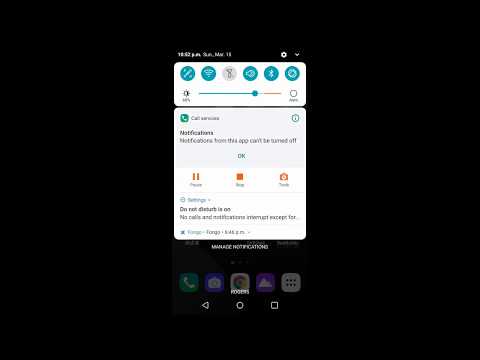
To Remove the Annoying Voicemail Notification on Android.
1. long-press the notification message.
2. wait until the info icon shows up
3. press the info icon
4. under cal services. press clear data.
5.fixed
It won't delete your call history.
1. long-press the notification message.
2. wait until the info icon shows up
3. press the info icon
4. under cal services. press clear data.
5.fixed
It won't delete your call history.
About this tutorial
E Micro Tech published this 1:20 video tutorial on April 1, 2020. It has been watched 53,984 times on YouTube.
- Channel
- E Micro Tech
- Category
- Education
- Duration
- 1:20
- Published
- April 1, 2020
- Views
- 53,984
- Likes
- 180
Share
This tutorial in other languages
- FRComment fixer une notification de messagerie vocale bloqué sur Android
- ESCómo corregir la notificación de correo de voz atascado en Android
- PTComo corrigir a notificação de correio de voz preso em Android
- ITCome risolvere la notifica di posta vocale bloccato su Android
- DEWie stecken Voicemail-Benachrichtigung auf Android beheben
- NLHoe wordt geplakt voicemail melding op Android te lossen
- RUКак исправить застрявшее уведомление голосовой почты на Android
- PLJak naprawić zatrzymany powiadomienia poczty głosowej na Androida
- JAAndroid上で立ち往生ボイスメール通知を修正する方法
- ARكيفية إصلاح إخطار البريد الصوتي عالقة على الروبوت
- HIकैसे Android पर अटक ध्वनि मेल अधिसूचना ठीक करने के लिए
- IDCara untuk memperbaiki notifikasi pesan suara terjebak pada Android