Playback starts YouTube’s embedded player (privacy-enhanced mode).
How to limit your mobile data usage on Android Oreo 8.0 & 8.1 phones
ChannelquicktipstoDescription from the creator
Steps:
So, From the home page go to "Settings"
Now tap on "Network & Internet"
Tap on "Data usage" and turn on "Mobile Data"
Now tap on " Billing cycle" then "Billing Cycle" again and choose the first day your data package refreshes.
For example my data package gets renewed on the 1st of every month. then tap "Set"
Now i will turn on "Set Data Warning" so my phone will notify me when i approach my limit.
For example i get every month 1 Gigabytes of data, so i will set my Data warning to 800 MegaBytes.
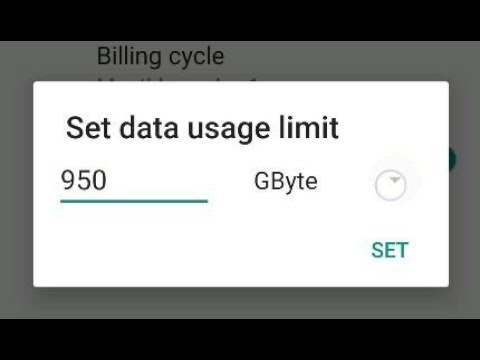
Now i will turn on "Set Data limit" This means the mobile data on my phone will turn off once it reaches the limit i set. tap okay
So i will set my Data limit to 950 Megabytes then tap "set"
By doing this, my phone will warn me once i hits 800 Megabytes of mobile data and disconnects my mobile data once i hits 950 megabytes.
So, From the home page go to "Settings"
Now tap on "Network & Internet"
Tap on "Data usage" and turn on "Mobile Data"
Now tap on " Billing cycle" then "Billing Cycle" again and choose the first day your data package refreshes.
For example my data package gets renewed on the 1st of every month. then tap "Set"
Now i will turn on "Set Data Warning" so my phone will notify me when i approach my limit.
For example i get every month 1 Gigabytes of data, so i will set my Data warning to 800 MegaBytes.
Now i will turn on "Set Data limit" This means the mobile data on my phone will turn off once it reaches the limit i set. tap okay
So i will set my Data limit to 950 Megabytes then tap "set"
By doing this, my phone will warn me once i hits 800 Megabytes of mobile data and disconnects my mobile data once i hits 950 megabytes.
About this tutorial
quicktipsto published this 2:37 video tutorial on November 7, 2019. It has been watched 140,548 times on YouTube.
- Channel
- quicktipsto
- Category
- Education
- Duration
- 2:37
- Published
- November 7, 2019
- Views
- 140,548
- Likes
- 923
Tags
Share
This tutorial in other languages
- FRComment limiter votre utilisation des données mobiles sur Android Oreo 8.0 et 8.1 téléphones
- ESCómo limitar el uso de datos móviles en Android 8.0 y 8.1 Oreo móviles
- PTComo limitar o uso de dados móveis em Oreo Android 8.0 & 8.1 telefones
- ITCome limitare l'utilizzo dei dati mobili su Android Oreo 8,0 & 8,1 telefoni
- DEWie Sie Ihre mobile Datennutzung auf Android Oreo 8.0 & 8.1 Telefone begrenzen
- NLHoe kunt u uw gebruik van mobiele gegevens te beperken op Android Oreo 8.0 & 8.1 telefoons
- RUКак ограничить мобильное использование данных на Android 8.0 Oreo и 8.1 телефонов
- PLJak ograniczyć wykorzystanie komórkowej transmisji danych na Android 8.0 i 8.1 Oreo telefony
- JAAndroidのオレオ8.0&8.1携帯電話でモバイルデータの使用を制限する方法
- ARكيفية الحد من استخدام البيانات المحمول على الروبوت أوريو 8.0 و 8.1 الهواتف
- HIएंड्रॉयड Oreo पर अपने मोबाइल डेटा के उपयोग को सीमित करने के लिए कैसे 8.0 और 8.1 फोन
- IDCara untuk membatasi penggunaan data seluler di Android Oreo 8,0 & 8.1 ponsel