Playback starts YouTube’s embedded player (privacy-enhanced mode).
How To Password Protect Word Documents | Microsoft Word 2016 Tutorial
ChannelThe TeacherDescription from the creator
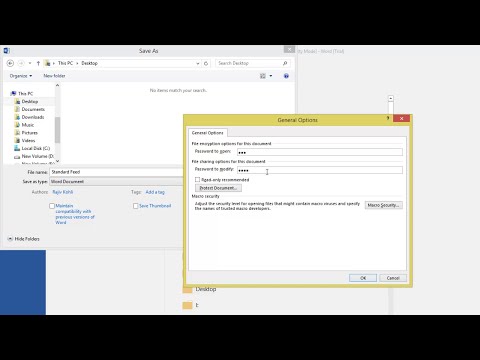
In Microsoft Word, 2016 you can protect your documents by using a password to prevent any unauthorized access. In Microsoft Word, you can assign two types of passwords to protect your document, first is Password To Open and the Second is Read Only.
Password to open will not let any unauthorized person to access your document without entering a password.
If you apply a read-only password along with open password then you can tell colleague the open password and he may still be able to access the file. Even he will be able to modify the document but will not be able to save changes in the original document until he open the document with open and read-only passwords.
Narrated By:
Emma (TTS)
Music Credits:
Juicy / ALBIS
📝 Learn More, Visit: theteacherpoint.com
✅ Recommend Playlists:
🔹 Microsoft Word 2016 Tutorial Series Playlist
bit.ly/Word-2016-Playlist
👌 Follow Me :
Twitter - twitter.com/TheTeacherPoint
Facebook - facebook.com/TheTeacherPoint
Instagram - instagram.com/TheTeacherPoint/
Pinterest - in.pinterest.com/TheTeacherPoint/
#WordTutorial
#TheTeacher
#MicrosoftWord
🌻 A Microsoft Word Tutorial By The Teacher
Password to open will not let any unauthorized person to access your document without entering a password.
If you apply a read-only password along with open password then you can tell colleague the open password and he may still be able to access the file. Even he will be able to modify the document but will not be able to save changes in the original document until he open the document with open and read-only passwords.
Narrated By:
Emma (TTS)
Music Credits:
Juicy / ALBIS
📝 Learn More, Visit: theteacherpoint.com
✅ Recommend Playlists:
🔹 Microsoft Word 2016 Tutorial Series Playlist
bit.ly/Word-2016-Playlist
👌 Follow Me :
Twitter - twitter.com/TheTeacherPoint
Facebook - facebook.com/TheTeacherPoint
Instagram - instagram.com/TheTeacherPoint/
Pinterest - in.pinterest.com/TheTeacherPoint/
#WordTutorial
#TheTeacher
#MicrosoftWord
🌻 A Microsoft Word Tutorial By The Teacher
About this tutorial
The Teacher published this 2:21 video tutorial on November 13, 2015. It has been watched 66,331 times on YouTube.
- Channel
- The Teacher
- Category
- Education
- Duration
- 2:21
- Published
- November 13, 2015
- Views
- 66,331
- Likes
- 195
Tags
Share
This tutorial in other languages
- FRComment mot de passe protéger les documents Word | Microsoft Word 2016 Tutorial
- ESCómo proteger con contraseña documentos de Word | Microsoft Word 2016 Tutorial
- PTComo a senha proteger documentos do Word | Microsoft Word 2016 Tutorial
- ITCome proteggere con password documenti di Word | Microsoft Word 2016 Tutorial
- DEWie man Kennwort Word-Dokumente schützen | Microsoft Word 2016 Tutorial
- NLHoe beveiligen met een wachtwoord Word-documenten | Microsoft Word 2016 Tutorial
- RUКак Защита паролем документов Word | Microsoft Word 2016 Tutorial
- PLJak zabezpieczyć hasłem dokumenty Word | Microsoft Word 2016 Tutorial
- JAどのようにパスワード保護Word文書| Microsoft Wordの2016チュートリアル
- ARكيفية حماية كلمة السر وثائق وورد | مايكروسوفت وورد 2016 دروس
- HIरक्षा कैसे पासवर्ड के लिए वर्ड दस्तावेज़ | माइक्रोसॉफ्ट वर्ड 2016 ट्यूटोरियल
- IDCara Password Protect Dokumen Word | Microsoft Word 2016 Tutorial