Playback starts YouTube’s embedded player (privacy-enhanced mode).
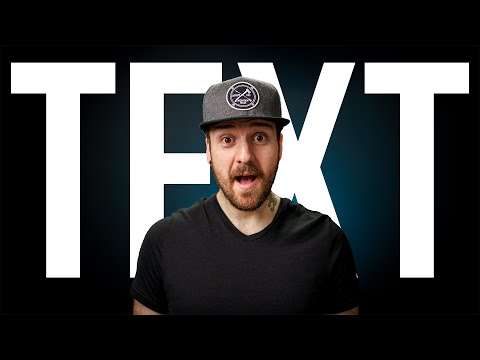
How To Place Text Behind An Image // Photoshop Tutorial
ChannelDunna Did ItChapters
Description from the creator
BY SPECIAL REQUEST! Here's How To Place Text Behind An Image In Photoshop. This was requested because I use this technique a lot in my thumbnails on YouTube. Let me know if you have any other topics you'd like me to cover!
Also, I am, by no means, a photoshop expert... but I have a few tricks up my sleeve that I think are useful for people and someone specifically asked for this video.
0:00 - Introduction
0:22 - Overview
0:57 - Start of Tutorial
1:31 - Cleaning Up The Image
2:00 - Adding Text
2:40 - Creating a Mask (Method 1)
4:06 - Creating a Mask (Method 2)
6:12 - Refining The Mask Layer
7:37 - Moving The Text
8:25 - Conclusion
--
--------------------------------------
*My Presets, Luts, and More*
▸ My Magnetic Ultra-Slim Filters - geni.us/ddifw
▸ Dunna Did It Store - dunnadidit.com/store
--------------------------------------
*My Main Gear*
*Cameras*
▸ Video Camera - Sony FX3 - geni.us/sonyfx3_01
▸ Photo Camera - Sony A1ii - geni.us/sonyalpha1ii
▸ Backup Photo/Video Camera - Sony A7IV - geni.us/sonya7iv_01
*Lenses*
▸ Wide Lens - Sony 16-35 GMii - geni.us/aUDS
▸ Mid-Range Lens - Sony 24-70 GMii - geni.us/sony24-70
▸ Telephoto Lens - Sony 70-200 GMii - geni.us/UeiNrs
*Tripods*
▸ Studio Tripod - Smallrig Tribex - geni.us/Tribexpo
▸ Travel Tripod - 3 Legged Thing Brian - geni.us/3ltpunksbrian2
*Audio Gear*
▸ Studio Microphone - Sennheiser MKH416 - geni.us/kGMS1
▸ Wireless Mic Kit - DJI Mic 2 - geni.us/GkMFBZ
*Lighting*
▸ Key Light - Amaran 300C - geni.us/GsZzFov
*Bags*
▸ Backpack - Shimoda Urban Explore - geni.us/RGzzo9
▸ Other Backpack - Nomatic PM 25L - geni.us/npm25l
*Accessories*
▸ Battery Charger - Pr1me Tri-Charge - geni.us/B9EQ
▸ My Magnetic, Locking, Ultra-Slim Filters - geni.us/ddifw
*Affordable alternatives and more gear recommendations, click here* → kit.co/dunnadidit
--------------------------------------
*For Music, sound effects, stock footage, and channel/video planning & optimization, check out my go-to providers, along with special discounts and trials, here:* dunnadidit.com/tools
--------------------------------------
*Follow Me*
▸ Instagram - instagram.com/dunnadidit
▸ Twitter - twitter.com/dunnadidit
▸ Website - dunnadidit.com
--------------------------------------
*Affiliate Disclaimer*
Some links are affiliate links, meaning I earn a small commission at no extra cost to you when you make a purchase. You can also use these storewide links below to support the channel while making other purchases.
🛒 Amazon - geni.us/shop_amazon
🛒 B&H Photo - bhpho.to/2KgLwwX
🛒 Moment - geni.us/shop_moment
--------------------------------------
*Professional & Sponsorship Inquiries*
Please use the contact form on my website or email [email protected]
Also, I am, by no means, a photoshop expert... but I have a few tricks up my sleeve that I think are useful for people and someone specifically asked for this video.
0:00 - Introduction
0:22 - Overview
0:57 - Start of Tutorial
1:31 - Cleaning Up The Image
2:00 - Adding Text
2:40 - Creating a Mask (Method 1)
4:06 - Creating a Mask (Method 2)
6:12 - Refining The Mask Layer
7:37 - Moving The Text
8:25 - Conclusion
--
--------------------------------------
*My Presets, Luts, and More*
▸ My Magnetic Ultra-Slim Filters - geni.us/ddifw
▸ Dunna Did It Store - dunnadidit.com/store
--------------------------------------
*My Main Gear*
*Cameras*
▸ Video Camera - Sony FX3 - geni.us/sonyfx3_01
▸ Photo Camera - Sony A1ii - geni.us/sonyalpha1ii
▸ Backup Photo/Video Camera - Sony A7IV - geni.us/sonya7iv_01
*Lenses*
▸ Wide Lens - Sony 16-35 GMii - geni.us/aUDS
▸ Mid-Range Lens - Sony 24-70 GMii - geni.us/sony24-70
▸ Telephoto Lens - Sony 70-200 GMii - geni.us/UeiNrs
*Tripods*
▸ Studio Tripod - Smallrig Tribex - geni.us/Tribexpo
▸ Travel Tripod - 3 Legged Thing Brian - geni.us/3ltpunksbrian2
*Audio Gear*
▸ Studio Microphone - Sennheiser MKH416 - geni.us/kGMS1
▸ Wireless Mic Kit - DJI Mic 2 - geni.us/GkMFBZ
*Lighting*
▸ Key Light - Amaran 300C - geni.us/GsZzFov
*Bags*
▸ Backpack - Shimoda Urban Explore - geni.us/RGzzo9
▸ Other Backpack - Nomatic PM 25L - geni.us/npm25l
*Accessories*
▸ Battery Charger - Pr1me Tri-Charge - geni.us/B9EQ
▸ My Magnetic, Locking, Ultra-Slim Filters - geni.us/ddifw
*Affordable alternatives and more gear recommendations, click here* → kit.co/dunnadidit
--------------------------------------
*For Music, sound effects, stock footage, and channel/video planning & optimization, check out my go-to providers, along with special discounts and trials, here:* dunnadidit.com/tools
--------------------------------------
*Follow Me*
▸ Instagram - instagram.com/dunnadidit
▸ Twitter - twitter.com/dunnadidit
▸ Website - dunnadidit.com
--------------------------------------
*Affiliate Disclaimer*
Some links are affiliate links, meaning I earn a small commission at no extra cost to you when you make a purchase. You can also use these storewide links below to support the channel while making other purchases.
🛒 Amazon - geni.us/shop_amazon
🛒 B&H Photo - bhpho.to/2KgLwwX
🛒 Moment - geni.us/shop_moment
--------------------------------------
*Professional & Sponsorship Inquiries*
Please use the contact form on my website or email [email protected]
About this tutorial
Dunna Did It published this 9:04 video tutorial on March 31, 2020. It has been watched 118,921 times on YouTube.
- Channel
- Dunna Did It
- Category
- Education
- Duration
- 9:04
- Published
- March 31, 2020
- Views
- 118,921
- Likes
- 2,992
Tags
Share
This tutorial in other languages
- FRComment placer derrière un texte image // Photoshop Tutorial
- ESCómo colocar texto detrás Una Imagen // Tutorial de Photoshop
- PTComo para colocar texto atrás de uma imagem // Photoshop Tutorial
- ITCome per inserire il testo dietro un immagine // Photoshop Tutorial
- DEWie man Platz Text hinter einem Bild // Photoshop Tutorial
- NLHow To Place Text Achter Een Afbeelding // Photoshop Tutorial
- RUКак разместить текст позади изображения // Photoshop Tutorial
- PLJak umieścić tekst za obrazem // Photoshop Tutorial
- JAアンイメージの背後にどのようにするにはプレイステキスト// Photoshopのチュートリアル
- ARكيفية وضع نص خلف صورة // دروس فوتوشوب
- HIकैसे प्लेस पाठ एक छवि // फ़ोटोशॉप ट्यूटोरियल के पीछे
- IDCara Tempat Teks Dibalik An Gambar // Photoshop Tutorial