Playback starts YouTube’s embedded player (privacy-enhanced mode).
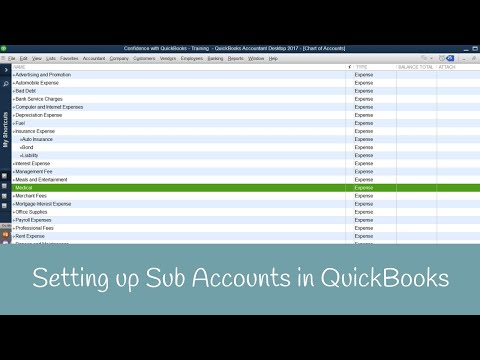
How to set up Sub Accounts in QuickBooks
ChannelCandus KampferChapters
Description from the creator
Learn how to set up Sub Accounts in QuickBooks.
Are you ready to learn how to set up your Sub Accounts in QuickBooks?
Remember your Chart of Accounts reflects directly on your reports.
Think about what you want to see in order to manage and grow your business. 😊
Remember your Chart of Accounts reflects directly on your reports. Think about what you want to see, to manage and grow your business.
Curious about "merging accounts" canduskampfer.com/how-to-merge-vendors-with-sim…
➡️ Remember: Chart of Accounts & Reports are Linked Together
Go up to “Lists”
“Chart of Accounts”
Go down to “Account”
You can…
New
Edit Account
Delete Account
Make Account Inactive
**It has to be the same type to make it a subcategory of the main category
➡️ Creating Sub Account
Go up to “Lists”
“Chart of Accounts”
Go down to “Account”
“New”
Choose type of category
Click “Continue”
“Account Name”
Checkmark “Subaccount of” **If it’s a subcategory
Choose your main category
Click “Save & Close”
Timestamps:
0:00 - Intro
0:18 - Reports & Chart of Accounts
1:35 - Dash other explained
2:55 - Benefit of creating subaccounts
3:52 - How Chart of Accounts work?
5:16 - Adding new category
8:35 - Final Thoughts
Need to learn more areas of QuickBooks? Join us on our next workshop to learn how to design QuickBooks for your specific business...
➡️ CandusKampfer.com/workshop
Receive our QB tips straight to your inbox each week visit:
➡️ CandusKampfer.com/tips
Subscribe here for more QuickBooks tips
➡️ youtube.com/c/CandusKampfer?sub_confirmation=1
I’d love to connect with you 👇
Instagram: instagram.com/candus.kampfer
Facebook: facebook.com/CandusKampfer
CandusKampfer.com: canduskampfer.com/
TikTok: tiktok.com/@canduskampfer
Pinterest: pinterest.com/canduskampfer/
#CandusKampfer
Are you ready to learn how to set up your Sub Accounts in QuickBooks?
Remember your Chart of Accounts reflects directly on your reports.
Think about what you want to see in order to manage and grow your business. 😊
Remember your Chart of Accounts reflects directly on your reports. Think about what you want to see, to manage and grow your business.
Curious about "merging accounts" canduskampfer.com/how-to-merge-vendors-with-sim…
➡️ Remember: Chart of Accounts & Reports are Linked Together
Go up to “Lists”
“Chart of Accounts”
Go down to “Account”
You can…
New
Edit Account
Delete Account
Make Account Inactive
**It has to be the same type to make it a subcategory of the main category
➡️ Creating Sub Account
Go up to “Lists”
“Chart of Accounts”
Go down to “Account”
“New”
Choose type of category
Click “Continue”
“Account Name”
Checkmark “Subaccount of” **If it’s a subcategory
Choose your main category
Click “Save & Close”
Timestamps:
0:00 - Intro
0:18 - Reports & Chart of Accounts
1:35 - Dash other explained
2:55 - Benefit of creating subaccounts
3:52 - How Chart of Accounts work?
5:16 - Adding new category
8:35 - Final Thoughts
Need to learn more areas of QuickBooks? Join us on our next workshop to learn how to design QuickBooks for your specific business...
➡️ CandusKampfer.com/workshop
Receive our QB tips straight to your inbox each week visit:
➡️ CandusKampfer.com/tips
Subscribe here for more QuickBooks tips
➡️ youtube.com/c/CandusKampfer?sub_confirmation=1
I’d love to connect with you 👇
Instagram: instagram.com/candus.kampfer
Facebook: facebook.com/CandusKampfer
CandusKampfer.com: canduskampfer.com/
TikTok: tiktok.com/@canduskampfer
Pinterest: pinterest.com/canduskampfer/
#CandusKampfer
About this tutorial
Candus Kampfer published this 9:38 video tutorial on November 7, 2017. It has been watched 30,543 times on YouTube.
- Channel
- Candus Kampfer
- Category
- Education
- Duration
- 9:38
- Published
- November 7, 2017
- Views
- 30,543
- Likes
- 198
Tags
Share
This tutorial in other languages
- FRComment mettre en place les comptes secondaires dans QuickBooks
- ESCómo configurar subcuentas en QuickBooks
- PTComo configurar Subcontas em QuickBooks
- ITCome impostare account secondari in QuickBooks
- DESo stellen Sie Unterkonten in Quickbooks bis
- NLHoe het opzetten van Sub-accounts in QuickBooks
- RUКак настроить Дополнительные учетные записи в QuickBooks
- PLJak skonfigurować Sub kont w QuickBooks
- JAQuickBooksの中でサブアカウントを設定する方法
- ARكيفية إعداد الحسابات الفرعية في QuickBooks
- HIQuickBooks में उप लेखा स्थापित करने के लिए कैसे
- IDCara mengatur Sub Rekening di QuickBooks