Playback starts YouTube’s embedded player (privacy-enhanced mode).
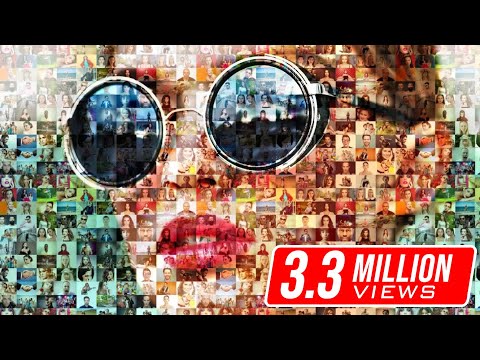
Photoshop Tutorial: How to Create Stunning, Photo Mosaic Portraits
ChannelBlue Lightning TV PhotoshopIn brief
Turn a single portrait into a striking mosaic using multiple smaller photos in Photoshop CC 2017. This technique works best for those comfortable with Photoshop’s Contact Sheet II feature and layer manipulation. The result is a visually engaging composite that blends individual images into a cohesive whole.
Questions & answers
Which Photoshop version supports Contact Sheet II?
Contact Sheet II is available in Photoshop CS6 and later versions.
How do I remove unwanted gaps between mosaic photos?
Uncheck 'Auto-Spacing' and set both Vertical and Horizontal spacing fields to 0.
Description from the creator
Contact Sheet II is only available in versions CS6 and later.
TIPS: 1) If the file names are included in the "Contact Sheet", remember to first uncheck "Use File Name as Caption" in the Contact Sheet II window.
2) If there's white space between your photos, make sure "Use Auto-Spacing" in NOT checked and the Vertical & Horizontal fields are "0".
Photos provided by shutterstock.com and dreamstime.com
Royalty-Free Music provided by beatsuite.com
High quality, copyright-free music for YouTube.
Music track: "Wonderment"
➤ Get 15% off BORIS FX OPTICS! - The BEST special effects plug-in for PHOTOS in Photoshop! Go to bit.ly/3aDnh4A and use my special code: bltv2020
Subscribe to Blue Lightning TV!:
youtube.com/user/bluelightningtv?sub_confirmati…
Become a Channel Member:
youtube.com/channel/UCDfJlseFwUx2X0h3m5PRILA/sp…
Support Blue Lightning TV on Patreon for as little as $2/month!
patreon.com/bluelightningtv
You'll receive early access to watch my new tutorials ONE WEEK BEFORE the public can see them on YouTube. AND, you'll receive 10% off all of my merch sold at Redbubble, TeeSpring & Society6!
BLTV MERCH:
redbubble.com/people/bltv/portfolio
teespring.com/stores/blue-lightning-tv
society6.com/bltv
BLTV TV Channel:
youtube.com/user/bluelightningtv
BLTV Website:
bluelightningtv.com
BLTV Facebook:
facebook.com/Blue-Lightning-TV-330761246941375
BLTV Facebook “Subscriber Page”:
facebook.com/BLTVsubscribers
Tumblr:
bluelightningtv.tumblr.com
Twitter:
twitter.com/bluelightningtv
Google+:
plus.google.com/u/0/+MartyGeller
Pinterest:
pinterest.com/bluelightningtv
LinkedIn:
www.linkedin.com/in/martygeller
About this tutorial
Blue Lightning TV Photoshop published this 7:01 video tutorial on October 25, 2017. It has been watched 3,504,265 times on YouTube.
- Channel
- Blue Lightning TV Photoshop
- Category
- Education
- Duration
- 7:01
- Published
- October 25, 2017
- Views
- 3,504,265
- Likes
- 63,088
Share
Further reading
-
Create a stunning photo mosaic portrait in Photoshop
photoshoproadmap.com
In this Photoshop tutorial by Marty Geller from Blue Lightning Tv, you will learn how to create a photo mosaic in Photoshop. There are many free applications that can be used to create a photo mosaic effect instantly an…
This tutorial in other languages
- FRTutoriel Photoshop: Comment créer de superbes, Photo Mosaic Portraits
- ESPhotoshop Tutorial: Cómo crear impresionantes, mosaico de fotos de retratos
- PTPhotoshop Tutorial: Como criar atordoamento, mosaico da foto Portraits
- ITTutorial Photoshop: come creare incredibili, mosaico di foto Ritratti
- DEPhotoshop Tutorial: Erstellen Stunning, Foto-Mosaik-Portraits
- NLPhotoshop Tutorial: Hoe Maak prachtige, Photo Mosaic Portraits
- RUPhotoshop Учебник: Как создать Потрясающие, Фото мозаичные портреты
- PLPhotoshop Tutorial: Jak stworzyć wspaniałe, mozaiki zdjęć portrety
- JAPhotoshopのチュートリアル:作成する方法、フォトモザイク肖像画を見事
- ARدروس فوتوشوب: كيفية إنشاء مذهل، صور فسيفساء صور
- HIफ़ोटोशॉप ट्यूटोरियल: कैसे बनाने के लिए आश्चर्यजनक, फोटो मोज़ेक चित्र
- IDPhotoshop Tutorial: Cara Membuat Stunning, Photo Mosaic Portraits