Playback starts YouTube’s embedded player (privacy-enhanced mode).
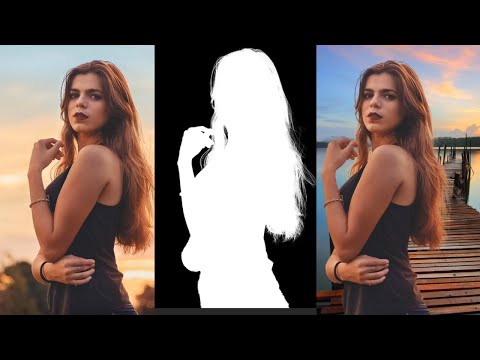
Photoshop Tutorial - How to Remove Background including Selecting Hair (Select and Mask Technique)
ChannelGood Creative AcademyDescription from the creator
In this Photoshop tutorial, learn how to remove the background in photos using the Select and Mask Technique. I include the special consideration of selecting hair, which can be tricky and more difficult than selecting people or objects with a more clearly define edge and contrast from the background. I use select and mask, selections, masking, and refine edge to remove and replace the background.
Check out a great mirrorless Canon camera I recommend: amzn.to/3KkJWsJ
To follow along with the photos in the video:
pexels.com/photo/photo-of-woman-wearing-black-t…
pexels.com/photo/seaport-during-daytime-132037/
This is a sample lesson from one of our Photoshop courses. Subscribe for more Photoshop tutorials, and enroll in our courses:
PHOTOSHOP COURSES:
Master Photoshop today--enroll in our courses using the following links so we get credit 😊
Photoshop Beginners Mastery: Zero to Hero in Photoshop: udemy.com/course/getting-started-in-photoshop/?…
Photoshop In-Depth: Master all of Photoshop’s Tools: udemy.com/course/photoshop-tools/?referralCode=…
Photoshop Retouching and Effects Masterclass: udemy.com/course/photoshop-portrait-photography…
Photoshop and Photography Digital Art Compositing Masterclass: udemy.com/course/photography-photoshop-course/?…
Digital Marketing Success: Proven Science and Design (with Photoshop projects): udemy.com/course/social-media-marketing-science…
Check out a great mirrorless Canon camera I recommend: amzn.to/3KkJWsJ
To follow along with the photos in the video:
pexels.com/photo/photo-of-woman-wearing-black-t…
pexels.com/photo/seaport-during-daytime-132037/
This is a sample lesson from one of our Photoshop courses. Subscribe for more Photoshop tutorials, and enroll in our courses:
PHOTOSHOP COURSES:
Master Photoshop today--enroll in our courses using the following links so we get credit 😊
Photoshop Beginners Mastery: Zero to Hero in Photoshop: udemy.com/course/getting-started-in-photoshop/?…
Photoshop In-Depth: Master all of Photoshop’s Tools: udemy.com/course/photoshop-tools/?referralCode=…
Photoshop Retouching and Effects Masterclass: udemy.com/course/photoshop-portrait-photography…
Photoshop and Photography Digital Art Compositing Masterclass: udemy.com/course/photography-photoshop-course/?…
Digital Marketing Success: Proven Science and Design (with Photoshop projects): udemy.com/course/social-media-marketing-science…
About this tutorial
Good Creative Academy published this 23:21 video tutorial on March 7, 2020. It has been watched 56,798 times on YouTube.
- Channel
- Good Creative Academy
- Category
- Education
- Duration
- 23:21
- Published
- March 7, 2020
- Views
- 56,798
- Likes
- 440
Share
This tutorial in other languages
- FRPhotoshop Tutorial - Comment faire pour supprimer arrière-plan y compris la sélection des cheveux (Sélectionner et Technique Mask)
- ESPhotoshop Tutorial - Cómo quitar Antecedentes incluyendo la selección de pelo (Seleccionar y Técnica de la máscara)
- PTPhotoshop Tutorial - Como remover fundo incluindo a seleção de cabelo (Select e Técnica Máscara)
- ITPhotoshop Tutorial - Come rimuovere sfondo compresa la selezione dei capelli (Selezione e Tecnica Mask)
- DEPhotoshop Tutorial - Wie Entfernen von Hintergrund einschließlich Auswählen Hair (Auswählen und Maskentechnik)
- NLPhotoshop Tutorial - Hoe Background waaronder Hair (Select en Mask Technique) selecteren Verwijder
- RUPhotoshop Учебник - Как удалить фон, включая Выбор волос (Выбор и маски Техника)
- PLPhotoshop Tutorial - Jak usunąć tło w tym Wybieranie Hair Mask (Wybierz i technika)
- JAPhotoshopのチュートリアル - ヘア(選択とマスク技術)を選ぶなど、背景を削除する方法
- ARدروس فوتوشوب - كيفية إزالة الخلفية بما في ذلك اختيار الشعر (اختر وتقنية قناع)
- HIफ़ोटोशॉप ट्यूटोरियल - कैसे बाल (चुनें और मास्क तकनीक) का चयन सहित पृष्ठभूमि निकालें करने के लिए
- IDPhotoshop Tutorial - Cara Hapus Latar belakang termasuk Memilih Rambut (Pilih dan Topeng Teknik)