Playback starts YouTube’s embedded player (privacy-enhanced mode).
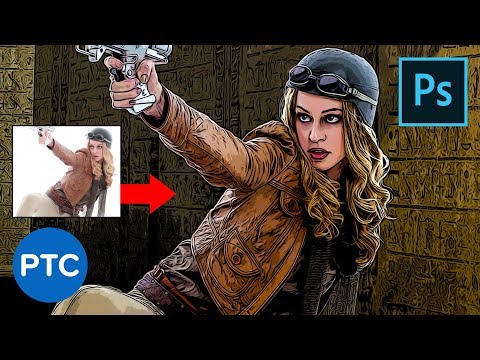
Smart Way to Quickly Make COMIC BOOK DRAWINGS From Your Photos! Photoshop Tutorial
ChannelPhotoshop Training ChannelChapters
Description from the creator
In this Photoshop tutorial, you will learn the smart and quick way to make comic book drawings from your photos.
For this cartoon drawing effect, we will only use three filters. The Poster Edges filter, Threshold, and the Oil Paint Filter.
As usual, I will explain what every filter is doing behind the scenes so that you understand why we're using it, but most importantly so that you can use it for other purposes.
Not just this Photoshop cartoon drawing effect.
📘 INDEX - Photoshop Tutorial - Photoshop Drawing Effect
00:00 - Introduction
01:49 - Create the Line Art Layer
06:52 - Create the Color Layer
08:10 - Blending Mode to Combine Layers
08:33 - Edit Smart Filters
09:45 - Fine-Tune Original Image
12:21 - Adjust Luminosity and Color
15:01 - Use The Cartoon Effect as a Template
LINKS
3D Personal Project (My Behance):
► behance.net/gallery/74188711/Contemporary-Livin…
Vibrance and Saturation Explained:
► youtube.com/watch?v=wUCZ0PQ9OEs&t=2s&li…
Facebook Group:
► facebook.com/groups/166474980794684/
PTC Newsletter:
► ptcvids.com/subscribe
Premium Tutorials:
► ptcvids.com/shop
Website:
► photoshoptrainingchannel.com
FOLLOW ME
Instagram:
► instagram.com/jrfromptc
Facebook Group:
► ptcvids.com/group
Twitter:
► twitter.com/JRfromPTC
LinkedIn:
► linkedin.com/in/jesusramirez9
CREDITS
● Stock Images provided by stock.adobe.com
● Photoshop video tutorials by Jesus Ramirez
#PhotoshopTutorial #Photoshop #PTCvids
For this cartoon drawing effect, we will only use three filters. The Poster Edges filter, Threshold, and the Oil Paint Filter.
As usual, I will explain what every filter is doing behind the scenes so that you understand why we're using it, but most importantly so that you can use it for other purposes.
Not just this Photoshop cartoon drawing effect.
📘 INDEX - Photoshop Tutorial - Photoshop Drawing Effect
00:00 - Introduction
01:49 - Create the Line Art Layer
06:52 - Create the Color Layer
08:10 - Blending Mode to Combine Layers
08:33 - Edit Smart Filters
09:45 - Fine-Tune Original Image
12:21 - Adjust Luminosity and Color
15:01 - Use The Cartoon Effect as a Template
LINKS
3D Personal Project (My Behance):
► behance.net/gallery/74188711/Contemporary-Livin…
Vibrance and Saturation Explained:
► youtube.com/watch?v=wUCZ0PQ9OEs&t=2s&li…
Facebook Group:
► facebook.com/groups/166474980794684/
PTC Newsletter:
► ptcvids.com/subscribe
Premium Tutorials:
► ptcvids.com/shop
Website:
► photoshoptrainingchannel.com
FOLLOW ME
Instagram:
► instagram.com/jrfromptc
Facebook Group:
► ptcvids.com/group
Twitter:
► twitter.com/JRfromPTC
LinkedIn:
► linkedin.com/in/jesusramirez9
CREDITS
● Stock Images provided by stock.adobe.com
● Photoshop video tutorials by Jesus Ramirez
#PhotoshopTutorial #Photoshop #PTCvids
About this tutorial
Photoshop Training Channel published this 16:59 video tutorial on November 11, 2019. It has been watched 542,194 times on YouTube.
- Channel
- Photoshop Training Channel
- Category
- Education
- Duration
- 16:59
- Published
- November 11, 2019
- Views
- 542,194
- Likes
- 24,541
Tags
Share
This tutorial in other languages
- FRSmart Way pour rapidement faire des dessins de séries télé de vos photos! Tutoriel Photoshop
- ESForma inteligente de hacer rápidamente dibujos CÓMIC de sus fotos! Tutorial de Photoshop
- PTInteligente maneira de fazer rapidamente DESENHOS DA BANDA DESENHADA de suas fotos! Photoshop Tutorial
- ITIntelligente modo per accelerare il fare disegni a fumetti dalle vostre foto! Photoshop Tutorial
- DEIntelligente Weise zu schnell zu machen COMIC Zeichnungen aus Ihren Fotos! Photoshop Tutorial
- NLSlimme manier om snel te maken Strip tekeningen van uw foto's! Photoshop Tutorial
- RUУмный способ быстро сделать Comic Book ЧЕРТЕЖИ из ваших фотографий! Photoshop учебник
- PLInteligentny sposób aby szybko dokonać KOMICZNE RYSUNKI książka z fotografiami! Photoshop Tutorial
- JA迅速にスマートな方法は、あなたの写真から、COMIC BOOKの図面を作ろう! Photoshopのチュートリアル
- ARطريقة ذكية لجعل بسرعة الرسومات الكتاب الهزلي من صورك! دروس فوتوشوب
- HIजल्दी करने के लिए स्मार्ट तरीका मौजूद अपनी फ़ोटो हास्य पुस्तक चित्र बनाओ! फ़ोटोशॉप ट्यूटोरियल
- IDCara Cerdas Cepat Membuat Garis BUKU KOMIK Dari Foto Anda! Photoshop Tutorial