Playback starts YouTube’s embedded player (privacy-enhanced mode).
How to create a music CD - with files that have a .CDA extension using windows media player 9.0
ChannelDilenge rDescription from the creator
Transferring and converting your music files (WAV, WMA, MP3, ect, ect.) onto a standard Compact Disk, in the CDA format. So that you may play your music files on any CD player. In your car, home Hi-Fi, Computer.
I use SoundForge 5.0b to record any sound that travels through my speakers, I then save the file as a .wav (just for quality issues)
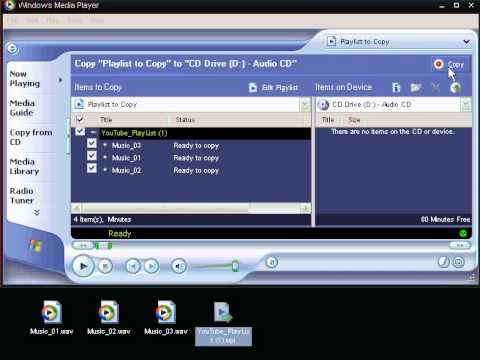
Then I create a play list in windows media player 9.0, I set the write speed to 16X or 24X but you can do the "Fastest" option if you like.
Put any standard CD-R (it doesn't have to be any special kind of disk...) in your write-able CD drive, I use a Super Market own brand £4.50 for about 17 million disks. Select copy from the menu, then the conversion takes place from the format you used to CDA format that allows the disk to be read by CD music players.
Finally, if you look at the CD files when you've completed copying them, you will notice they all have a .CDA extension. So I've heard, these are the pointers.
thanks for watching
I use SoundForge 5.0b to record any sound that travels through my speakers, I then save the file as a .wav (just for quality issues)
Then I create a play list in windows media player 9.0, I set the write speed to 16X or 24X but you can do the "Fastest" option if you like.
Put any standard CD-R (it doesn't have to be any special kind of disk...) in your write-able CD drive, I use a Super Market own brand £4.50 for about 17 million disks. Select copy from the menu, then the conversion takes place from the format you used to CDA format that allows the disk to be read by CD music players.
Finally, if you look at the CD files when you've completed copying them, you will notice they all have a .CDA extension. So I've heard, these are the pointers.
thanks for watching
About this tutorial
Dilenge r published this 2:21 video tutorial on November 3, 2011. It has been watched 51,355 times on YouTube.
- Channel
- Dilenge r
- Category
- Howto & Style
- Duration
- 2:21
- Published
- November 3, 2011
- Views
- 51,355
- Likes
- 35
Tags
Share
This tutorial in other languages
- FRComment créer un CD de musique - avec des fichiers qui ont une extension .CDA en utilisant Windows Media Player 9.0
- ESCómo crear un CD de música - con los archivos que tienen una extensión .CDA utilizando Windows Media Player 9.0
- PTComo criar um CD de música - com arquivos que têm uma extensão .CDA usando o Windows Media Player 9.0
- ITCome creare un CD di musica - con i file con estensione .CDA utilizzando Windows Media Player 9.0
- DEWie eine Musik-CD erstellen - mit Dateien, die eine Erweiterung .CDA mit Windows Media Player 9.0 haben
- NLmet bestanden die een .cda verlenging met Windows Media Player 9.0 hebben - Hoe maak je een muziek-cd te maken
- RUКак создать музыкальный компакт-диск - с файлами, имеющими расширение .CDA с помощью Windows Media Player 9.0
- PLJak utworzyć płytę CD z muzyką - z plików, które mają rozszerzenie .cda za pomocą odtwarzacza multimediów Windows 9.0
- JA音楽CDを作成する方法 - .CDA拡張子を持つファイルは、Windows Media Playerの9.0を使用して
- ARكيفية إنشاء CD الموسيقى - مع الملفات التي لديها ملحق بتنسيق .cda باستخدام ويندوز ميديا بلاير 9.0
- HIफ़ाइलों विंडोज मीडिया प्लेयर 9.0 का उपयोग कर एक .cda एक्सटेंशन के साथ - एक संगीत सीडी बनाने के लिए कैसे
- IDCara membuat CD musik - dengan file yang memiliki ekstensi .CDA menggunakan windows media player 9.0