Playback starts YouTube’s embedded player (privacy-enhanced mode).
How to Create Adoption Process: PowerPoint Diagram Series
ChannelPresentation ProcessDescription from the creator
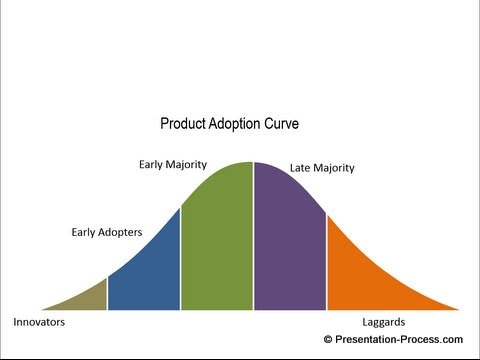
Learn to create a adoption of innovation process in PowerPoint. This technique allows you to customize the diagram to your business requirements. You can create different widths for each segment, you can animate each component etc. when you know how to create this template yourself.
* Please note in the video, the diagram is incorrectly labelled as Life cycle diagram. Many thanks to Ambarish Mishra for bringing this to our attention.
Learn how to create Normal curve referred to in this video:
youtube.com/watch?v=kDKKUv0Y0sY
To use the Intersect Tool shown in this video you need to set up the Quick access Menu in PowerPoint 2010 ( under merge shapes option in PowerPoint 2013). Here is the tutorial to set up the menu:
presentation-process.com/quick-access-toolbar.h…
You can find more such model templates in PowerPoint here:
presentation-process.com/powerpoint-models.html
* Please note in the video, the diagram is incorrectly labelled as Life cycle diagram. Many thanks to Ambarish Mishra for bringing this to our attention.
Learn how to create Normal curve referred to in this video:
youtube.com/watch?v=kDKKUv0Y0sY
To use the Intersect Tool shown in this video you need to set up the Quick access Menu in PowerPoint 2010 ( under merge shapes option in PowerPoint 2013). Here is the tutorial to set up the menu:
presentation-process.com/quick-access-toolbar.h…
You can find more such model templates in PowerPoint here:
presentation-process.com/powerpoint-models.html
About this tutorial
Presentation Process published this 11:44 video tutorial on November 11, 2014. It has been watched 44,040 times on YouTube.
- Channel
- Presentation Process
- Category
- Howto & Style
- Duration
- 11:44
- Published
- November 11, 2014
- Views
- 44,040
- Likes
- 275
Tags
Share
This tutorial in other languages
- FRComment créer le processus d'adoption: PowerPoint Schéma série
- ESCómo crear proceso de adopción: Serie de PowerPoint Diagrama
- PTComo criar processo de adoção: PowerPoint Series Diagram
- ITCome creare Adozione processo: PowerPoint Schema Series
- DESo erstellen Adoptionsverfahren: Powerpoint-Diagramm-Serie
- NLHoe maak je adoptieproces: PowerPoint Diagram Series
- RUКак создать Принятия процесс: PowerPoint Диаграмма серии
- PLJak utworzyć proces adopcyjny: PowerPoint Diagram Series
- JA採用プロセスを作成する方法:パワーポイントダイアグラムシリーズ
- ARكيفية إنشاء عملية التبني: باور بوينت مخطط السلسلة
- HIदत्तक ग्रहण प्रक्रिया बनाने के लिए कैसे: PowerPoint आरेख सीरीज
- IDCara Membuat Proses Adopsi: PowerPoint Diagram Series