Playback starts YouTube’s embedded player (privacy-enhanced mode).
How to Customize iPhone or iPad Control Center
ChannelMax DaltonDescription from the creator
See more videos by Max here: youtube.com/c/MaxDalton
Follow Max on Twitter: twitter.com/maxdaltontech
Friend Max on Facebook: facebook.com/maxdaltontech/
Video Transcript:
Hi. I'm Max Dalton, and in this video I'm going to talk through how to customize the control center on an Apple iPhone or iPad.
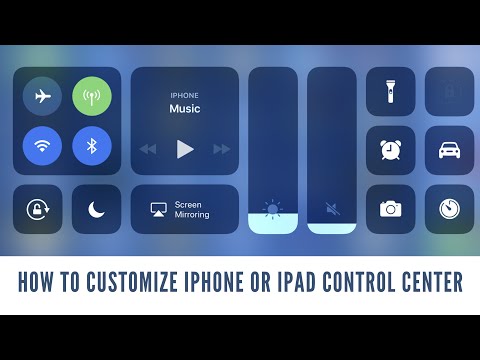
With the rollout of iOS 11, Apple is giving iPhone and iPad owners the ability to customize some of the icons that appear in the Control Center. A set of core applications and functionality will still appear in the Control Center and can't be removed, such as locking screen rotation, adjusting screen brightness, audio volume, and buttons to enable or disable Wifi, Bluetooth, and Airplane Mode. However, the Flashlight, Timer, Calculator, and Camera shortcuts can now be removed, and there's a healthy suite of other app and functionality shortcuts that can be added. Additionally, for the app and functionality shortcuts that are customizable, you can configure the order in which they are displayed.
And now, the steps to add or remove applications and functionality shortcuts from the control center.
Step 1. Tap the Settings app on your iPhone or iPad home screen. The Settings screen appears.
Step 2. Scroll down to the third section, and then choose "Control Center." The Control Center screen appears.
Step 3. Select "Customize Controls." The Customize window opens. The items currently availabe in your Control center are in the Include section. By default, the only items in the Include section will be the Flashlight, Timer, Calculator, and Camera apps.
Step 4. Tap the "-" icon to the left of any items in the Control Center you want to remove, and then tap the red "Remove" button to the right of those items. Any removed items will instantly be removed from the Include section and added to the More Controls section directly beneath it.
Step 5. Scroll down to the More Controls section, and then tap the "+" icon to the left of any apps you want to add to the Control Center. After tapping the "+" icon, these items will automatically be moved to the Include section.
Step 6. After getting all of the apps you'd want to add to the Control Center in the Include section, adjust the order of the apps in that section to set how they will appear in the Control Center. Hold your finger against the "Move" icon to the right of any app you want to move until the border of that app becomes dark. Then, move the app to the location where you want it to appear in the list as it relates to the other apps.
Step 7. Swipe up from the bottom of the iPhone or iPad home screen to display the Control Center. You'll see your changes take effect immediately, and any apps you placed in the Include section will appear in order on the row beneath Screen Mirroring.
About this tutorial
Max Dalton published this 2:47 video tutorial on October 25, 2017. It has been watched 98,639 times on YouTube.
- Channel
- Max Dalton
- Category
- Howto & Style
- Duration
- 2:47
- Published
- October 25, 2017
- Views
- 98,639
- Likes
- 431
Share
Further reading
-
Access and customize Control Center on your iPhone and iPod touch ...
support.apple.com
On an iPhone SE (2nd generation), iPhone 8 or earlier, or iPod touch, swipe up from the bottom edge of any screen. To close, tap the top of the screen or press the Home button. Learn how to use Control Center on your iP…
-
How to Customize Your iPhone or iPad’s Control Center
howtogeek.com
Starting with iOS 11, you can now customize the Control Center you see when you swipe up from the bottom of your iPhone or iPad’s screen. You can remove shortcuts you never use, add new shortcuts, and rearrange the shor…
-
How to Customize the Control Center on iPhone or iPad: 7 Steps - wikiHow
wikihow.com
This wikiHow teaches you how to customize the options that appear in the Control Center on an Apple iPhone or iPad. The ability to customize the Control Center is a feature that is only available in iOS 11. If you don’t…
This tutorial in other languages
- FRComment faire pour personnaliser l'iPhone ou l'iPad Control Center
- ESCómo Personalizar iPhone o iPad Centro de Control
- PTComo iPhone Personalizar ou iPad Control Center
- ITCome personalizzare iPhone o iPad Control Center
- DEWie Anpassen iPhone oder iPad Control Center
- NLHoe kan aanpassen iPhone of iPad Control Center
- RUКак настроить iPhone или IPad Центр управления
- PLJak dostosować iPhone lub iPad Control Center
- JAどのようにカスタマイズiPhoneやiPadコントロールセンターへ
- ARكيفية تخصيص اي فون أو آي باد مركز التحكم
- HIकैसे अनुकूलित iPhone या iPad नियंत्रण केंद्र
- IDCara Customize iPhone atau iPad Control Center