Playback starts YouTube’s embedded player (privacy-enhanced mode).
How To Display Battery Percentage On iPhone 12 mini/iPhone 12/iPhone 12 Pro/iPhone 12 Pro Max
ChannelMichael's TechDescription from the creator
In this video, I show you three ways on how to display the battery percentage on iPhone X, iPhone Xr, iPhone Xs, iPhone Xs Max, iPhone 11, iPhone 11 Pro, iPhone 11 Pro Max, iPhone 12 mini, iPhone 12, iPhone 12 Pro/iPhone 12 Pro Max, iPhone 13 mini, iPhone 13, iPhone 13 Pro, iPhone 13 Pro Max. This works on iOS 15.1/iOS 15/iOS 14/iOS 13/iOS 12.
So, you’re probably wondering where has the battery indicator go from the iPhone 13 mini, iPhone 13, iPhone 13 Pro, iPhone 13 Pro Max, iPhone 12 mini, iPhone 12, iPhone 12 Pro/iPhone 12 Pro Max, iPhone 11, iPhone 11 Pro, iPhone 11 Pro Max, iPhone X, iPhone Xr, iPhone Xs, iPhone Xs Max. You go into Settings, Battery and you cannot see where the toggle for Battery Percentage is, as it was on older iPhones. Well, to put it straight, Apple removed it from these new iPhones because of the notch. You can’t really see it all the time, but it’s still there, hidden. So, where you can see your battery percentage, though?
First way:
1. You can ask Siri about your battery percentage, which can be helpful when you use AirPods or any other wired or wireless headphones. That’s when I personally use this method, since it can be used handsfree.
Second way:
2. You can use a wireless charger or just the regular charging brick and the Lightning cable, which is not really optimal, since you can’t really do it on the go.
Third way:
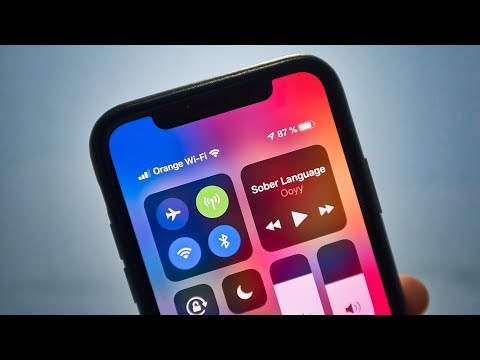
3. The best and easiest option is just to swipe down from the top right corner, which reveals the Control Center, as Apple calls it. There you can see your WiFi, Bluetooth, Do Not Disturb Mode and other toggles that you can easily use just by tapping or 3D touching. And there you can see the battery percentage, as well! Yay, it’s not gone forever! Yet!
This is also accesible from the lockscreen, so you can just have your iPhone placed on your desk, you can tap the screen and just drag down the Control Center to check your battery indicator.
To be honest, I’m fine with the fact that Apple has removed it, since I haven’t used it on my older iPhones, either. I’m much more comfortable seeing that battery icon instead of the percentage. Sometimes, you just end up looking at the numbers too much!
Hope you guys liked this quick video and found it useful. If you did, please press the “Like” button and subscribe for more content. Also, if you want, leave me comments in the comment section below with your questions or feedback and I’ll get back at you. Thanks for watching! Have a great day!
So, you’re probably wondering where has the battery indicator go from the iPhone 13 mini, iPhone 13, iPhone 13 Pro, iPhone 13 Pro Max, iPhone 12 mini, iPhone 12, iPhone 12 Pro/iPhone 12 Pro Max, iPhone 11, iPhone 11 Pro, iPhone 11 Pro Max, iPhone X, iPhone Xr, iPhone Xs, iPhone Xs Max. You go into Settings, Battery and you cannot see where the toggle for Battery Percentage is, as it was on older iPhones. Well, to put it straight, Apple removed it from these new iPhones because of the notch. You can’t really see it all the time, but it’s still there, hidden. So, where you can see your battery percentage, though?
First way:
1. You can ask Siri about your battery percentage, which can be helpful when you use AirPods or any other wired or wireless headphones. That’s when I personally use this method, since it can be used handsfree.
Second way:
2. You can use a wireless charger or just the regular charging brick and the Lightning cable, which is not really optimal, since you can’t really do it on the go.
Third way:
3. The best and easiest option is just to swipe down from the top right corner, which reveals the Control Center, as Apple calls it. There you can see your WiFi, Bluetooth, Do Not Disturb Mode and other toggles that you can easily use just by tapping or 3D touching. And there you can see the battery percentage, as well! Yay, it’s not gone forever! Yet!
This is also accesible from the lockscreen, so you can just have your iPhone placed on your desk, you can tap the screen and just drag down the Control Center to check your battery indicator.
To be honest, I’m fine with the fact that Apple has removed it, since I haven’t used it on my older iPhones, either. I’m much more comfortable seeing that battery icon instead of the percentage. Sometimes, you just end up looking at the numbers too much!
Hope you guys liked this quick video and found it useful. If you did, please press the “Like” button and subscribe for more content. Also, if you want, leave me comments in the comment section below with your questions or feedback and I’ll get back at you. Thanks for watching! Have a great day!
About this tutorial
Michael's Tech published this 1:52 video tutorial on October 27, 2019. It has been watched 537,559 times on YouTube.
- Channel
- Michael's Tech
- Category
- Howto & Style
- Duration
- 1:52
- Published
- October 27, 2019
- Views
- 537,559
- Likes
- 1,897
Tags
Share
This tutorial in other languages
- FRComment faire pour afficher Pourcentage de la batterie sur l'iPhone 12 mini / iPhone 12 / iPhone 12 Pro / iPhone 12 Pro Max
- ESCómo mostrar Porcentaje de la batería en 12 mini iPhone / iPhone 12/12 iPhone Pro / Pro iPhone 12 Max
- PTComo exibir Percentual da bateria no iPhone 12 Mini / iPhone 12 / iPhone 12 Pro / iPhone 12 Pro Max
- ITCome visualizzare Percentuale batteria Su iPhone 12 mini / iPhone 12 / iPhone 12 Pro / iPhone 12 Pro Max
- DESo zeigen Batterie Prozentsatz auf iPhone 12 Mini / iPhone 12 / iPhone 12 Pro / iPhone 12 Pro Max
- NLHow To display Battery Percentage Op de iPhone 12 mini / iPhone 12 / iPhone 12 Pro / iPhone 12 Pro Max
- RUКак отображать Процент батареи на iPhone 12 мини / картинки 12 / iPhone 12 Pro / iPhone 12 Pro Max
- PLJak wyświetlić Procent baterii na iPhone / iPhone 12 mini 12/12 Pro iPhone / iPhone 12 Pro Max
- JA12ミニ/ iPhone 12 / iPhone 12のPro / iPhone iPhoneのバッテリーのパーセンテージを表示する方法12プロマックス
- ARكيفية عرض البطارية النسبة المئوية على أجهزة iPhone 12 مصغرة / اي فون 12/12 فون برو / اي فون 12 برو ماكس
- HIकैसे iPhone पर बैटरी प्रतिशत प्रदर्शन करने के लिए 12 मिनी / iPhone के 12 / iPhone के 12 प्रो / iPhone के 12 प्रो मैक्स
- IDCara Tampilan Baterai Persentase Pada iPhone 12 mini / iPhone 12 / iPhone 12 Pro / iPhone 12 Pro Max