Playback starts YouTube’s embedded player (privacy-enhanced mode).
How to File Ebay Dispute
ChannelInternet Services and Social Networks Tutorials from HowTechDescription from the creator
In this tutorial you are going to learn how to file a dispute in eBay.
Don't forget to check out our site howtech.tv/ for more free how-to videos!
youtube.com/ithowtovids - our feed
facebook.com/howtechtv - join us on facebook
plus.google.com/103440382717658277879 - our group in Google+
In this tutorial you are going to learn how to file an eBay dispute which is vital if there has been a serious problem with your transaction.
Step # 1 -- Finding the Item
Go to eBay and make sure that you are logged into your account. At the top of the page click the "My eBay" link and on the page that loads you should see a list of all the items that you have recently purchased. Locate the item that you want to raise a dispute over and click the "More actions" option to the right of the item.
Step # 2 -- Entering Details of the Dispute
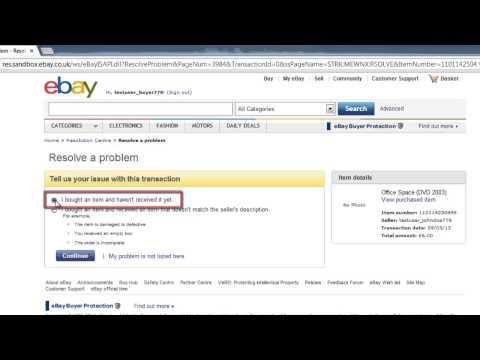
In the drop down menu that appears you need to click on "Resolve a problem". A page will load and you will be able to give some details about the issue you are having. Here we are going to say that we did not receive the item, we will click this option and then click "Continue". On the following page enter details of how you paid (here we are saying check) and the date that you paid, then click "Continue". Note here that if you paid with PayPal, you will be able to resolve the payment issue with them and eBay will direct you to that site.
Step # 3 -- Submitting the Case
On the next page you will need to read some information about opening a dispute and when you have done this you should click the "Continue" button. On the next page click "Submit case" and you will be informed that the case has been opened and that is how to file an eBay dispute.
Don't forget to check out our site howtech.tv/ for more free how-to videos!
youtube.com/ithowtovids - our feed
facebook.com/howtechtv - join us on facebook
plus.google.com/103440382717658277879 - our group in Google+
In this tutorial you are going to learn how to file an eBay dispute which is vital if there has been a serious problem with your transaction.
Step # 1 -- Finding the Item
Go to eBay and make sure that you are logged into your account. At the top of the page click the "My eBay" link and on the page that loads you should see a list of all the items that you have recently purchased. Locate the item that you want to raise a dispute over and click the "More actions" option to the right of the item.
Step # 2 -- Entering Details of the Dispute
In the drop down menu that appears you need to click on "Resolve a problem". A page will load and you will be able to give some details about the issue you are having. Here we are going to say that we did not receive the item, we will click this option and then click "Continue". On the following page enter details of how you paid (here we are saying check) and the date that you paid, then click "Continue". Note here that if you paid with PayPal, you will be able to resolve the payment issue with them and eBay will direct you to that site.
Step # 3 -- Submitting the Case
On the next page you will need to read some information about opening a dispute and when you have done this you should click the "Continue" button. On the next page click "Submit case" and you will be informed that the case has been opened and that is how to file an eBay dispute.
About this tutorial
Internet Services and Social Networks Tutorials from HowTech published this 1:09 video tutorial on November 1, 2013. It has been watched 41,892 times on YouTube.
- Category
- Howto & Style
- Duration
- 1:09
- Published
- November 1, 2013
- Views
- 41,892
- Likes
- 98
Share
This tutorial in other languages
- FRComment déposer Ebay différends
- ESCómo presentar Ebay de Diferencias
- PTComo arquivo Ebay Dispute
- ITCome file eBay controversie
- DEWie Ebay Streit Datei
- NLHoe eBay Dispute Bestand
- RUКак подать Ebay Спора
- PLJak złożyć spór Ebay
- JAイーベイの異議申し立てをする方法
- ARكيفية ملف باي المنازعات
- HIईबे दावा लगाने के लिए कैसे
- IDBagaimana ke File Ebay Sengketa